web
You’re offline. This is a read only version of the page.
close
Skip to main content

Announcements

No record found.

News and Announcements icon
Community site session details

Community site session details

Session Id :
Microsoft Dynamics AX (Archived)

Document could not be created. in integration

(0) ShareShare
ReportReport
Posted on by

Hi Friends,

 I  have facing  this error when i am trying to create sales order  in AIF Service Ax 2012 using Visual studio.0652.Error.png
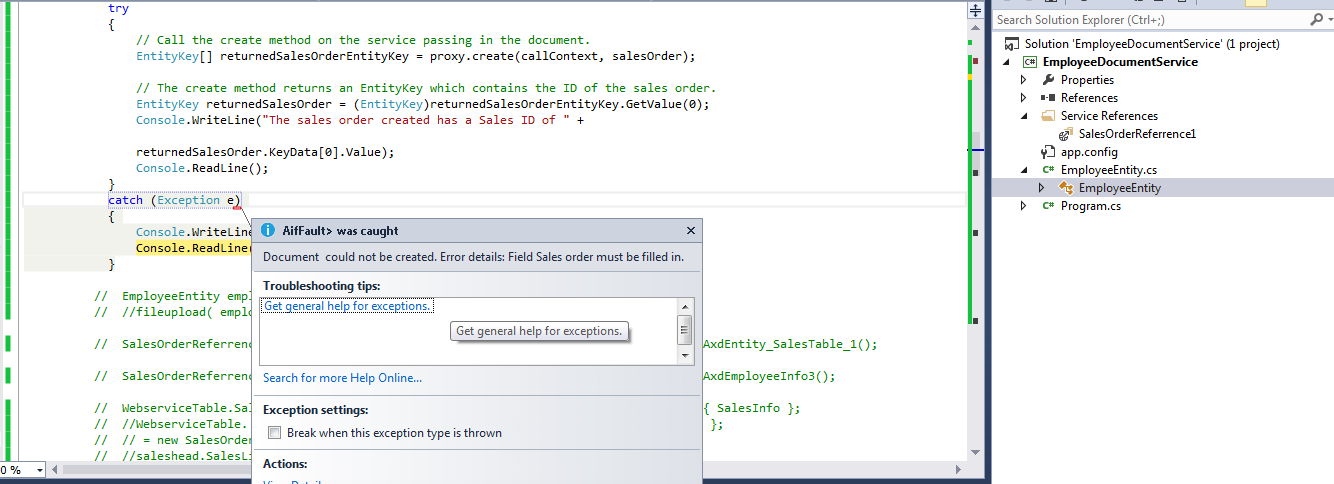
My Code 

// Instantiate an instance of the service client class.
EmployeeInfo4ServiceClient proxy = new EmployeeInfo4ServiceClient();

// Create an instance of the document class.
AxdEntity_SalesTable_1 salesTable = new AxdEntity_SalesTable_1();
AxdEmployeeInfo4 salesOrder = new AxdEmployeeInfo4();

// Create instances of the entities that are used in the service and

salesOrder.SalesTable_1 = new SalesOrderReferrence1.AxdEntity_SalesTable_1[1] { salesTable };
salesTable.CurrencyCode = "USD";
salesTable.CustAccount = "INMF-000001";
salesTable.InvoiceAccount = "INMF-000001";
salesTable.SalesId = "INMF-000071";
salesTable.DeliveryDate = DateTime.Now.Date;//Convert.ToDateTime("4/21/2015");
salesTable.Payment = "PP";
salesTable.SalesName = "Wingtip Toys India Ltd.";
salesTable.ShippingDateRequested = salesTable.DeliveryDate;
AxdEntityKey_LogisticsPostalAddress LPA = new AxdEntityKey_LogisticsPostalAddress();
LPA.Location_LocationId = "5637282089";
salesTable.SalesType = AxdEnum_SalesType.Journal;
salesTable.ShippingDateRequested = DateTime.Now.Date;

AxdExtType_EffectiveDateTime date = new AxdExtType_EffectiveDateTime();
date.timezone = AxdEnum_Timezone.GMT_COORDINATEDUNIVERSALTIME;
DateTime dateValue = new DateTime(2015, 4, 29, 14, 10, 53, 001, DateTimeKind.Utc);

date.timezoneSpecified = false;
date.localDateTimeSpecified = false;
date.Value = dateValue;
LPA.ValidFrom = date;
salesTable.DeliveryPostalAddress = LPA;

AxdEntity_SalesLine salesLine = new AxdEntity_SalesLine();
salesLine.ItemId = "1105";
salesLine.SalesQty = 9;
salesLine.SalesUnit = "ea";
salesLine.InventDimId ="000458";

CallContext callContext = new CallContext();
callContext.Language = "en-us";
callContext.Company = "INMF";
salesTable.SalesLine = new AxdEntity_SalesLine[1] { salesLine };
salesOrder.SalesTable_1 = new AxdEntity_SalesTable_1[1] { salesTable };

try
{
// Call the create method on the service passing in the document.
EntityKey[] returnedSalesOrderEntityKey = proxy.create(callContext, salesOrder);

// The create method returns an EntityKey which contains the ID of the sales order.
EntityKey returnedSalesOrder = (EntityKey)returnedSalesOrderEntityKey.GetValue(0);
Console.WriteLine("The sales order created has a Sales ID of " +

returnedSalesOrder.KeyData[0].Value);
Console.ReadLine();
}
catch (Exception e)
{
Console.WriteLine(e.ToString());
Console.ReadLine();
}

Please give any solution to solve this error.

Thanks&Regards,

Ashwini.E

*This post is locked for comments

I have the same question (0)
  • Suggested answer
    Vilmos Kintera Profile Picture
    46,149 on at

    You did not set a SalesId for SalesLine, only on SalesTable. How would you link it to the header otherwise? The error message is pretty clear about this.

  • Community Member Profile Picture
    on at

    Hi Vilmos,

              i  gave the sales id field in sales Line even though i am getting the same error .Please see the below screenshot.

    Salesid-error.png

    Thanks&Regards,

    Ashwini.E


  • Suggested answer
    Vilmos Kintera Profile Picture
    46,149 on at

    How about not providing a salesid then at all? AX is supposed to fetch one using a number sequence.

    If that does not work, and neither these examples, then time to debug it in AX to see what is missing then, let us know how it goes.

    http://dev.goshoom.net/en/2014/01/sales-orders-via-aif/

  • Community Member Profile Picture
    on at

    Hi Sukrut,

                 I used your code, but same error shows in it .I don't know what to do.whether the

    issue needs any permission update.

     Regrads,

    Ashwini.e

  • Suggested answer
    Vilmos Kintera Profile Picture
    46,149 on at

    Again, if it throws an error and you think SalesId is provided correctly, maybe it is a customization on your end that we would not be able to tell that throws the error.

    The only way to resolve the issue is if you use a Visual Studio debugger and attach to your AX AOS process where the AIF call is landing, and debug through.

    [View:https://community.dynamics.com/ax/f/33/t/188424:750:50]

Under review

Thank you for your reply! To ensure a great experience for everyone, your content is awaiting approval by our Community Managers. Please check back later.

Helpful resources

Quick Links

Introducing the 2026 Season 1 community Super Users

Congratulations to our 2026 Super Stars!

Meet the Microsoft Dynamics 365 Contact Center Champions

We are thrilled to have these Champions in our Community!

Congratulations to the March Top 10 Community Leaders

These are the community rock stars!

Leaderboard > 🔒一 Microsoft Dynamics AX (Archived)

#1
CP04-islander Profile Picture

CP04-islander 26

#2
imran ul haq Profile Picture

imran ul haq 8

#3
André Arnaud de Calavon Profile Picture

André Arnaud de Cal... 4 Super User 2026 Season 1

Last 30 days Overall leaderboard

Featured topics

Product updates

Dynamics 365 release plans
