web
You’re offline. This is a read only version of the page.
close
Skip to main content

Notifications

Announcements

No record found.

Community site session details

Community site session details

Session Id :
Microsoft Dynamics GP (Archived)

Printing Purchase order Template

(0) ShareShare
ReportReport
Posted on by 12

Dear All,

I am having problem while printing the purchase order on just one company.  When I print the PO template will generate with warning and all the values are XXX instead of the actual content.  The following is the screen shot of the same
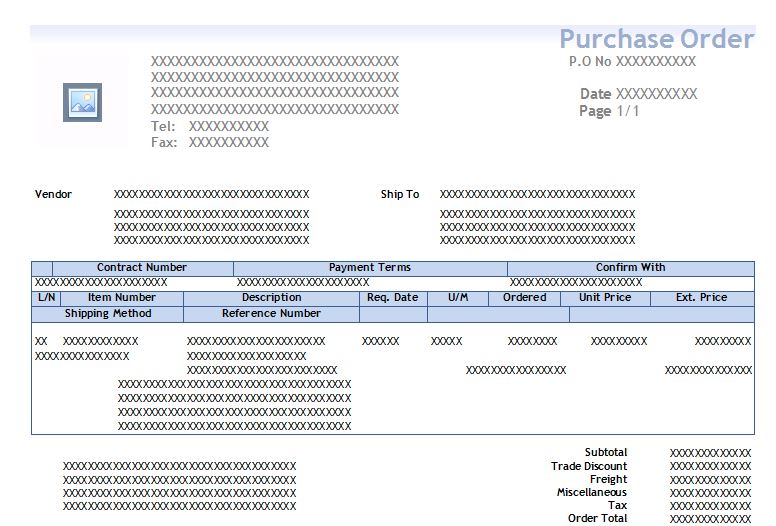
poerror.JPG

If I click the warning it says 'One or more templates could not be processed. View the exception log for more details.'   In order to see the exception log I included the following on my dex.ini.

KeepTemplateTempFiles=TRUE

TPELogging=TRUE

I can see the .tmp file on the temp folder when I open the same on notepad its big xml file which contain calculated field xmlname and report table xml name and I have no way finding what is the issue.  Can anyone help on this. 

*This post is locked for comments

I have the same question (0)
  • Lyn Barr Profile Picture
    1 on at

    Is this the same Word template you are using in your other companies? Or do you have a separate Word template for each company?

    You may need to refresh the source on this template by creating a new XML file from the Standard Version of the PO. Even when I do that, occasionally I still have to actually delete & replace the fields in the tables, with fields from the updated XML source.

    Are you familiar with how to do that, or do you need instructions?

  • babubaskaran@outlook.com Profile Picture
    12 on at

    Hi Lyn,

    Thanks for your kind reply.  Word template I have saved each company separate file and use the same.  This was working till 2 weeks ago.  I modified the template and removed source and add source using the new XML which is created from Standard PO with no luck.  Do you have any other suggestions.

  • Verified answer
    Lyn Barr Profile Picture
    1 on at

    If this was working until 2 weeks ago, that is an indication that something changed, which caused this problem. Possibly someone changed either the standard or template version of the form, and "broke" it.

    If you have other templates that work, you can try making a copy of one that works, modifying it as needed, and then using that.

    I think this problem (with the x's) usually occurs when the template used doesn't match the standard form. For example, using the unmodified template with the modified standard, or vice versa.

  • babubaskaran@outlook.com Profile Picture
    12 on at

    Yes Lyn,

    I tried to copy of the template which works fine on other company and its works fine on this company too.  For now I have just given basic format so that the user can work on it until I format it fully.  Thanks for your kind help on this.

  • Lyn Barr Profile Picture
    1 on at

    One other comment I have is that, if the forms look the same in each company, then it is more efficient to use a single template for all companies.

    The only reason you would need more than one template would be if they needed to look different, depending on the company.

    If the only real change would be the logo and/or company address, I would normally use calculated fields display the correct information depending on the company ID. That way, I only have to maintain a single template, instead of several different templates.

    That's just a suggestion, though - do what is easiest for you!

  • babubaskaran@outlook.com Profile Picture
    12 on at

    Thanks Lyn for your suggestion and agree with you, each of our company has different format to meet different requirement so I have separate template.

Under review

Thank you for your reply! To ensure a great experience for everyone, your content is awaiting approval by our Community Managers. Please check back later.

Helpful resources

Quick Links

Responsible AI policies

As AI tools become more common, we’re introducing a Responsible AI Use…

Neeraj Kumar – Community Spotlight

We are honored to recognize Neeraj Kumar as our Community Spotlight honoree for…

Leaderboard > 🔒一 Microsoft Dynamics GP (Archived)

#1
Community Member Profile Picture

Community Member 2

#2
mtabor Profile Picture

mtabor 1

#2
Victoria Yudin Profile Picture

Victoria Yudin 1

Last 30 days Overall leaderboard

Featured topics

Product updates

Dynamics 365 release plans
