web
You’re offline. This is a read only version of the page.
close
Skip to main content

Announcements

No record found.

News and Announcements icon
Community site session details

Community site session details

Session Id :
Microsoft Dynamics AX (Archived)

Error while printing Sales Invoice

(0) ShareShare
ReportReport
Posted on by

Hi

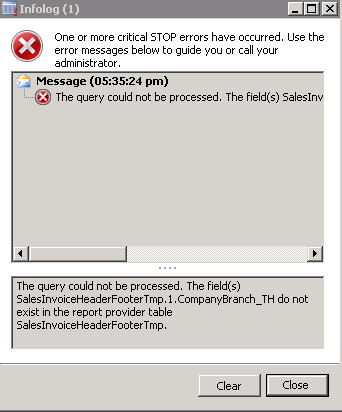
I am getting following error while printing Sales Invoice in AX 2012 R3:

The query could not be processed. The field(s) SalesInvoiceHeaderFooterTmp.1.CompanyBranch_TH do not exist in the report provider table SalesInvoiceHeaderFooterTmp.
*This post is locked for comments

I have the same question (0)
  • raelhefn Profile Picture
    Microsoft Employee on at

    compile this report it will give you missing field. add this field to your report.

  • Community Member Profile Picture
    on at

    Dear Ramy,

    Thanks for the reply.

    I have compiled all the reports and I am not getting any error.

    Thanks

    Birva

  • Suggested answer
    Community Member Profile Picture
    on at

    try to refresh the cache

    Tools > Caches > Refresh Directory

    Tools > Caches > Refresh Data

    Tools > Caches > Refresh Elements

    Please verify and update us if this helps you.

  • Community Member Profile Picture
    on at

    I refreshed them all, but still facing the same error.

    When i checked the SalesInvoice.rdl file, there is a field SalesInvoiceHeaderFooterTmp.1.CompanyBranch_TH but the same field is not available in the table  SalesInvoiceHeaderFooterTmp when i checked the database.

  • Suggested answer
    venkatesh vadlamani Profile Picture
    3,180 on at

    Do you have this field in the table mentioned in error?

    Go to report datasource in VS and refresh it.Save and delete from report server and deploy again.Seems to me that report data source is not in sync with ax table its pointing to

    Regard

    Venkatesh

  • Suggested answer
    Dhanasekar Profile Picture
    190 on at

    Hi,

    In Visual studio remove the "SalesInvoiceHeaderTmp " data set and again add the Data set with same table and same name.after adding the Data set compile and deploy the report.

    regards

    Dhanasekar S

  • Suggested answer
    Abhimanyu Naruka Profile Picture
    160 on at

    After doing these steps. Finally i would suggest you to restart you reporting server and AOS. this will resolve your problem.

  • Community Member Profile Picture
    on at

    Hi

    From the report server, i downloaded the rdl file and could open it in VS as xml.

    I am not able to view the report datasource in VS.

    I am new to this.

    Can you please provide me a step-by-step guide.

    Thanks

  • Suggested answer
    Bashir Ahmad Profile Picture
    5,248 on at
  • Khurram Profile Picture
    655 on at

    Please let me know the solution which resolved your problem, I'm facing same problem. And applied many resolutions by adding required field in SalesInvoiceHeaderFooterTmp table but one after another issue is reported for many fields but problem not resolved. This seems standard bug from MS.

Under review

Thank you for your reply! To ensure a great experience for everyone, your content is awaiting approval by our Community Managers. Please check back later.

Helpful resources

Quick Links

Introducing the 2026 Season 1 community Super Users

Congratulations to our 2026 Super Stars!

Meet the Microsoft Dynamics 365 Contact Center Champions

We are thrilled to have these Champions in our Community!

Congratulations to the April Top 10 Community Leaders

These are the community rock stars!

Leaderboard > 🔒一 Microsoft Dynamics AX (Archived)

#1
CP04-islander Profile Picture

CP04-islander 39

#2
Michel ROY Profile Picture

Michel ROY 14

#3
imran ul haq Profile Picture

imran ul haq 8

Last 30 days Overall leaderboard

Featured topics

Product updates

Dynamics 365 release plans
