web
You’re offline. This is a read only version of the page.
close
Skip to main content

Notifications

Announcements

No record found.

Community site session details

Community site session details

Session Id :
Microsoft Dynamics CRM (Archived)

Issue Tracking Appointment created by other external contact

(0) ShareShare
ReportReport
Posted on by 45

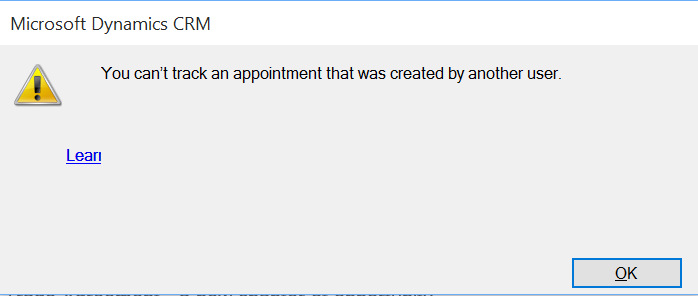
When someone sends me a meeting request and I try to track the appointment I'm getting the following error message: "You can’t track an appointment that was created by another user."

The organizer in this case is a contact outside out organization.

When I track an appointment I have created myself the is no issue at all.

Does anyone if there is a solution for this as I obviously want to track some meetings I'm not the organizer of?

Versions:

  • CRM Online 2015 Update 1
  • Outlook 2015 64-bit
  • Exchange Online
  • Windows 10

Tracking-error.PNG

*This post is locked for comments

I have the same question (0)
  • Community Member Profile Picture
    on at

    I am having the same issue. Is there a workaround for tracking an appointment where the organizer is external?

  • cmillerlce Profile Picture
    147 on at

    I'm having the same issue with CRM 2015 on-prem.  I have Outlook 2013 with CRM 2015 Update 1 add-in and get the same error for any type of appointment where I am not the original creator of the appointment.  My issue isn't isolated to external contact records owning the appointment/calendar item, even internal folks where I am a recipient/attendee of the meeting I am unable to track in CRM 2015.  

    Anyone have any work arounds? 

  • Stephanie Byrne Profile Picture
    on at

    Have you received any additional information on this issue?  I am also running into the same thing.  Only difference is I am running Windows 7.

  • Peter@Organon Profile Picture
    45 on at

    Unfortunately I haven't been able to get a solution or workaround for this issue as yet.

    If anyone has a workaround please let me know.

  • mreed Profile Picture
    on at

    I've seen where this can occasionally be a security role issue - if you have the ability to give yourself System Admin you can do that - then try to track and see if that solves the issue.

    If not it may have something to do with the settings for exchange and the permissions enable through that.

  • Suggested answer
    Community Member Profile Picture
    on at

    Possibly in some cases, but I am the System Admin on our system and I have the same problem.

    Basically, if you don't create the appointment then you don't control it and cannot track it.

    The only - ugly - workaround I can find is to create a duplicate appointment and then track THAT instead.  :-(

  • JenStocco Profile Picture
    on at

    Did you ever find a solution for this?  We are experiencing the same issue.  

  • Stephanie Byrne Profile Picture
    on at

    No.  I wasn't able to find an answer to this as of yet. If you do, please let me know.

  • JenStocco Profile Picture
    on at

    FYI - I have users who can do this and users who can't, and sometimes users who previously could, suddenly can't any longer.  It doesn't seem to matter what role as I've even had it happen myself as an admin.  In my troubleshooting, when I uninstalled (fully) the add-in and then reinstalled it, the user could once again associate an appointment they were invited to in the CRM.  I just ran into it yesterday, I uninstalled the users add in, reinstalled and set regarding the same appt, to the same crm record that previously wouldn't work and it worked.    FYI - we are on Outlook 2010, CRM online 2015 7.1.1.446, add-in  version 7.0.000.3543 (with the 1.1 update uninstalled)  Maybe uninstalling and reinstalled will help, sorry not a great resolution, but it seems to work for us.

  • Suggested answer
    Gagandeep Singh Profile Picture
    587 on at

    Hi,

    I've figured this out with help of Microsoft. To resolve this issue, check the user mailbox settings.

    The Incoming Email, Outgoing Email and Appointments, Contacts and Tasks must be set to Microsoft Dynamics CRM for Outlook.

    Hopefully, this would solve your issue.

Under review

Thank you for your reply! To ensure a great experience for everyone, your content is awaiting approval by our Community Managers. Please check back later.

Helpful resources

Quick Links

Responsible AI policies

As AI tools become more common, we’re introducing a Responsible AI Use…

Neeraj Kumar – Community Spotlight

We are honored to recognize Neeraj Kumar as our Community Spotlight honoree for…

Leaderboard > 🔒一 Microsoft Dynamics CRM (Archived)

#1
SA-08121319-0 Profile Picture

SA-08121319-0 4

#1
Calum MacFarlane Profile Picture

Calum MacFarlane 4

#3
Alex Fun Wei Jie Profile Picture

Alex Fun Wei Jie 2

Last 30 days Overall leaderboard

Featured topics

Product updates

Dynamics 365 release plans