web
You’re offline. This is a read only version of the page.
close
Skip to main content

Notifications

Announcements

No record found.

Community site session details

Community site session details

Session Id :
Small and medium business | Business Central, N...
Answered

Fatal error during installation while installation (BC)

(0) ShareShare
ReportReport
Posted on by 15

hello experts,

i searched a lot solution but could not get 

please do suggest your ideas.

{Fatal error during installation.

The service 'Microsoft Dynamics 365 Business Central Server [BC150]' (MicrosoftDynamicsNavServer$BC150) failed to start. This can be caused by one of several issues. For example, the password for the account that runs the service may be incorrect, or there could be a conflict in port sharing for the port settings for the service, or you have specified that the port for the server should be opened in the Windows firewall even though the Windows firewall is not enabled on the computer. For more information, see the event viewer.}

And i am not able to create i free trial demo on business central , i use to get a error message
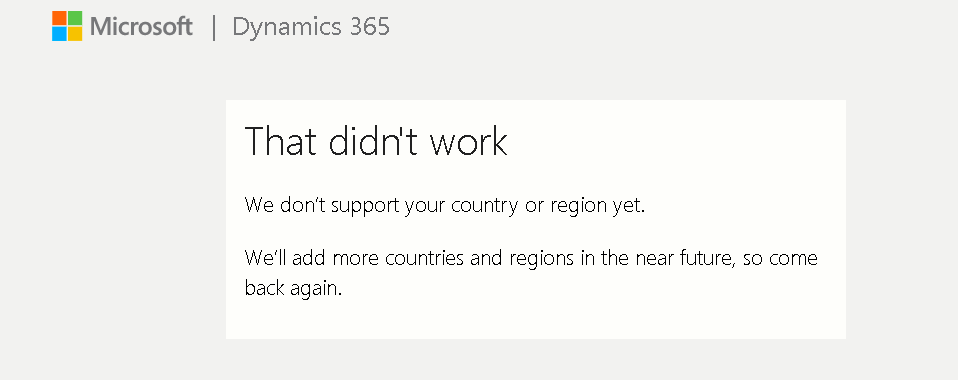
7367.error1.PNG

[View:/cfs-file/__key/communityserver-discussions-components-files/758/error2.rtf:320:240]

thank in advance

I have the same question (0)
  • Verified answer
    Chameera Kavinda Profile Picture
    510 on at

    Hi siv12334,

    Please re-check the ports that you are using in the installation (Ex: Client Port, Management Port , ect). They may be used by another process.\

    Thank you

  • siv12334 Profile Picture
    15 on at

    bc-port.PNGThank you for the quick reply sir,

     As you told me to check the ports whether they are same , Yes they are same. now shall i just put any number or just increment the numbers +1.

    port-num.PNG   

    i am also okay with getting demo version for business  central , but i get my region is not supported and get some errors also for that.

  • Suggested answer
    Marco Mels Profile Picture
    on at

    Hello,

    You can verify if these ports are enabled via:

    netsh http show urlacl

    The output will give you hints if other urls are being assigned to 7047, 7048 and 7049.

    Apart from that, you can search through the application event log file. After deleting possible port assignments via netsh http delete urlacl url=xxxx, run setup.exe, delete Service Tier from the setup and then rerun setup.exe and install Service Tier. You must retype the password again in the setup page.

    Thanks.

  • siv12334 Profile Picture
    15 on at

    thank you for the quick reply sir.

    all i have to do is just to change all 5 of the port id

    and it was able to install.

    But when i login to BC web client . 

    i use to  get enter login id and password which i did not create .so i tried some various password. And i this error came.4426.PNG

  • Allen Martin Abuto Profile Picture
    10 on at

    For access rights in the client,run this script in the Management studio to clear user. Remember to replace the name of your database

    USE [Database Name]

    GO

    delete from [dbo].[User]

    delete from [dbo].[Access Control]

    delete from [dbo].[User Property]

    delete from [dbo].[Page Data Personalization]

    delete from [dbo].[User Default Style Sheet]

    delete from [dbo].[User Metadata]

    delete from [dbo].[User Personalization]

    delete from [dbo].[Active Session]

  • Suggested answer
    Allen Martin Abuto Profile Picture
    10 on at

    Just like they have mentioned, there are several causes for this error.  There is a possibility that your SQL Server is not started in the services or proper permissions are not given to the Service Account

Under review

Thank you for your reply! To ensure a great experience for everyone, your content is awaiting approval by our Community Managers. Please check back later.

Helpful resources

Quick Links

Responsible AI policies

As AI tools become more common, we’re introducing a Responsible AI Use…

Neeraj Kumar – Community Spotlight

We are honored to recognize Neeraj Kumar as our Community Spotlight honoree for…

Leaderboard > Small and medium business | Business Central, NAV, RMS

#1
OussamaSabbouh Profile Picture

OussamaSabbouh 2,135

#2
YUN ZHU Profile Picture

YUN ZHU 733 Super User 2025 Season 2

#3
Sumit Singh Profile Picture

Sumit Singh 612

Last 30 days Overall leaderboard

Featured topics

Product updates

Dynamics 365 release plans



