web
You’re offline. This is a read only version of the page.
close
Skip to main content

Announcements

No record found.

News and Announcements icon
Community site session details

Community site session details

Session Id :
Finance | Project Operations, Human Resources, ...
Answered

Deploy a new VM from LCS or download new VHD - D365FO

(0) ShareShare
ReportReport
Posted on by

Hi All,

We are trying to connect VS2015 in one of the DEV environment(already installed) by applying the Product key for VS2015, (one of the ex-colleague used to connect VS2015 without any issues but it is not working for us).

Our current Production version is:

Application release: 10.0.22
Platform release:PU46 (7.0.6164.49)
My current version: Version: 10.0.22 (10.0.995.51)

Getting the below info while trying to connect VS, 
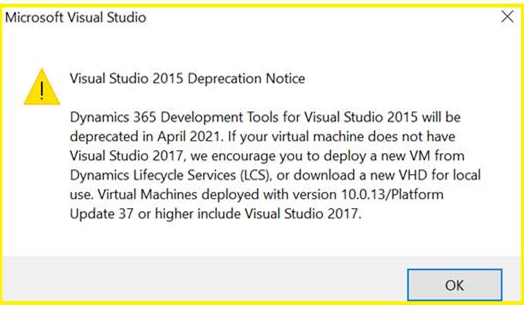
pastedimage1639315748689v1.png

After closing the above info, we are unable to see any customized models created for the application in the Model management tab. It is displaying all the standard models.

If we deploy a new DEV VM, will it contain VS2017 and customized Models and all the existing customization which is there in Production? or do we need to restore database from Production.

Please advise us.

I have the same question (0)
  • Verified answer
    André Arnaud de Calavon Profile Picture
    305,125 Super User 2026 Season 1 on at

    Hi Akbarpasha,

    When you deploy a new VM, you will have VS2017 or VS2019. VS2019 is installed on the latest environment. If you are using DevOps for source control, you can easily get the latest in your new development VM. For this, you need to ensure you checked in all coding from the old development VM containing VS2015.

  • Verified answer
    YY Lim Profile Picture
    960 on at

    You would need to use VS 2017 or the latest one VS 2019 because VS2015 is deprecated. You wouldn't need to apply product key because your user email would associate with the MSDN license when you login.

    The new VM is without your customized code unless you are connecting to the project DevOps repo to get the latest code from there. On your last question, your customized model will only in production after you deploy the package to tier 2 and sign off and deploy to production. If you need the data from production then you can refresh it but it will not move your code, it is just the data.

  • Akbarpasha Profile Picture
    on at

    Hi Yaun,

    We have new DEV VM, and we have refreshed database from UAT, but unable to see customized models into VS,

    how we can get these models into VS, we connected to VSTS as well.

  • nmaenpaa Profile Picture
    101,172 Moderator on at

    Hi Akbarpasha,

    seems you have posted the same question twice - let's continue here: community.dynamics.com/.../unable-to-see-customized-models-in-new-dev-environment---d365fo

Under review

Thank you for your reply! To ensure a great experience for everyone, your content is awaiting approval by our Community Managers. Please check back later.

Helpful resources

Quick Links

Introducing the 2026 Season 1 community Super Users

Congratulations to our 2026 Super Stars!

Meet the Microsoft Dynamics 365 Contact Center Champions

We are thrilled to have these Champions in our Community!

Congratulations to the April Top 10 Community Leaders

These are the community rock stars!

Leaderboard > Finance | Project Operations, Human Resources, AX, GP, SL

#1
Giorgio Bonacorsi Profile Picture

Giorgio Bonacorsi 771

#2
André Arnaud de Calavon Profile Picture

André Arnaud de Cal... 629 Super User 2026 Season 1

#3
Subra Profile Picture

Subra 496

Last 30 days Overall leaderboard

Product updates

Dynamics 365 release plans
