web
You’re offline. This is a read only version of the page.
close
Skip to main content

Notifications

Announcements

No record found.

Community site session details

Community site session details

Session Id :
Microsoft Dynamics CRM (Archived)

Ribbon Workbench - How to load correct JS for custom button

(0) ShareShare
ReportReport
Posted on by 1,328

I am following this guide to create a button to fire an on-demand workflow. I am stuck on adding the correct JS file. It is not showing in Ribbon Workbench, so I am assuming that I need to add it to my solution first. My trouble is I don't know which JS file that would be. Step 9 on that guide shows it to be "/_static/_common/scripts/RibbonActions.js" but I cannot find that in the solution.

Ribbon Workbench 2016 (via XRM Toolbox):
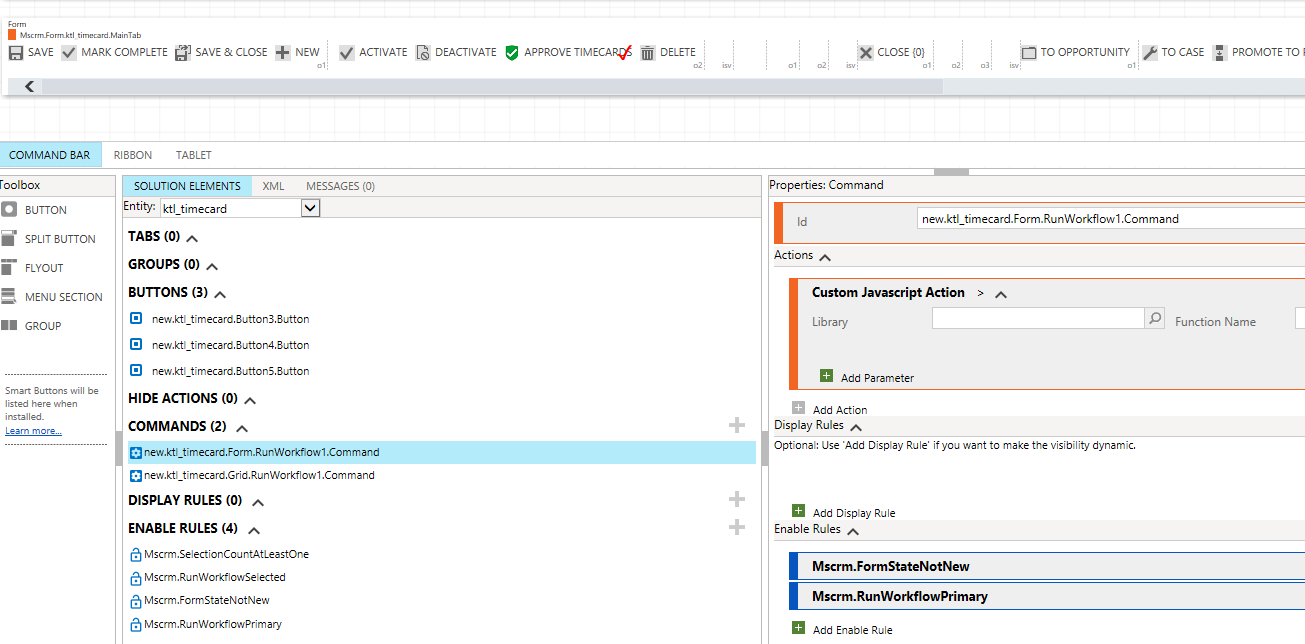
approvetimecardRW2.png

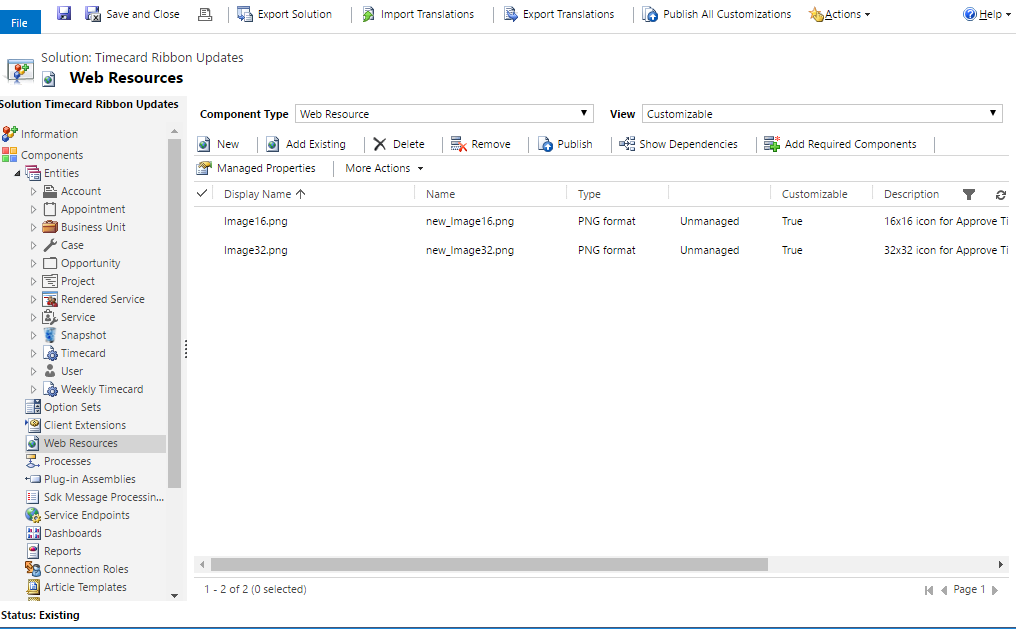
Solution:

approvetimecardRW.png

*This post is locked for comments

I have the same question (0)
  • Verified answer
    a33ik Profile Picture
    84,331 Most Valuable Professional on at

    Hello,

    This is OOB JS. Just type it in as it is.

    Have you resolved your issue with this thread - community.dynamics.com/.../239917 if yes, please close it marking reply as answer. If not please answer my question to get help.

  • epark06 Profile Picture
    1,328 on at

    [quote user="Andrii Butenko"]

    Hello,

    This is OOB JS. Just type it in as it is.

    Have you resolved your issue with this thread - community.dynamics.com/.../239917 if yes, please close it marking reply as answer. If not please answer my question to get help.

    [/quote]

    Type "/_static/_common/scripts/RibbonActions.js" into the library in Ribbon Workbench?

  • a33ik Profile Picture
    84,331 Most Valuable Professional on at

    Yes.

  • epark06 Profile Picture
    1,328 on at

    I did that and now tried to Publish in RW. I got this error again. Any help would be appreciated. I got this before too.

    approvetimecardRW3.png

    Unhandled Exception: System.ServiceModel.FaultException`1[[Microsoft.Xrm.Sdk.OrganizationServiceFault, Microsoft.Xrm.Sdk, Version=7.0.0.0, Culture=neutral, PublicKeyToken=31bf3856ad364e35]]: Import failedDetail: 
    <OrganizationServiceFault xmlns:i="www.w3.org/.../XMLSchema-instance" xmlns="schemas.microsoft.com/.../Contracts">
      <ErrorCode>-2147188706</ErrorCode>
      <ErrorDetails xmlns:d2p1="schemas.datacontract.org/.../System.Collections.Generic" />
      <Message>Import failed</Message>
      <Timestamp>2017-06-12T16:43:40.688928Z</Timestamp>
      <InnerFault>
        <ErrorCode>-2147188706</ErrorCode>
        <ErrorDetails xmlns:d3p1="schemas.datacontract.org/.../System.Collections.Generic" />
        <Message>Import failed</Message>
        <Timestamp>2017-06-12T16:43:40.688928Z</Timestamp>
        <InnerFault>
          <ErrorCode>-2147220970</ErrorCode>
          <ErrorDetails xmlns:d4p1="schemas.datacontract.org/.../System.Collections.Generic" />
          <Message>System.Data.SqlClient.SqlException: Microsoft Dynamics CRM has experienced an error. Reference number for administrators or support: #19FA3289</Message>
          <Timestamp>2017-06-12T16:43:40.688928Z</Timestamp>
          <InnerFault i:nil="true" />
          <TraceText i:nil="true" />
        </InnerFault>
        <TraceText i:nil="true" />
      </InnerFault>
      <TraceText i:nil="true" />
    </OrganizationServiceFault>
       at Microsoft.Crm.Extensibility.OrganizationSdkServiceInternal.Execute(OrganizationRequest request, CorrelationToken correlationToken, CallerOriginToken callerOriginToken, WebServiceType serviceType, Boolean checkAdminMode)
       at Microsoft.Crm.Extensibility.InprocessServiceProxy.ExecuteCore(OrganizationRequest request)
       at Microsoft.Crm.Asynchronous.ExecuteSdkMessageOperation.InternalExecute(AsyncEvent asyncEvent)


  • Verified answer
    Community Member Profile Picture
    on at

    The javascript should be in the solution you open in the Ribbon Workbench.  Have you added it to that solution as a Web Resource?  

  • epark06 Profile Picture
    1,328 on at

    [quote user="Shawn S"]

    The javascript should be in the solution you open in the Ribbon Workbench.  Have you added it to that solution as a Web Resource?  

    [/quote]

    I have not, that's where I'm having trouble. I don't know how to locate in the solution the javascript pertaining to the workflow I want to add a button for. The workflow is a simple on-demand workflow. Does a new JS have to be written to fire this workflow? I was assuming no, that i could just follow these below steps and load that JS.

    approvetimecardRW4.png

  • Suggested answer
    Community Member Profile Picture
    on at

    You'll have to create a javascript function to perform this action.  I have provided three functions I use to accomplish this.  The first is CallWorkflow which allows you to call a workflow by name rather than by guid.  The CallWorkflow gets the guid of the workflow and then passes that into the RunWorkflow function.  Finally is the assignResponse which only serves to save and refresh the entity after the workflow has run.

    You will need to:

    1) create a javascript web resource in your solution and paste all of this code into the resource. 

    2) return to the ribbon workbench and the button you are coding.  Add a javascript command and choose the new resource you created in step one.

    3) add the CallWorkflow function name with the lone parameter of workflow name.  Add a string parameter for the workflow name and enter the workflow you created and are trying to run.

    function CallWorkflow(szWorkflowName) {
        debugger
        var _url = Xrm.Page.context.getClientUrl();
        var _query = "/WorkflowSet?$select=WorkflowId&$filter=Name eq '" + szWorkflowName + "' and ActiveWorkflowId/Id ne null";
        var _odataurl = _url + "/XRMServices/2011/OrganizationData.svc" + _query;
        var _uReq = new XMLHttpRequest();
        _uReq.open("GET", _odataurl, false);
        _uReq.setRequestHeader("Accept", "application/json");
        _uReq.setRequestHeader("Content-Type", "application/json; charset=utf-8");
        _uReq.onreadystatechange = function () {
            if (this.readyState == 4) {
                if (this.status === 200) {
                    debugger
                    var _json = JSON.parse(_uReq.responseText);
                    var _res;
                    if ((_json != undefined) && (_json.d != undefined) && (_json.d.results != undefined) && (_json.d.results[0] != null)) {
                        _res = _json.d.results[0];
                        var _wfid = _res.WorkflowId;
                        //test id
                        if (_wfid != null) {
                            //call runworkflow
                            RunWorkflow(_wfid);
                        } else {
                            alert("Error: Could Not Find Workflow by Name: " + szWorkflowName);
                        }
                    }
                } else {
                    alert("Problem getting Workflow Named: " + szWorkflowName);
                }
            }
        }
        _uReq.send();
    }
    
    function RunWorkflow(szWorkflowID) {
            var url = Xrm.Page.context.getClientUrl();
            var entityId = Xrm.Page.data.entity.getId();
            var workflowId = szWorkflowID;
            var OrgServicePath = "/XRMServices/2011/Organization.svc/web";
            url = url + OrgServicePath;
            var request;
            request = "<s:Envelope xmlns:s=\"schemas.xmlsoap.org/.../envelope\">" +
                        "<s:Body>" +
                        "<Execute xmlns=\"schemas.microsoft.com/.../Services\" xmlns:i=\"www.w3.org/.../XMLSchema-instance\">" +
                            "<request i:type=\"b:ExecuteWorkflowRequest\" xmlns:a=\"schemas.microsoft.com/.../Contracts\" xmlns:b=\"schemas.microsoft.com/.../Contracts\">" +
                            "<a:Parameters xmlns:c=\"schemas.datacontract.org/.../System.Collections.Generic\">" +
                                "<a:KeyValuePairOfstringanyType>" +
                                "<c:key>EntityId</c:key>" +
                                "<c:value i:type=\"d:guid\" xmlns:d=\"schemas.microsoft.com/.../Serialization\">" + entityId + "</c:value>" +
                                "</a:KeyValuePairOfstringanyType>" +
                                "<a:KeyValuePairOfstringanyType>" +
                                "<c:key>WorkflowId</c:key>" +
                                "<c:value i:type=\"d:guid\" xmlns:d=\"schemas.microsoft.com/.../Serialization\">" + workflowId + "</c:value>" +
                                "</a:KeyValuePairOfstringanyType>" +
                            "</a:Parameters>" +
                            "<a:RequestId i:nil=\"true\" />" +
                            "<a:RequestName>ExecuteWorkflow</a:RequestName>" +
                            "</request>" +
                        "</Execute>" +
                        "</s:Body>" +
                    "</s:Envelope>";
    
            var req = new XMLHttpRequest();
            req.open("POST", url, true)
            // Responses will return XML. It isn't possible to return JSON.
            req.setRequestHeader("Accept", "application/xml, text/xml, */*");
            req.setRequestHeader("Content-Type", "text/xml; charset=utf-8");
            req.setRequestHeader("SOAPAction", "schemas.microsoft.com/.../Execute");
            req.onreadystatechange = function () { assignResponse(req); };
            req.send(request);
    }
    function assignResponse(req) {
        if (req.readyState == 4) {
            if (req.status == 200) {
                //save and refresh - settimeout for any delay for workflow to run
                Xrm.Page.data.save();
                Xrm.Page.data.refresh();
            }
        }
    }

    Hope this all helps....

  • epark06 Profile Picture
    1,328 on at

    Thank you Shawn. The guide I'm following stated that no code is required, and that it would use the existing Javascript. Andrii in this thread also said that this JS is out of box. I am hoping they are correct because I have no experience with JS. If they are, it seems my issue is now on the import error I am receiving above.

  • a33ik Profile Picture
    84,331 Most Valuable Professional on at

    How many entities items do you have inside your solution you work Ribbon Workbench with?

  • epark06 Profile Picture
    1,328 on at

    [quote user="Andrii Butenko"]

    How many entities items do you have inside your solution you work Ribbon Workbench with?

    [/quote]

    I have 12. Should I delete the other entities? The workflow is on the Timecard entity.

Under review

Thank you for your reply! To ensure a great experience for everyone, your content is awaiting approval by our Community Managers. Please check back later.

Helpful resources

Quick Links

Responsible AI policies

As AI tools become more common, we’re introducing a Responsible AI Use…

Neeraj Kumar – Community Spotlight

We are honored to recognize Neeraj Kumar as our Community Spotlight honoree for…

Leaderboard > 🔒一 Microsoft Dynamics CRM (Archived)

#1
SA-08121319-0 Profile Picture

SA-08121319-0 4

#1
Calum MacFarlane Profile Picture

Calum MacFarlane 4

#3
Alex Fun Wei Jie Profile Picture

Alex Fun Wei Jie 2

Last 30 days Overall leaderboard

Featured topics

Product updates

Dynamics 365 release plans