web
You’re offline. This is a read only version of the page.
close
Skip to main content

Notifications

Announcements

No record found.

Community site session details

Community site session details

Session Id :
Small and medium business | Business Central, N...
Suggested Answer

You Do Not have the following permissions on TableDate Sales Invoice Header: Modify when canceling a posted sales invoice

(0) ShareShare
ReportReport
Posted on by 10

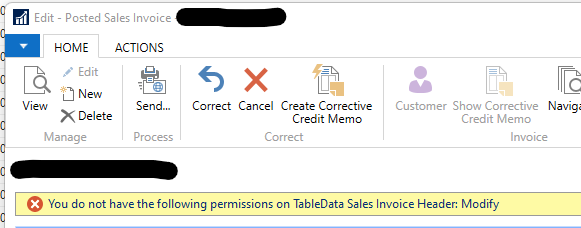
Hi i am trying to cancel a Posted Sales Invoice using the Correct/Cancel feature, however i am having this error "You do not have the following permissions on TableData Sales Invoice Header: Modify"

see the attached image. Is this a license problem? If yes, is there a fast workaround on how to cancel a Posted Sales Invoice without using the Correct/Cancel feature? Any guide/solutions is appreciated. Thanks
pastedimage1661616340216v1.png

I have the same question (0)
  • Suggested answer
    Inge M. Bruvik Profile Picture
    1,111 Moderator on at

    This is not a license issue unless you run on a team member license.

    It is most likely a permission issue. So you should check your user permissions, or have your system administrator check them for you.

  • Arnaz De Jesus Profile Picture
    10 on at

    Hi i do have SUPER role as user. So i am not quite sure what's the problem here.

  • Suggested answer
    Inge M. Bruvik Profile Picture
    1,111 Moderator on at

    Then i wonder if you have customization in your system? Because then this can be caused by a bug in your customizations.

  • Arnaz De Jesus Profile Picture
    10 on at

    Is there a way for me to check? To be honest a guy before me handled the system, right now i am just making the requested changes so i cannot really tell if there's a customization that has been done. 

  • Suggested answer
    Inge M. Bruvik Profile Picture
    1,111 Moderator on at

    Are you familiar with the NAV object designer ?

    And can you just check your user card to make sure that super is the only permission set you are assigned to?

  • Arnaz De Jesus Profile Picture
    10 on at

    I`ve been using the object design this past few days so i think i can manage somehow.

    Here`s the user card,

    pastedimage1661665996408v1.png

  • Suggested answer
    Inge M. Bruvik Profile Picture
    1,111 Moderator on at

    Please try to delete the company name under user permission set and leave it blank to see if that makes any change.

    And check if you have a user group that is named all or something like that.

    I see you do not belong to any user group.

  • Arnaz De Jesus Profile Picture
    10 on at

    Hi, i tried deleting the Company name under the permission set, and it still gave me the same error.

    These are the ones that are in my User Groups.

    pastedimage1661695494279v1.png

  • Suggested answer
    Inge M. Bruvik Profile Picture
    1,111 Moderator on at

    By now i am pretty sure there must be some kind of customization in your database. You should go to your object designer and make a list of all objects that are marked as modified.

    Because you have an issue with the invoices i would try to select the user group for billing. In theory there can be custom code that checks if you are in that user group.

  • Suggested answer
    YUN ZHU Profile Picture
    95,593 Super User 2025 Season 2 on at

    Hi, as far as I know, if the license has expired, a similar question will be prompted. You can check your Licnese.

    About canceling a Posted Sales Invoice without using the Correct/Cancel feature, you can use the Copy Document feature to create Sales Credit Memo.

    pastedimage1661729427330v1.png

    Hope this helps as well.

    Thanks.

    ZHU

Under review

Thank you for your reply! To ensure a great experience for everyone, your content is awaiting approval by our Community Managers. Please check back later.

Helpful resources

Quick Links

Responsible AI policies

As AI tools become more common, we’re introducing a Responsible AI Use…

Neeraj Kumar – Community Spotlight

We are honored to recognize Neeraj Kumar as our Community Spotlight honoree for…

Leaderboard > Small and medium business | Business Central, NAV, RMS

#1
OussamaSabbouh Profile Picture

OussamaSabbouh 3,151

#2
Jainam M. Kothari Profile Picture

Jainam M. Kothari 1,443 Super User 2025 Season 2

#3
YUN ZHU Profile Picture

YUN ZHU 1,092 Super User 2025 Season 2

Last 30 days Overall leaderboard

Featured topics

Product updates

Dynamics 365 release plans



