web
You’re offline. This is a read only version of the page.
close
Skip to main content

Announcements

No record found.

News and Announcements icon
Community site session details

Community site session details

Session Id :
Microsoft Dynamics AX (Archived)

enable/disable field based on enum(NoYes)

(0) ShareShare
ReportReport
Posted on by

Hello Experts,

Please assist me to overcome on enabling/disabling the field on form.

we have requirement  Customer account = filter by Customer Account Id -(Only enabled when Order type filter is set to All, Sales order, sales return order). 

I have created active() method to do this but when i am marking to yes, customer account is still showing disable.

please see the below code.

public int active()
{
int ret;

ret = super();
if(OrdersTable.All && OrdersTable.SalesOrder && OrdersTable.SalesReturnOrder == NoYes::Yes)
{
OrdersTable_ds.object(fieldNum(OrdersTable, CustAccount)).allowEdit(true);
}
else
{
OrdersTable_ds.object(fieldNum(OrdersTable, CustAccount)).allowEdit(false);
}


return ret;
}

below is screenshot.
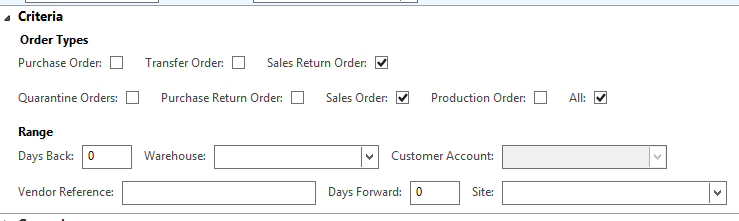
1401.Capture.PNG

*This post is locked for comments

I have the same question (0)
  • Martin Dráb Profile Picture
    239,022 Most Valuable Professional on at

    If you want the field to get enabled immediately when you change the check box, having your logic in active() isn't enough, because that gets executed only when you change rows. Extract your logic from active() to a separate method and call it from active() as well as from modified() methods of relevant fields.

  • Suggested answer
    startax Profile Picture
    1,845 on at

    Place your code in Data source field modified()

  • Community Member Profile Picture
    on at

    Thanks for reply Martin.

    I have created separate one form method enableCustAccount() and called from datasource active() method as well as from modified method of relevant fields. but it's still not enabling. i have set autodeclaration "Yes" as well for relevant field. Could you please tell me still where i'm missing something.

  • Community Member Profile Picture
    on at

    Hi Dinkar,

    I tried but it's not working.

  • Martin Dráb Profile Picture
    239,022 Most Valuable Professional on at

    I'm sorry, I didn't get enough information to know what's happening in your system.

    First please tell us whether it works if you switch between records. If it does, if you have a bug in your code in modified(). If not, you have a bug in the enabling logic.

    Also use the debugger to verify that your code gets executed as expected, e.g. whether the "if" condition is evaluated to true when it should.

  • startax Profile Picture
    1,845 on at

    Without knowing what logic you are using cant say what you are missing . Can you share you code or screen shot will help to identify issue.

  • Community Member Profile Picture
    on at

    Hi Martin,

    i have gone through debugger to verify the code and it's getting executed successfully.

    it's working but not reflecting/enabling immediately. when i am opening the form, marked check box then the field is still disable but when i am opening form again. it's showing enabled with marked check box.

    Should I call refresh() method to reflect immediately or any other method?

  • Community Member Profile Picture
    on at

    Dinkar,

    I have written one form method enableCustAccount()method and placed same above code in this method and have called enableCustAccount() from active () and relevant field method. please let me know if you need anything extra. as it's working but not reflecting immediately. please suggest how i can overcome to reflect accordingly.

  • Suggested answer
    startax Profile Picture
    1,845 on at

    FormDataSource > Field > modified ()

    Write below code after super();

    if(OrdersTable.All && OrdersTable.SalesOrder && OrdersTable.SalesReturnOrder == NoYes::Yes)

    {

    OrdersTable_ds.object(fieldNum(OrdersTable, CustAccount)).allowEdit(true);

    }

    else

    {

    OrdersTable_ds.object(fieldNum(OrdersTable, CustAccount)).allowEdit(false);

    }

    remove other peace of code and check

    or

    write your code in form control modified method  

  • Community Member Profile Picture
    on at

    Thanks for replying soon but isn't working. i placed code as you said and moreover now it's not even disabling relevant field as i was expecting.

Under review

Thank you for your reply! To ensure a great experience for everyone, your content is awaiting approval by our Community Managers. Please check back later.

Helpful resources

Quick Links

Introducing the 2026 Season 1 community Super Users

Congratulations to our 2026 Super Stars!

Congratulations to our 2025 Community Spotlights

Thanks to all of our 2025 Community Spotlight stars!

Leaderboard > 🔒一 Microsoft Dynamics AX (Archived)

#1
Joris dG Profile Picture

Joris dG 5

#2
Alexey Lekanov Profile Picture

Alexey Lekanov 2

#2
Henrik Nordlöf Profile Picture

Henrik Nordlöf 2 User Group Leader

Last 30 days Overall leaderboard

Featured topics

Product updates

Dynamics 365 release plans
