web
You’re offline. This is a read only version of the page.
close
Skip to main content

Announcements

No record found.

News and Announcements icon
Community site session details

Community site session details

Session Id :
Finance | Project Operations, Human Resources, ...
Suggested Answer

Vendor Invoice Workflow start from approved by

(0) ShareShare
ReportReport
Posted on by 469

Hi,

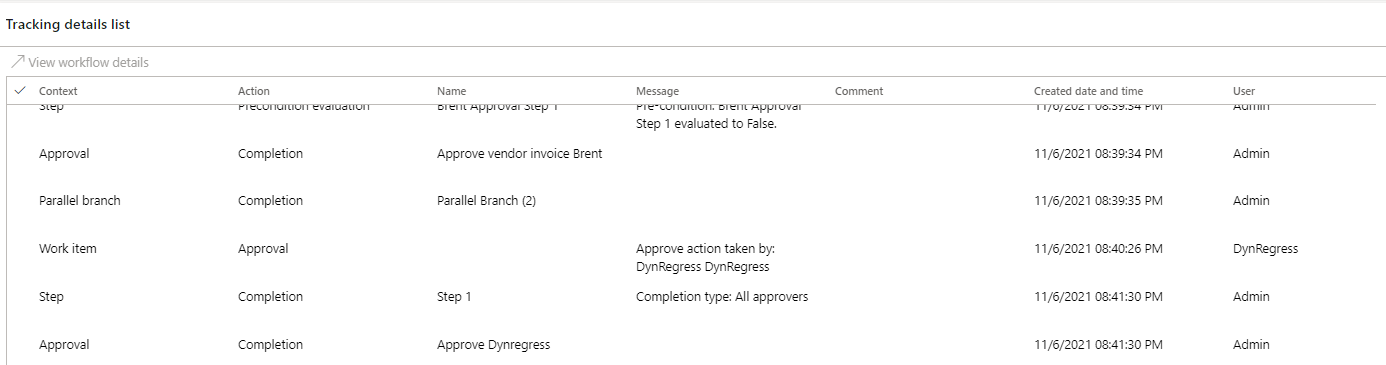
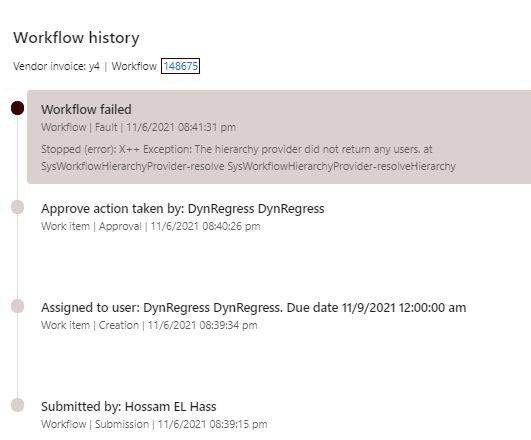
I have started the setup of vendor invoice workflow, so I managed to assign the first approval task using conditions. Now I want the next approval to be based on the hierarchy based on the invoice approval limit. To use the hierarchy, the options are to start from approved by. I could see that this field is empty since I am using a vendor collaboration invoice, and there is no manual process to set this field.

Initially I thought that the approved by field would be set automatically based on the first user who approved the first task, but it is not. Please guide me on how to use the approval hierarchy.
pastedimage1636256650805v1.png

pastedimage1636256694583v2.png

pastedimage1636256745915v3.png 

I have the same question (0)
  • Suggested answer
    Ramit Paul Profile Picture
    22,805 Most Valuable Professional on at

    Hi,

    Can you check if the user and employee relstion is there in user form ?

  • Hossam EL Hassan Profile Picture
    469 on at

    Hi Ramit, 

    The user form is there, but it will not allow you to go through the hierarchy based on position and approval limit.

    pastedimage1636318322127v1.png

    pastedimage1636318355542v2.png

  • Suggested answer
    Ramit Paul Profile Picture
    22,805 Most Valuable Professional on at

    I think I wasn't clear, I said you need to check the user and employee relation from user settings.

    Please check that 

  • Hossam EL Hassan Profile Picture
    469 on at

    Hi,

    I am not sure where to find the option you are refering to. Kindly find below my screens

    pastedimage1636319980748v1.png

    pastedimage1636320065233v2.png

Under review

Thank you for your reply! To ensure a great experience for everyone, your content is awaiting approval by our Community Managers. Please check back later.

Helpful resources

Quick Links

Introducing the 2026 Season 1 community Super Users

Congratulations to our 2026 Super Stars!

Meet the Microsoft Dynamics 365 Contact Center Champions

We are thrilled to have these Champions in our Community!

Congratulations to the April Top 10 Community Leaders

These are the community rock stars!

Leaderboard > Finance | Project Operations, Human Resources, AX, GP, SL

#1
Giorgio Bonacorsi Profile Picture

Giorgio Bonacorsi 608

#2
André Arnaud de Calavon Profile Picture

André Arnaud de Cal... 591 Super User 2026 Season 1

#3
CP04-islander Profile Picture

CP04-islander 430

Last 30 days Overall leaderboard

Product updates

Dynamics 365 release plans
