web
You’re offline. This is a read only version of the page.
close
Skip to main content

Announcements

No record found.

News and Announcements icon
Community site session details

Community site session details

Session Id :
Customer experience | Sales, Customer Insights,...
Suggested Answer

Social Media Account creation error - Insufficient Permissions

(0) ShareShare
ReportReport
Posted on by 5

Hi everyone - 

We've recently switched from ClickDimensions to D365 Marketing, and users are getting the following error when trying to setup Social Media Accounts:
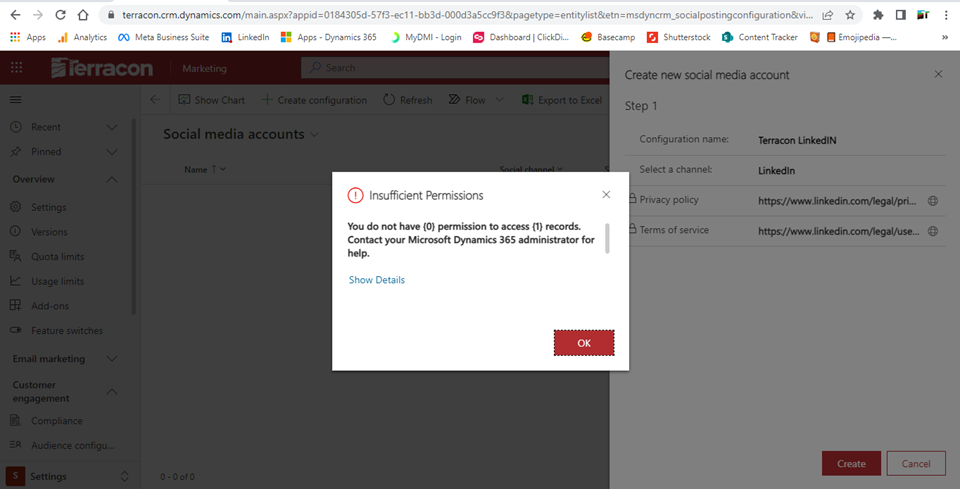
Social-Media-Account-setup-error.png

I've confirmed the Social Media Account permisisons are turned on for the Marketing Manager - Business security role. I have Sys Admin rights and I am able to create a record. Is there a different security role that needs to be updated to allow non-Sys Admin users access to create a Social Media account?

Thanks for any suggestions!

Steve Strati

CRM Product Owner

Terracon 

www.terracon.com

I have the same question (0)
  • Suggested answer
    Tereza Kirk Profile Picture
    Microsoft Employee on at

    Hello Steve,

    Thanks for the question. To connect and authenticate Social Media Accounts, user will need create permissions for Social media account and Social Posting Consent under Custom entities.

    PM, D365 Marketing

  • Steve Strati Profile Picture
    5 on at

    Hi Tereza -

    Thanks for your reply. I added Org level access to Social Posting Content via the "Marketing Services User Extensible Role" security role as I am unable to directly update the "Marketing Manager - Business" security role. The user now has access for Social Media Account and Social Posting Consent, but continues to get the insufficient permissions error message.

    Did I misunderstand the suggestion? If not, this does not appear to resolve the issue in my case.

    I appreciate any other suggestions.

  • Tereza Kirk Profile Picture
    Microsoft Employee on at

    If you added create permissions for those two entities and it is not working, please file a support ticket to ensure we can assist further. https://admin.powerplatform.microsoft.com/?referer=mbssupport  Thanks, PM, Microsoft

Under review

Thank you for your reply! To ensure a great experience for everyone, your content is awaiting approval by our Community Managers. Please check back later.

Helpful resources

Quick Links

Introducing the 2026 Season 1 community Super Users

Congratulations to our 2026 Super Stars!

Meet the Microsoft Dynamics 365 Contact Center Champions

We are thrilled to have these Champions in our Community!

Congratulations to the April Top 10 Community Leaders

These are the community rock stars!

Leaderboard > Customer experience | Sales, Customer Insights, CRM

#1
ManoVerse Profile Picture

ManoVerse 128 Super User 2026 Season 1

#2
11manish Profile Picture

11manish 97

#3
Muhammad Shahzad Shafique Profile Picture

Muhammad Shahzad Sh... 69 Most Valuable Professional

Last 30 days Overall leaderboard

Product updates

Dynamics 365 release plans



