Hi,
Recently, I had to work on a task which includes many field validations and Ajax calls that took a lot of background processing time and I had to stop the end user from taking any other actions like saving or submitting the form. To say, stopping all basic form actions. To achieve this, either I have to disable all form actions or show an Overlay on the page. In my case, the second option is the best.
While researching, I found that there is no OOB functionality in MS Dynamics CRM for this, like calling a method to mask the page and unmask whenever it is not required. So, I have developed a generic function in JavaScript which can be used for both Show and Hide the overlay. Of course, with the default CRM loading spinner. And it is working with the latest version of CRM too.
Below is the screenshot of the end result.
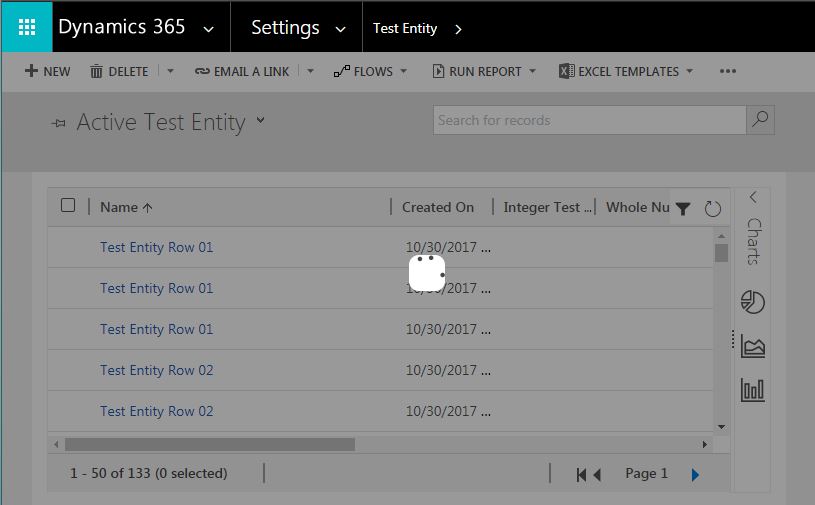
And, below method can be used to achieve it.
function ToggleLoader(ShowOverLay){
	var CRMTopBar = top.document.getElementById("crmTopBar");
	var divOverlays = top.document.getElementById("divOverLay");
	if(ShowOverLay){
		if(divOverlays == null && CRMTopBar != null){
			var divOverlay = document.createElement('div');
			divOverlay.setAttribute('id',"divOverLay");

			divOverlay.style.textAlign = "center";
			divOverlay.style.position = "absolute";
			divOverlay.style.top = "0px";
			divOverlay.style.left = "0px";
			divOverlay.style.bottom = "0px";
			divOverlay.style.right = "0px";
			divOverlay.style.zIndex = "100";
			divOverlay.style.backgroundColor = "rgba(0,0,0,0.4)";
			var imgSource = "<img id='loading' src='/_imgs/AdvFind/progress.gif' style='text-align:center; position:absolute; top:50%; left:50%; right:0px; border-radius: 10px; background-color:white;'>";
			divOverlay.innerHTML = imgSource;
			divOverlay.style.display = 'block';
			CRMTopBar.parentNode.insertBefore(divOverlay, CRMTopBar);
		}
	}
	else{
		var hideDivOverlays = top.document.getElementById('divOverLay');
		if(hideDivOverlays != null){
			hideDivOverlays.style.display = 'none';
		}
	}
}
I have inserted the newly created dynamic div before the "CRMTopBar" which contains the Form basic actions.
To show the overlay, JS method should be called with parameter either 1 or True and to hide, with 0 or False.
- Show Overlay: ToggleLoader(1); or ToggleLoader(true);
- Hide Overlay: ToggleLoader(0); or ToggleLoader(false);
Hope this helps someone who is in need.
Thanks
Jagadesh D


