web
You’re offline. This is a read only version of the page.
close
Skip to main content

Notifications

Announcements

Community site session details

Community site session details

Session Id :
Customer experience | Sales, Customer Insights,...
Suggested Answer

Segments results not as expected

(0) ShareShare
ReportReport
Posted on by 185

Hi community,

I have recently implemented D365 for Marketing at a customer. Ive been setting up a few customer Journeys and using dynamic segments to identify specific contacts, and seem to be getting results that I was not expecting.

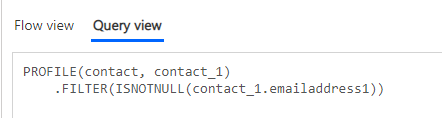
A simple example: Return all contacts where emailaddress1 contains data.

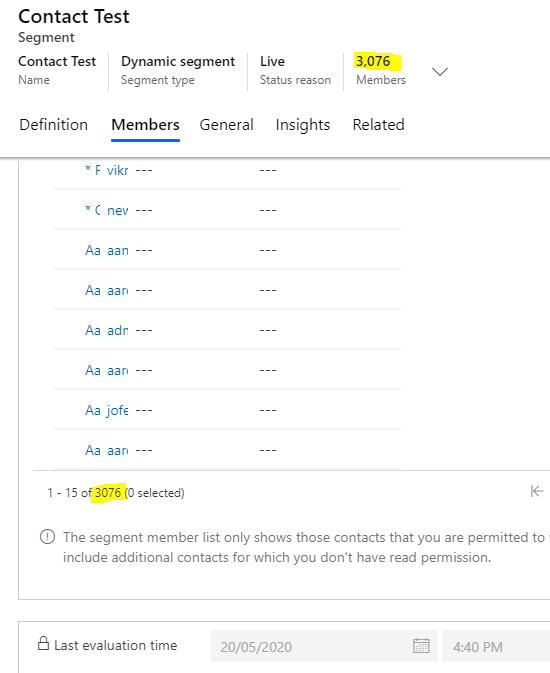
1. The member result is 3076 members(contacts).

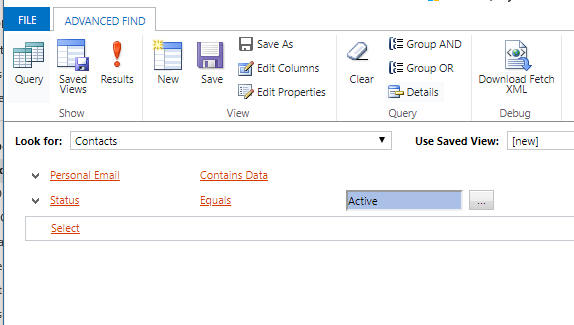
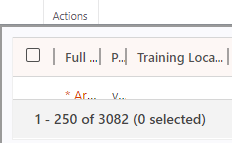
2. If I use the same query in an advanced find I get back 3082 contacts.

I have a more intricate query which I am expecting to produce records when a sequence is followed, but this consistently returns 0 results where my advanced search returns 1 or more.

Has anyone else seen this, and if so, any extra ideas how i can figure out whats going on? I've double checked that records are all active and the usual culprits, but this seems odd to me.
2783.SQ1.jpgSQ2.PNGSQ3.PNGSQ4.PNG

I have the same question (0)
  • cloflyMao Profile Picture
    25,210 on at

    Hi Jarrod,

    In your segment query, the email field is emailaddress1, the corresponding display name is Email.

    However, in your Advanced Find, the email field is Personal Email instead, it seems that its a custom email field instead of the default primary email field. 

    Please change field in Advanced Find to check whether result could be match to segment query.

    pastedimage1589953324158v1.png

    Regards,

    Clofly

  • J.G Profile Picture
    185 on at

    Hi Clofly,

    The display name of EmailAddress1 has been changed to 'Personal Email'. The advanced find is pointing at the correct field.

    <fetch version="1.0" output-format="xml-platform" mapping="logical" distinct="false">

     <entity name="contact">

       <attribute name="fullname" />

       <attribute name="emailaddress1" />

       <attribute name="contactid" />

       <order attribute="fullname" descending="false" />

       <filter type="and">

         <condition attribute="emailaddress1" operator="not-null" />

         <condition attribute="statecode" operator="eq" value="0" />

       </filter>

     </entity>

    </fetch>

  • Suggested answer
    cloflyMao Profile Picture
    25,210 on at

    Hi Jarrod,

    Have you checked result from both entitylist column filter and advanced filters?

    pastedimage1589966721376v1.png

    pastedimage1589966758059v2.png

    If result of them are all 3082, then try to check whether there is any difference(owner field value or any other fields value) between 6 remaining contacts and other 3076 contacts.

    Regards,

    Clofly 

Under review

Thank you for your reply! To ensure a great experience for everyone, your content is awaiting approval by our Community Managers. Please check back later.

Helpful resources

Quick Links

Responsible AI policies

As AI tools become more common, we’re introducing a Responsible AI Use…

Congratulations to our 2025 Community Spotlights

Thanks to all of our 2025 Community Spotlight stars!

Leaderboard > Customer experience | Sales, Customer Insights, CRM

#1
Tom_Gioielli Profile Picture

Tom_Gioielli 60 Super User 2026 Season 1

#2
Jimmy Passeti Profile Picture

Jimmy Passeti 33 Most Valuable Professional

#3
Eugen Podkorytov Profile Picture

Eugen Podkorytov 26

Last 30 days Overall leaderboard

Product updates

Dynamics 365 release plans