web
You’re offline. This is a read only version of the page.
close
Skip to main content

Notifications

Announcements

No record found.

Community site session details

Community site session details

Session Id :
Microsoft Dynamics CRM (Archived)

Trouble with Dynamic Values in Form Assistant while building a template for email in a process

(0) ShareShare
ReportReport
Posted on by

Hi All,

I'm having a lot of trouble dealing with the form assistant trying to create a message template within a process. When trying to insert "dynamic values", after I save and activate the process, I find that some values simply change or are deleted from the template. Please see the screenshot below: 
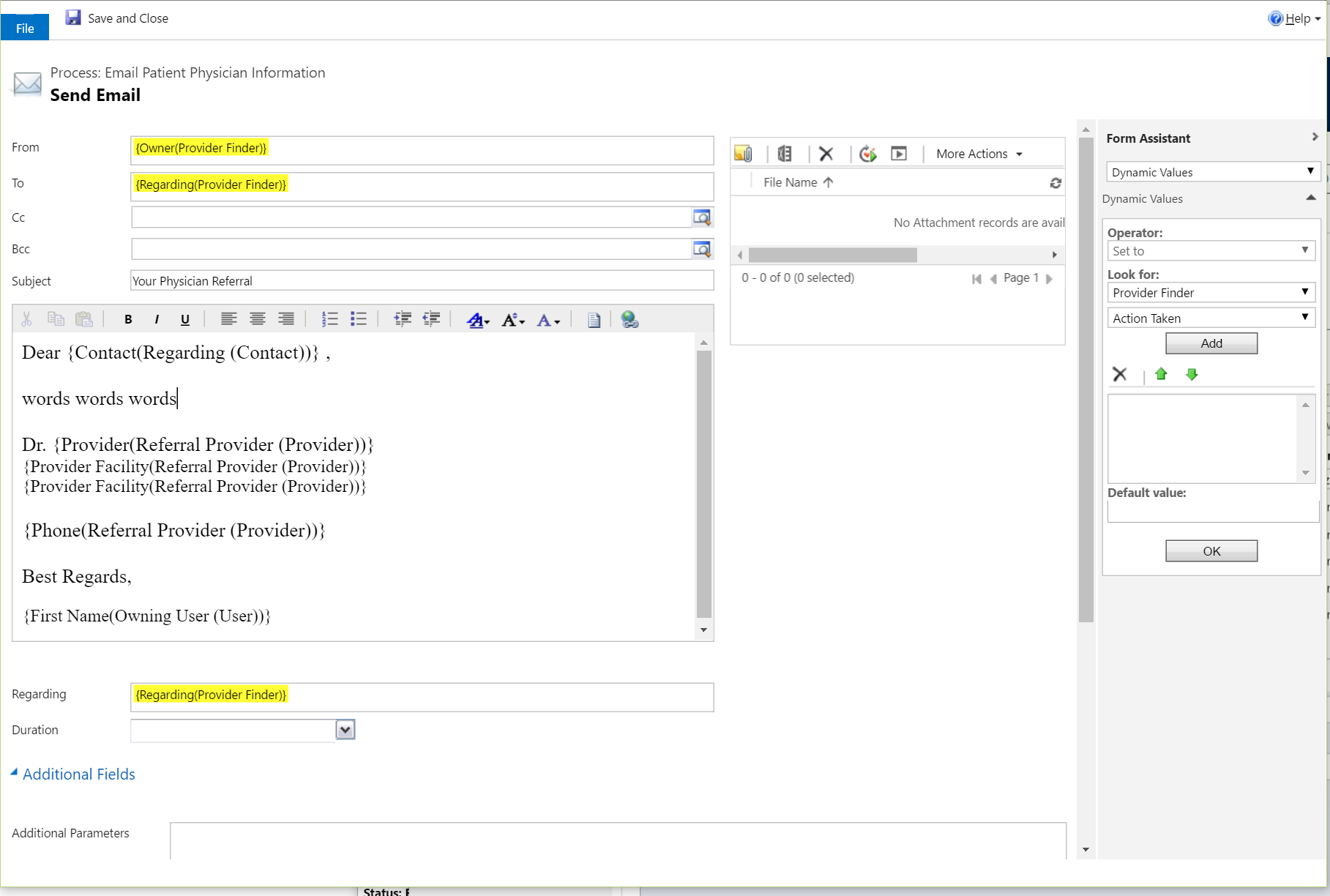
TT2.PNG

As you can see, I have repeat values in there that I did not configure as such. Also, some values do not seem to pick up the correct data, and are simply rendered as if they are text items in the email. 

Has anyone experienced anything like this, or is there any known snags with working with form assistants like this? Thanks very much for any help.

Best

*This post is locked for comments

I have the same question (0)
  • Community Member Profile Picture
    on at

    Are you creating the template from the scratch or you are copy pasting it from somewhere else?

  • fishyjj Profile Picture
    on at

    Not creating it from scratch, but also not copy/pasting. The template is an import from a solution in a sandbox environment into a production environment. The imported template didn't replace any values, so I deleted the replacement values and tried to re-add them.

  • Verified answer
    Community Member Profile Picture
    on at

    Try to remove all content for one template, save and close it and then re-create by adding the values.

  • fishyjj Profile Picture
    on at

    This worked pretty well with just a couple minor snags. Any idea why the template builder is so wonky? It seems to sort of "hold on" to replacement parameters under the covers and it messes up the template. Are there any good ways to effectively deal with this?

    Thanks for your reply.

  • Suggested answer
    Community Member Profile Picture
    on at

    It happens sometimes, all we do is remove and create the template again and it works. Please mark my answer as verified if it helped.

Under review

Thank you for your reply! To ensure a great experience for everyone, your content is awaiting approval by our Community Managers. Please check back later.

Helpful resources

Quick Links

Responsible AI policies

As AI tools become more common, we’re introducing a Responsible AI Use…

Neeraj Kumar – Community Spotlight

We are honored to recognize Neeraj Kumar as our Community Spotlight honoree for…

Leaderboard > 🔒一 Microsoft Dynamics CRM (Archived)

#1
SA-08121319-0 Profile Picture

SA-08121319-0 4

#1
Calum MacFarlane Profile Picture

Calum MacFarlane 4

#3
Alex Fun Wei Jie Profile Picture

Alex Fun Wei Jie 2

Last 30 days Overall leaderboard

Featured topics

Product updates

Dynamics 365 release plans



