web
You’re offline. This is a read only version of the page.
close
Skip to main content

Notifications

Announcements

No record found.

Community site session details

Community site session details

Session Id :
Customer experience | Sales, Customer Insights,...
Answered

Unable to import Solution with dependencies(Self Referencing Entity issue)

(0) ShareShare
ReportReport
Posted on by 15

Hi,

I am trying to export a Solution(as managed) from my Dev environment(CE) to another Dev environment(CE) with just one entity and 3 related image WebResources(.png,.svg).

I get an error which shows a dependency and it is the same entity that has already been added in the Solution.

I have been working on this for hours and end up with no progress. Any pointers on this would be of great help.
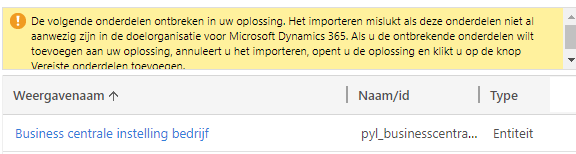

pastedimage1622754357341v1.png

pastedimage1622754599711v5.png

Thanks in advance,

Manu.

I have the same question (0)
  • Suggested answer
    Charan Raju C R Profile Picture
    7 Moderator on at

    Hi Manasa,

    Try to export the solution after adding components required by that entity.

  • Sanket Kumar Profile Picture
    90 on at

    Was it resolved for you?

    [quote user="Manasa Jangiti"]

    Hi,

    I am trying to export a Solution(as managed) from my Dev environment(CE) to another Dev environment(CE) with just one entity and 3 related image WebResources(.png,.svg).

    I get an error which shows a dependency and it is the same entity that has already been added in the Solution.

    I have been working on this for hours and end up with no progress. Any pointers on this would be of great help.

    pastedimage1622754357341v1.png

    pastedimage1622754599711v5.png

    Thanks in advance,

    Manu.

    [/quote]

    [quote user="Manasa Jangiti"]

    Hi,

    I am trying to export a Solution(as managed) from my Dev environment(CE) to another Dev environment(CE) with just one entity and 3 related image WebResources(.png,.svg).

    I get an error which shows a dependency and it is the same entity that has already been added in the Solution.

    I have been working on this for hours and end up with no progress. Any pointers on this would be of great help.

    pastedimage1622754357341v1.png

    pastedimage1622754599711v5.png

    Thanks in advance,

    Manu.

    [/quote]
  • Verified answer
    Community Member Profile Picture
    on at

    Hi,

    You are missing come component please add the requirecomponent as while add the component and sub component please select yes to add the requirecomponent.

    Thanks,

    Arshad

    For interview preparation please go through the below link.

    https://juniorcrmblog.blogspot.com/2021/08/ms-dynamic-crm-interview-question-for-2.html 

    https://www.youtube.com/channel/UC3Pe9Y_2SxA9xAmTfuSWQaA/videos


Under review

Thank you for your reply! To ensure a great experience for everyone, your content is awaiting approval by our Community Managers. Please check back later.

Helpful resources

Quick Links

Responsible AI policies

As AI tools become more common, we’re introducing a Responsible AI Use…

Neeraj Kumar – Community Spotlight

We are honored to recognize Neeraj Kumar as our Community Spotlight honoree for…

Leaderboard > Customer experience | Sales, Customer Insights, CRM

#1
Tom_Gioielli Profile Picture

Tom_Gioielli 170 Super User 2025 Season 2

#2
#ManoVerse Profile Picture

#ManoVerse 70

#3
Jimmy Passeti Profile Picture

Jimmy Passeti 50 Most Valuable Professional

Last 30 days Overall leaderboard

Product updates

Dynamics 365 release plans
