web
You’re offline. This is a read only version of the page.
close
Skip to main content

Announcements

No record found.

News and Announcements icon
Community site session details

Community site session details

Session Id :
Customer experience | Sales, Customer Insights,...
Suggested Answer

Unsubscribe Link

(0) ShareShare
ReportReport
Posted on by 110

Hello,

i am creating marketing emails with a dynamic content field to link to the Unsubscribe Form:
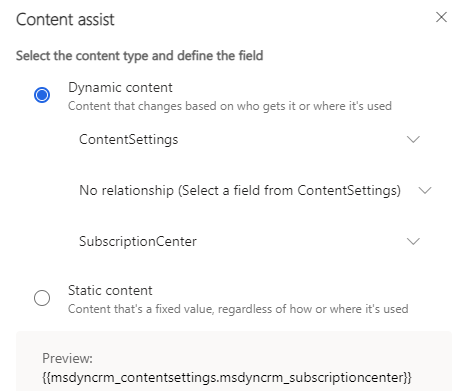
pastedimage1629213369050v1.png

We host the Form on a Website with the URL: www.website.org/newsletter-unsubscribe (i dont want to post the original URL). This Subscripton Center is hosted as an iframe on the site.

But after sending out test customer journeys its not possible to open the form. I am reaching a broken link:

www.website.org newsletter-unsubscribe?msdynunsubscribeid=BiUoLfGHQNZdpyVR1LXRbxxdp1TFOqYfjH2xixvdZCkx&msdynttrid=Ao4ngJ_tv_73k1d18bfdaVhriXGa9tdajie8KXXTmCU#

And i could figure out that the following URL would work:

www.website.org newsletter-unsubscribe#?msdynunsubscribeid=BiUoLfGHQNZdpyVR1LXRbxxdp1TFOqYfjH2xixvdZCkx&msdynttrid=Ao4ngJ_tv_73k1d18bfdaVhriXGa9tdajie8KXXTmCU#

So i thought i just add a # at the end of the link in the content setting and everything is fine, but dynamics adds the personalized part of the link directly to the subscription center link. Even if there is a # there, it will be ignored.

So then i tried different things, but the personalized part of the link still creates issues.

Whats the solution? 

Thanks

I have the same question (0)
  • Suggested answer
    Nya Profile Picture
    29,064 on at

    Hi,

    The URL you mentioned is actually the Full page URL of the Marketing Page which contains the subscription center.

    If the page you're using is hosted on the portal, you can refer to the following sections to change it.

    Change the default portal URL for events and pages

    Update existing events and marketing pages records

    If it is embedded in an external website, you can change the URL of the website directly.

    Embed forms on external websites (Dynamics 365 Marketing) | Microsoft Docs

  • MarioKraus Profile Picture
    110 on at

    Hi Nya,

    thanks, but I think we have talked past each other.

    We have a subscription center as a form, hosted on a marketing website (so called form page) which is integrated via iframe on the website.

    So I have neither a portal URL, nor a marketing page, nor an external form.

    The problem is not that the Subscription Center does not work, but that the link clicked from an email is incorrect. There are missing characters between the external link and the personalization by:

    "msdynunsubscribeid=BiUoLfGHQNZdpyVR1LXRbxxdp1TFOqYfjH2xixvdZCkx&msdynttrid=Ao4ngJ_tv_73k1d18bfdaVhriXGa9tdajie8KXXTmCU#"

    Dynamics Marketing pulls the URL from the content settings and then adds the part i just copied. But between the first link and this personalization something is missing to make the link work. If I add a "#" by hand, for example, the link works. But if i add the link in the content settings with "#" dynamics will send this character at the end of the personalized link.

    Should I open a ticket for this? This is a high priority and vlt can help me better?

    Thanks

  • Suggested answer
    Nya Profile Picture
    29,064 on at

    Hi,

    This link is dynamically spliced. If you need to change the content in the middle, you need to change the URL of the website used for splicing.

    As you can see, the URL in the Content Settings is a URL which relates to a certain Marketing Page.

    So you can't achieve what you want by adding this symbol directly to Content Settings.

    pastedimage1629273015905v1.png

    I'm sorry I can't be of complete help to you, and if your problem is rather urgent, it is recommended to raise a ticket.

Under review

Thank you for your reply! To ensure a great experience for everyone, your content is awaiting approval by our Community Managers. Please check back later.

Helpful resources

Quick Links

Introducing the 2026 Season 1 community Super Users

Congratulations to our 2026 Super Stars!

Meet the Microsoft Dynamics 365 Contact Center Champions

We are thrilled to have these Champions in our Community!

Congratulations to the March Top 10 Community Leaders

These are the community rock stars!

Leaderboard > Customer experience | Sales, Customer Insights, CRM

#1
ManoVerse Profile Picture

ManoVerse 176 Super User 2026 Season 1

#2
11manish Profile Picture

11manish 139

#3
CU11031447-0 Profile Picture

CU11031447-0 100

Last 30 days Overall leaderboard

Product updates

Dynamics 365 release plans
