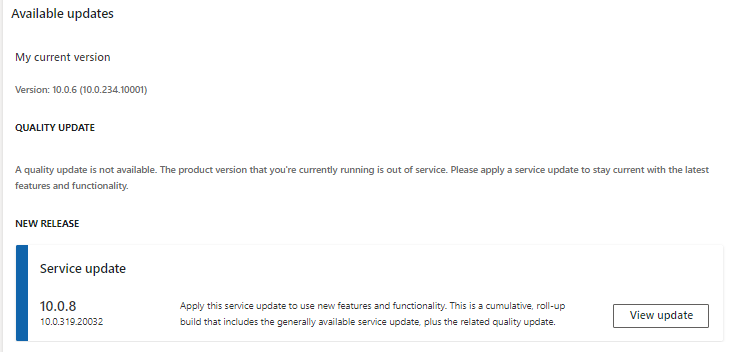
This is my Cloud hosted environment Version
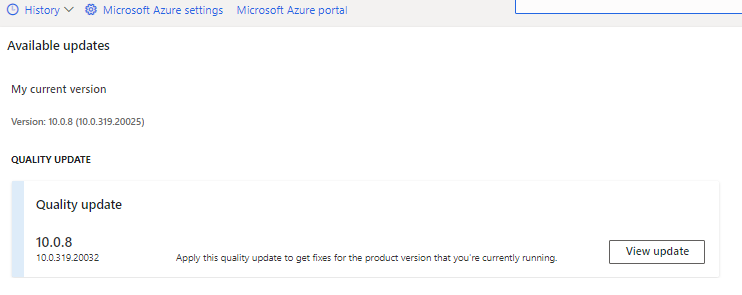
and this is my UAT Environment version (Where Database backup is taken)
Here is when i do sync the error is copied from event viewer
+ System
- Provider
[ Name] Microsoft-Dynamics-AX-DatabaseSynchronize
EventID 53
- Execution
[ ProcessID] 11928
[ ThreadID] 17652
exceptionDetails Microsoft.Dynamics.AX.InitializationException: Failed to open SQL connection at Microsoft.Dynamics.AX.AOS.StartupInternal(String[] Arguments) at Microsoft.Dynamics.AX.AOS.Startup() at Microsoft.Dynamics.AX.AosConfig.?A0x0ecd63ac.GetAosConfig() at Microsoft.Dynamics.AX.AosConfig.Config.InitInternal() at Microsoft.Dynamics.AX.AosConfig.Config.InitOnce(Boolean isOfflineMode) at Microsoft.Dynamics.AX.Framework.Database.Tools.LegacyCodepath.StartAosCode(SyncOptions syncOptions, String sqlConnectionString) at Microsoft.Dynamics.AX.Framework.Database.Tools.LegacyCodepath.ExecuteWithinAOS(SyncOptions syncOptions, String sqlConnectionString, IMetadataProvider metadataProvider, Func`1 func, Action`1 errorHandler) at Microsoft.Dynamics.AX.Framework.Database.Tools.LegacyCodepath.RunFullTableSync(SyncOptions syncOptions, String sqlConnectionString, IMetadataProvider metadataProvider) at Microsoft.Dynamics.AX.Framework.Database.Tools.SyncEngine.FullTableViewSync() at Microsoft.Dynamics.AX.Framework.Database.Tools.SyncEngine.FullSync() at Microsoft.Dynamics.AX.Framework.Database.Tools.SyncEngine.RunSync() at Microsoft.Dynamics.AX.Framework.Database.Tools.SyncEngine.Run(String metadataDirectory, String sqlConnectionString, SyncOptions options)
Message [DbSync: 7.0.30182.0] [Platform: 7.0.5407.35455]: Failed to open SQL connection
When i do some research on this i found this blog Stating this
https://community.dynamics.com/365/financeandoperations/f/dynamics-365-for-finance-and-operations-forum/237572/synchronization-failed-after-database-restore-data-import?pifragment-94775=1
"This issue may arise when the platform build number of the current environment is lower than the platform build number of the source environment. I had the same one and resolved by upgrading my environment’s platform to match the source environment. Also, it's possible to adjust the expected version in the database, but I didn't try that. Read more about it here: https://docs.microsoft.com/en-us/dynamics365/unified-operations/dev-itpro/database/copy-database-from-azure-sql-to-sql-server"
So my doubt is is this really because of version mismatch ?
If this is the case how can we "Also, it's possible to adjust the expected version in the database," ?
How can i proceed now with this sync error ?
Experts please provide some solution on this.
Regards.
Have a nice day.


