web
You’re offline. This is a read only version of the page.
close
Skip to main content

Announcements

No record found.

News and Announcements icon
Community site session details

Community site session details

Session Id :
Microsoft Dynamics AX (Archived)

Clear grid in second tab AX 2012

(0) ShareShare
ReportReport
Posted on by

Hi experts,

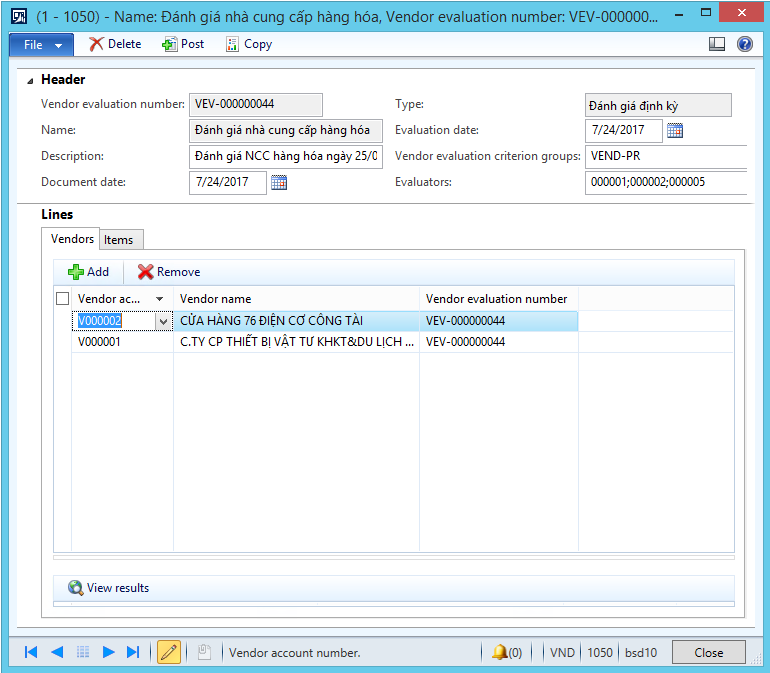
I customized a form has 2 tab

Tab1: I use to add Vendor

Tab2: I use to add Item, and this item follows the vendor.

like pic below:
2017_2D00_07_2D00_29_5F00_10_2D00_04_2D00_27.png

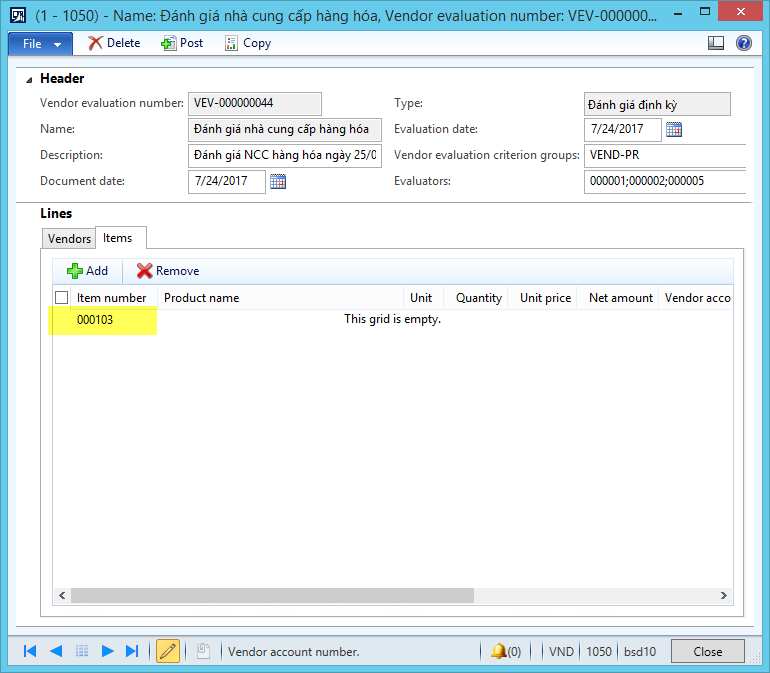
And I have an issue:

When I create a 1st Vendor in line  1, and add Item for this vendor.

Then I create a 2nd Vendor in line 2, and I move to Tab Item.

the issue appear like pic below:
2017_2D00_07_2D00_29_5F00_10_2D00_12_2D00_36.png

Any one help me  to clear the value "000103"

thanks all.

*This post is locked for comments

I have the same question (0)
  • Ajit Profile Picture
    8,788 on at

    Did you added this particular item for your first vendor?

  • Community Member Profile Picture
    on at

    Hi Ajit Srivastava,

    I added this particular item for your first vendor.

    If I don't add for first vendor, tab Item of 2nd Vendor nothing happens.

  • Suggested answer
    Ajit Profile Picture
    8,788 on at

    I assume you are using two data sources ( 1 for vendors and other for items)and relation between them is not proper.Please check data source relation.

  • Community Member Profile Picture
    on at

    Hi Ajit Srivastava ,

    This is my data source relation:

    2017_2D00_07_2D00_29_5F00_14_2D00_30_2D00_39.png

    BHS_VendorEvaluationVendTable --> Tab Vendor

    BHS_VendorEvaluationInventTable --> Tab Item.

    Is it wrong or right?

  • Suggested answer
    Ajit Profile Picture
    8,788 on at

    That relation looks ok.  I would have asked you before, what about the relation at table level?

  • Suggested answer
    Vilmos Kintera Profile Picture
    46,149 on at

    Are you saying that the grid is empty but you have a floating itemid from the previously created record? Maybe this is just some odd rendering issue if you use some specific remote desktop connectivity, or if the form has personalizations.

    Try dropping usage data.

    Try using an AX fat client locally installed instead of remote desktop.

    I have only seen randomly floating date lookup buttons in a RDS RemoteApp connection for vendor transactions screen which was heavily loaded with new personalized fields.

  • Community Member Profile Picture
    on at

    Hi Vilmos Kintera,

    I'm using AX client, in RDS RemoteApp connection and VPN.

    All of them cause an error.

  • Suggested answer
    Vilmos Kintera Profile Picture
    46,149 on at

    Again, this is an odd rendering issue most likely, for which we cannot give much help for, other than some generic tips.

    Try to install the latest available kernel, drop usage data, delete AUC files, and then try it in fat client without MSTSC or without RemoteApp.

    Finally, try the code/form in a different environment like in a demo VM to see if it is truly the fault with the design or not.

    If that does not help, and others do not have any suggestions, your only option remaining is to open a Microsoft Support Incident.

  • Verified answer
    Community Member Profile Picture
    on at

    I have fixed my issue.

    I overrided pageActivated() method and call method BHS_VendorEvaluationInventTable_DS.executeQuery();

    BHS_VendorEvaluationInventTable is datasource of Item tab.

    Issue close.

    Thanks all.

Under review

Thank you for your reply! To ensure a great experience for everyone, your content is awaiting approval by our Community Managers. Please check back later.

Helpful resources

Quick Links

Introducing the 2026 Season 1 community Super Users

Congratulations to our 2026 Super Stars!

Meet the Microsoft Dynamics 365 Contact Center Champions

We are thrilled to have these Champions in our Community!

Congratulations to the March Top 10 Community Leaders

These are the community rock stars!

Leaderboard > 🔒一 Microsoft Dynamics AX (Archived)

#1
CP04-islander Profile Picture

CP04-islander 16

#2
GiacomoRovai Profile Picture

GiacomoRovai 4

#3
Douglas Noel Profile Picture

Douglas Noel 2

Last 30 days Overall leaderboard

Featured topics

Product updates

Dynamics 365 release plans
