web
You’re offline. This is a read only version of the page.
close
Skip to main content

Notifications

Announcements

No record found.

Community site session details

Community site session details

Session Id :
Small and medium business | Business Central, N...
Suggested Answer

Upgrading from BC20 GB to BC21 GB - Export to Excel error

(0) ShareShare
ReportReport
Posted on by 10

Hello,

I have made several Upgrades from BC20 GB to BC21 GB for a number of databases, and a few of them have had issues post-upgrade when trying to use any function which exports to excel. E.g. When going to configuration packages, creating a new one and clicking on Export to Excel returns the following error message.
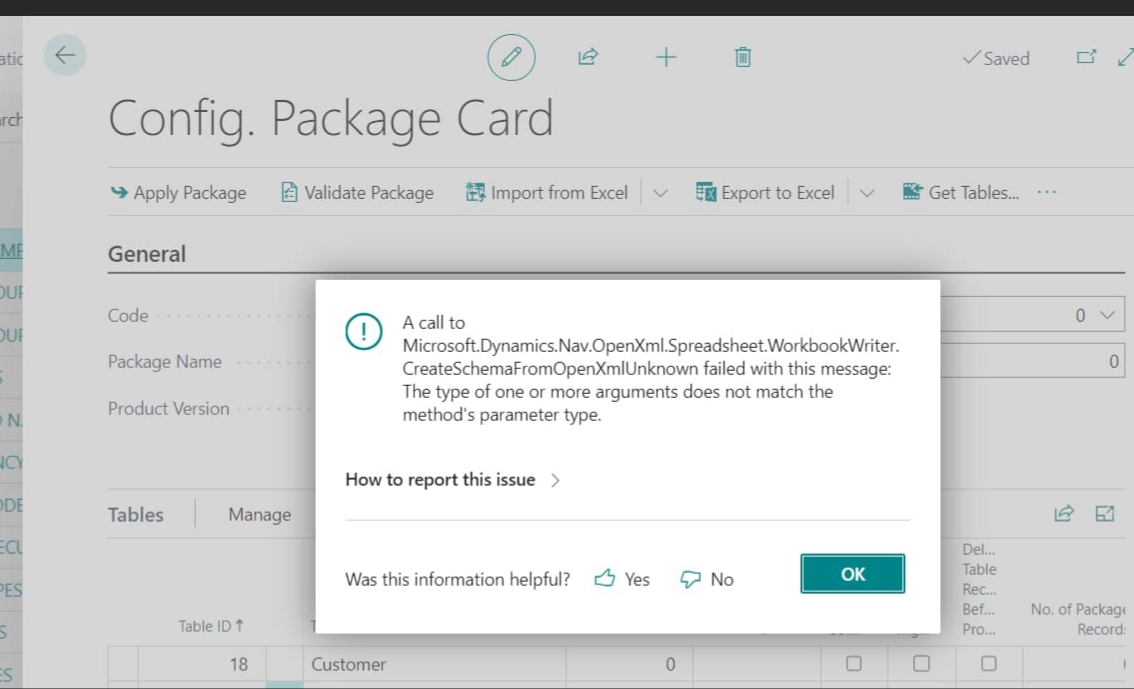
20230127_5F00_211740.jpg

This seems to be a DLL issue, and BC21 started the first change from .NET Framework to .NET Standard.

Has anyone had this issue when doing an upgrade? This applies to any of the BC21 GB versions.

Thank you

I have the same question (0)
  • Suggested answer
    Inge M. Bruvik Profile Picture
    1,105 Moderator on at

    Are you on the latest cumulative update for BC21?

    If not i would recommend you try to use the latest available cumulative update.

  • aelagha Profile Picture
    10 on at

    Hi Inge,

    I have tried BC21.3, but sadly still the same issue. It seems to be fine when using a demo database, but not with a database that's been upgraded.

    Kind regards,

    Ahmed

  • Suggested answer
    Inge M. Bruvik Profile Picture
    1,105 Moderator on at

    Have you been through this setup?

    learn.microsoft.com/.../configuring-excel-addin

  • aelagha Profile Picture
    10 on at

    This wouldn't be necessary as it requires to have Azure AD authentication as a prerequisite, which would be a huge blocker for existing clients who are still using Windows Authentication.

  • Suggested answer
    aelagha Profile Picture
    10 on at

    I have resolved this issue. What I have forgotten to mention is that the app we are working on has some custom .NET addins. A few of those addins have a dependency on DocumentFormat.OpenXml.dll v2.8.1

    BC21 has a number of DLLs in the Service folder, including the new DocumentFormat.OpenXml.dll v2.19.0, which has a number of changes compared to v2.8.1

    These changes are what caused this error, but more importantly, it happened because the publishing of the Base application happened AFTER the older DLL file was copied into the folder, causing the Base application to unfortunately use the older version instead.

    The easy solution here is just to publish the Microsoft apps before copying any additional DLLs into the Service folder.

Under review

Thank you for your reply! To ensure a great experience for everyone, your content is awaiting approval by our Community Managers. Please check back later.

Helpful resources

Quick Links

Responsible AI policies

As AI tools become more common, we’re introducing a Responsible AI Use…

Neeraj Kumar – Community Spotlight

We are honored to recognize Neeraj Kumar as our Community Spotlight honoree for…

Leaderboard > Small and medium business | Business Central, NAV, RMS

#1
OussamaSabbouh Profile Picture

OussamaSabbouh 3,098

#2
Jainam M. Kothari Profile Picture

Jainam M. Kothari 1,556 Super User 2025 Season 2

#3
YUN ZHU Profile Picture

YUN ZHU 1,108 Super User 2025 Season 2

Last 30 days Overall leaderboard

Featured topics

Product updates

Dynamics 365 release plans
