web
You’re offline. This is a read only version of the page.
close
Skip to main content

Notifications

Announcements

No record found.

Community site session details

Community site session details

Session Id :
Microsoft Dynamics GP (Archived)

Is there a way to change the default Sales Document Print Options?

(0) ShareShare
ReportReport
Posted on by

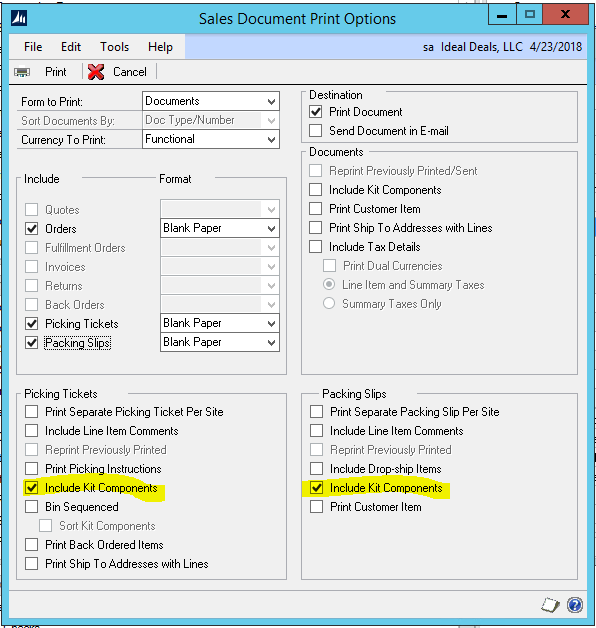
When we go to print an SOP order, pick ticket, or packing slip, we have to select what we need. GP has selections set as a default. Rather then having to change these all the time, or use a macro (which we have tried, but does not work), is there a way to change the defaults? The order prints out correct, because it is just the line items that needs to be on there.

The picking ticket and packing slip are what need to change. The picking tickets have "Include Kit Components" selected. We would like to default them to have 'Include Line Item Comments" and "Print Back Ordered Items," and remove the "Include Kit Components."

For the packing slip, we want the "Include Kit Components" to be removed.

I set a macro to print on the fly, but if there is a change to the SOP, we have to save it, close it, and then reopen it for the macro to work. I also tried the quick print setting, which does not allow us to select the back ordered option. GP-Print-defaults.PNG
*This post is locked for comments

I have the same question (0)
  • Community Member Profile Picture
    on at

    Hi #Chase.Landorf

    I was wondering whether you have found a solution to your issue?

    We are having similar challenge; we would like "Include Kit Components" to be removed and could not find any settings which could be amended.

    All the best,

    Tom

  • Community Member Profile Picture
    on at

    Hi Tom. Yes we did. Here is a link to setting up the quick print. dynamicsgpblogster.blogspot.com/.../wonders-of-ctrlq-saving-and-printing.html

  • Community Member Profile Picture
    on at

    Hi #Chase.Landorf,

    Thank you! This works perfectly.

    Regards,

    Tom

Under review

Thank you for your reply! To ensure a great experience for everyone, your content is awaiting approval by our Community Managers. Please check back later.

Helpful resources

Quick Links

Responsible AI policies

As AI tools become more common, we’re introducing a Responsible AI Use…

Neeraj Kumar – Community Spotlight

We are honored to recognize Neeraj Kumar as our Community Spotlight honoree for…

Leaderboard > 🔒一 Microsoft Dynamics GP (Archived)

#1
mtabor Profile Picture

mtabor 1

Last 30 days Overall leaderboard

Featured topics

Product updates

Dynamics 365 release plans



