web
You’re offline. This is a read only version of the page.
close
Skip to main content

Announcements

No record found.

News and Announcements icon
Community site session details

Community site session details

Session Id :
Microsoft Dynamics AX (Archived)

Add sales tax to inventory item cost price

(0) ShareShare
ReportReport
Posted on by 576

Dear Experts,

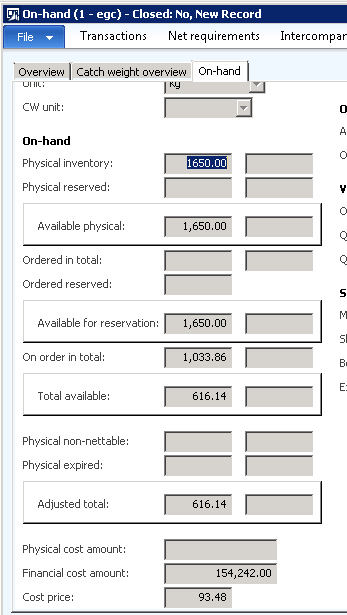
When I receive goods I want to update Sales tax to my inventory item cost price not to tax receivable account .may I know any setup or configuration issue.
3581.tax.png

Thanks in advance

*This post is locked for comments

I have the same question (0)
  • Suggested answer
    ZvikaR Profile Picture
    190 on at

    1. The key thing is that you set your sales tax code as "100% non-deductible" (on the "Values" form where you also set up the sales tax rate)

    2. You create the Purchase order, and select the sales tax group / item sales tax group to result in the above sales tax code.

    3. When you INVOICE the purchase order (I don't believe it happens during receipt, but you can double check), the tax amount will become part of the total amount posted into inventory value.

  • ZvikaR Profile Picture
    190 on at

    Was your question answered? if so, please mark the thread as closed.

  • Ludwig Reinhard Profile Picture
    Microsoft Employee on at

    Hi Ismail,

    for which country do you setup this sales tax? Isn't it allowed in your country to deduct that tax?

    Best regards

    Ludwig

  • Ismail Mohamed Profile Picture
    576 on at

    Egypt

    In some products we bought some items with tax 14% and don't added this tax in sales , like some items of food , so we need to add the tax to item cost in inventory

    Thanks

  • Suggested answer
    ZvikaR Profile Picture
    190 on at

    IF the tax is recorded (and paid to the vendor) as part of the purchase order - you can use "non-deductible" tax codes I described above.

    If the tax is collected through a 3rd party, so is not part of the invoice to the vendor, you can use AP Charge Codes set to "debit" into the item.

    If you already invoiced the purchase order there is a functionality allowing you to add charges after the fact. as described in the article below

    technet.microsoft.com/.../aa551276.aspx  

  • Verified answer
    Ludwig Reinhard Profile Picture
    Microsoft Employee on at

    Hi Ismail,

    Can you please check if changing the sales tax code setup overcomes the issue.

    In my example, I have a 7% tax and I specified that 100% of that tax is exempt.

    7026.tax.png

    Would be great if you could double check in a demo/test environment and let us know whether this change achieves what you want.

    Best regards,

    Ludwig

  • Ismail Mohamed Profile Picture
    576 on at

    thanks all experts ,

  • Suggested answer
    AX2012 hassan Profile Picture
    20 on at

    Dear Ismail,

    can to help me how to solved this case please by detail setup 

Under review

Thank you for your reply! To ensure a great experience for everyone, your content is awaiting approval by our Community Managers. Please check back later.

Helpful resources

Quick Links

Introducing the 2026 Season 1 community Super Users

Congratulations to our 2026 Super Stars!

Meet the Microsoft Dynamics 365 Contact Center Champions

We are thrilled to have these Champions in our Community!

Congratulations to the March Top 10 Community Leaders

These are the community rock stars!

Leaderboard > 🔒一 Microsoft Dynamics AX (Archived)

#1
CP04-islander Profile Picture

CP04-islander 39

#2
Michel ROY Profile Picture

Michel ROY 14

#3
imran ul haq Profile Picture

imran ul haq 8

Last 30 days Overall leaderboard

Featured topics

Product updates

Dynamics 365 release plans
