web
You’re offline. This is a read only version of the page.
close
Skip to main content

Notifications

Announcements

No record found.

Community site session details

Community site session details

Session Id :
Microsoft Dynamics NAV (Archived)

Item adjust cost getting error 'value of decimal parameter is outside of the permitted range'

(0) ShareShare
ReportReport
Posted on by 952

NAV version : 2018

Costing method: Average cost

When running adjust cost for only certain items getting error at per attached
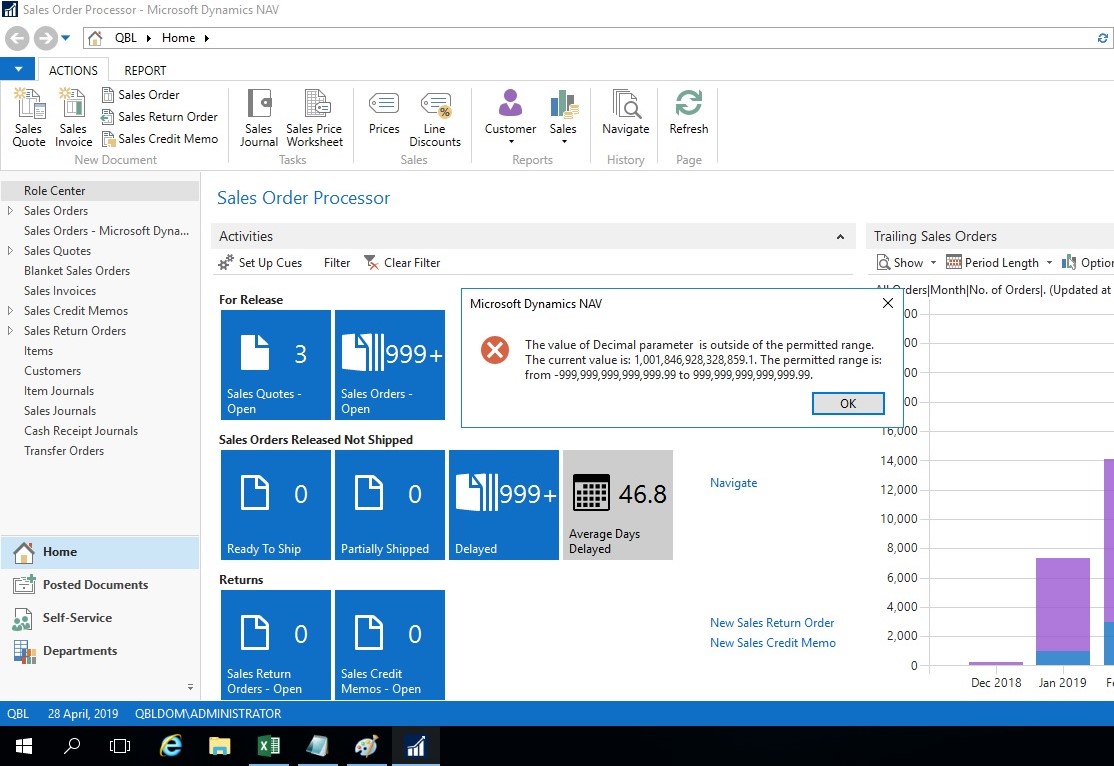
decimal-error_5F00_adjust-cost.jpg

The NAV has  manufacturing setup and the error is being displayed only for certain finished items

We have tried to run the adjust cost for only one item but still getting the error.

We have already done the following as proposed in other blogs but same error:

1) The manufacturing setup is set to 'Dynamics low level code'

2) The process 'Calculate low level code' has been run before running adjust cost

3) run adjust cost for the raw materials and then for the finished goods

The items where we have the error have on average 400,000 entries in item ledger entries.

Thanks to advise what can be done to avoid the error

*This post is locked for comments

I have the same question (0)
  • Dipak Patel Profile Picture
    70 on at

    Hello Mosaheb

    Did you find any solution? I am facing the same problem? Please share any solution/workaround if you have.

  • Mosaheb Profile Picture
    952 on at

    Hi

    Which NAV version you are using and are you using manufacturing.

    has been able to troubleshoot the problem as it was related to transfer orders posting date

  • Dipak Patel Profile Picture
    70 on at

    Hello Mosaheb,

    Thank you for your reply.

    I am using NAV 2015 CU1.

    Item, having Costing Method = Average, had been Purchased and then has many Transfer entries.

  • Suggested answer
    Mosaheb Profile Picture
    952 on at

    The error arises when the Valuation Date in Value Entries applied to this Item Ledger Entry is earlier than the Valuation Date in the Value Entry for this Item Ledger Entry.”

    The fix 318531 (NAV 2018 CU21) has been closed some potential scenario for this story.

    support.microsoft.com/.../cumulative-update-21-for-microsoft-dynamics-nav-2018-build-35815

    318531 (Outbound entry is not assigned latest Valuation Date of associated inbound item ledger entries in a backdated transfer scenario causing an inbound entry having a later Valuation Date than Posting Date.)

    adju.png

    try to use Costing Error Detection tool maybe this is give you some ideas

    mbs.microsoft.com/.../NAVCostingErrorDetectionWP

  • Blackmbakara Profile Picture
    15 on at

    Hello Mosaheb,

    How were you able to resolve this issue?

  • Blackmbakara Profile Picture
    15 on at

    Hello Dipak,

    How were you able to resolve this issue?

Under review

Thank you for your reply! To ensure a great experience for everyone, your content is awaiting approval by our Community Managers. Please check back later.

Helpful resources

Quick Links

Responsible AI policies

As AI tools become more common, we’re introducing a Responsible AI Use…

Neeraj Kumar – Community Spotlight

We are honored to recognize Neeraj Kumar as our Community Spotlight honoree for…

Leaderboard > 🔒一 Microsoft Dynamics NAV (Archived)

#1
HoangNam Profile Picture

HoangNam 7

Last 30 days Overall leaderboard

Featured topics

Product updates

Dynamics 365 release plans


