web
You’re offline. This is a read only version of the page.
close
Skip to main content

Announcements

No record found.

News and Announcements icon
Community site session details

Community site session details

Session Id :
Customer experience | Sales, Customer Insights,...
Answered

Account fields not populating Order fields based on 1:N relationship

(0) ShareShare
ReportReport
Posted on by 138

I have a 1:N relationship defined to populate Order fields from Account fields yet the Order fields are not being populated. 

I checked field names but everything seems OK and I added new fields to the relationship but they too are not populated

Attached:

Relationship definition

Account form field

Order form field

5127.Relationship.png

Relationship-Mappings.png

Shipping-field-on-Account-form.png

Shipping-field-on-Order-form.png

I have the same question (0)
  • Verified answer
    Community Member Profile Picture
    on at

    Hi Mohamed,

    Account and Order is OOB 1:N relationship, and there are many fields has added in the Mappings, can you tell me what fields can’t be populated automatically.

    Is the field ‘Address1:Shipping Method’ in the screenshot you provided?

    Through my test, it can work, Shipping Method of Order entity can be populated with the value from Account entity.

    You need fulfill following points:

    1.Shipping Method of Account is not null.
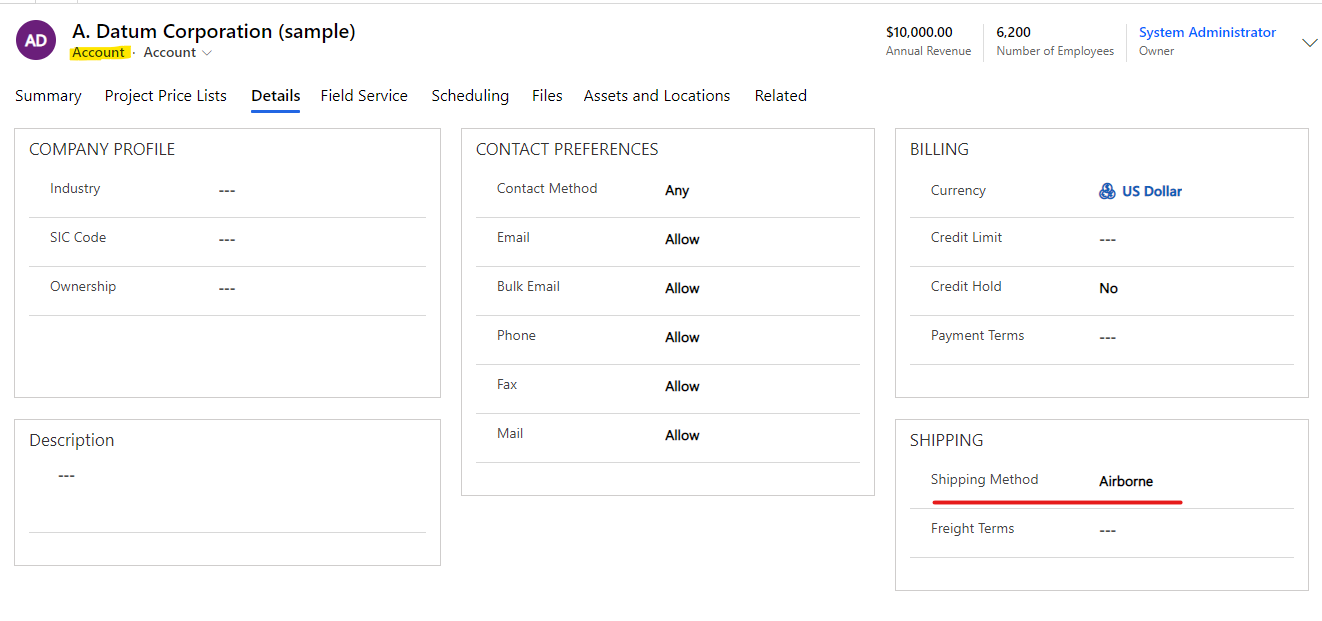
    pastedimage1620638710746v1.png

    2.You need create order from the account form.

    (1)Navigate to 'Related' tab to find 'Orders' to open following view, then click '+ New Order' button.
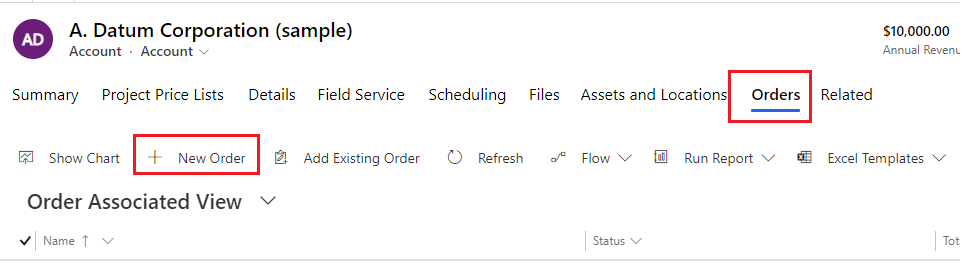
    pastedimage1620638748161v2.png

    Then you can oprn new order form, Shipping Method field has been populated with the value from  A.Datum Corporation (sample) Account.
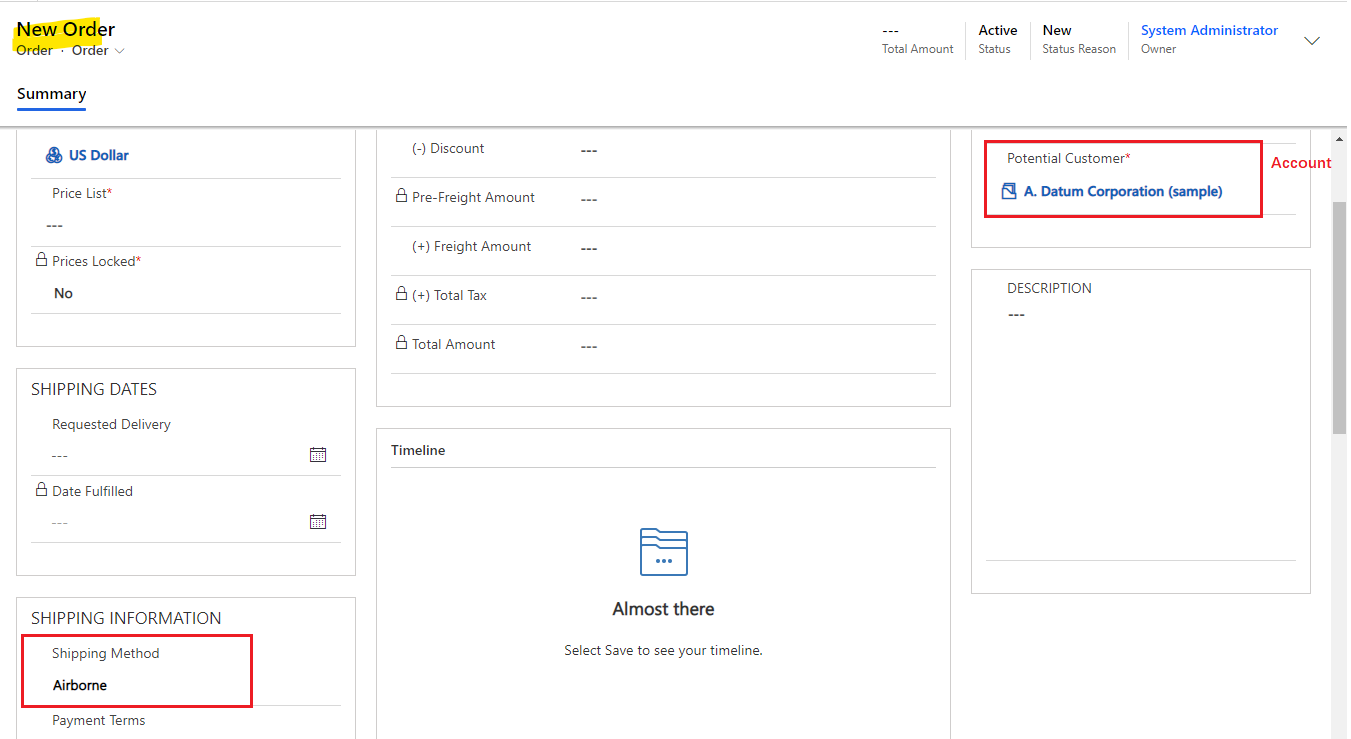
    pastedimage1620638813291v3.png

    Regards,

    Leah Ju

    Please mark as verified if the answer is helpful. Welcome to join hot discussions in Dynamics 365 Forums.

  • empath-e CRM Profile Picture
    1,136 on at

    Hi Leah,

    I had a look at this myself and field mappings will only work as a copy mechanism when the record is created from what I can see. If Mohamed is looking for the Account Order information to populate real-time I assume this will require a sub-grid on the Order Form?

  • empath-e CRM Profile Picture
    1,136 on at

    My mistake, I can display additional Account related fields on the main Order form using a Quick View Form. 

  • Hanno Profile Picture
    138 on at

    Thank you Leah.

    I did not realize that I need to create the Order from the Account record. I tried it and all of the OOB fields were populated. But a field I had created is being populated by a number (100000000) although it is an Option Set field with text choices only in both forms.

  • Verified answer
    Community Member Profile Picture
    on at

    Hi Mohamed,

    Firstly we need to create two fields on our entities that are of type Option Set, and to map them it is important to use Global Option Set.

    Create and edit global option sets | Microsoft Docs

    Regards,

    Leah Ju

    Please mark as verified if the answer is helpful. Welcome to join hot discussions in Dynamics 365 Forums.

Under review

Thank you for your reply! To ensure a great experience for everyone, your content is awaiting approval by our Community Managers. Please check back later.

Helpful resources

Quick Links

Introducing the 2026 Season 1 community Super Users

Congratulations to our 2026 Super Stars!

Meet the Microsoft Dynamics 365 Contact Center Champions

We are thrilled to have these Champions in our Community!

Congratulations to the April Top 10 Community Leaders

These are the community rock stars!

Leaderboard > Customer experience | Sales, Customer Insights, CRM

#1
ManoVerse Profile Picture

ManoVerse 98 Super User 2026 Season 1

#2
11manish Profile Picture

11manish 72

#3
Muhammad Shahzad Shafique Profile Picture

Muhammad Shahzad Sh... 69 Most Valuable Professional

Last 30 days Overall leaderboard

Product updates

Dynamics 365 release plans
