web
You’re offline. This is a read only version of the page.
close
Skip to main content

Announcements

Community site session details

Community site session details

Session Id :
Customer experience | Sales, Customer Insights,...
Answered

Event Management: Prevent certain email domains from registering

(0) ShareShare
ReportReport
Posted on by 10

Hi Guys,

Is there a way to automatically prevent people working for our competitors registering for an event? Exlude them if they enter a certain company name into that box on the form or if they have a certain email domain name?

Thanks, Simon

I have the same question (0)
  • Verified answer
    cloflyMao Profile Picture
    25,210 on at

    Hi Simon,

    Please refer to my solution, it uses a flow to check whether email of new contact is in black list, if exists, delete contact and its event registration.

    Part 1:

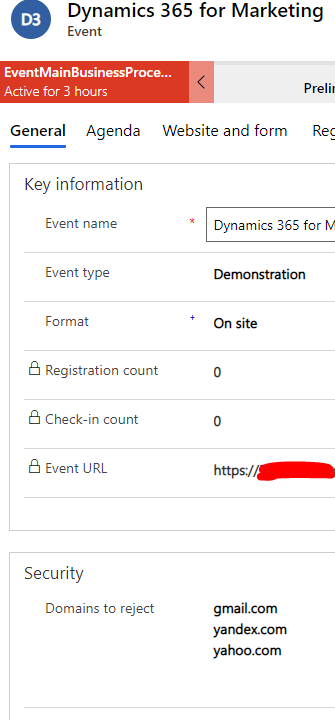
    Create a custom text field "Domains to reject" to Event entity.
    pastedimage1602667185092v1.png

    Part 2:

    Trigger a flow on creation of Event Registration.

    1. Retrieve the corresponding contact of event registration to get submitted email by contact.

    2. Retrieve the corresponding event of event registration to get domains of black list.

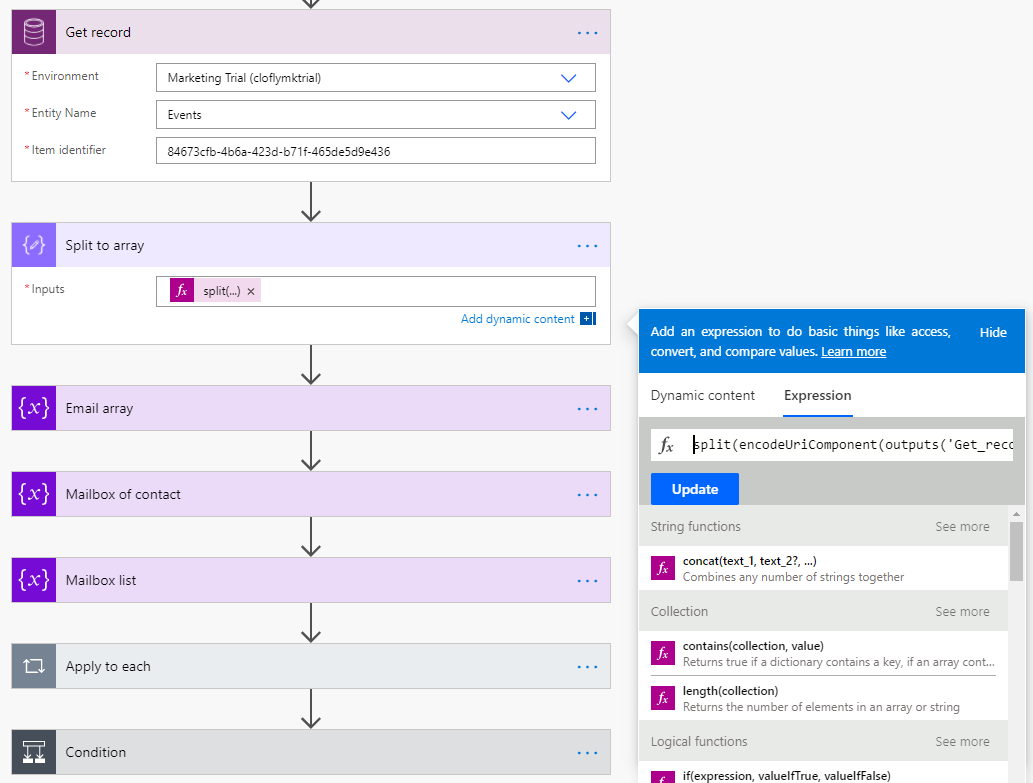
    3. Spilt domains value into an array with following expression:

    split(encodeUriComponent(outputs('Get_record')?['body/new_rejected_domains']),'
    ')

    The value of the sample will be in array format: [gmail.com,yandex.com,yahoo.com
    pastedimage1602667687018v2.png

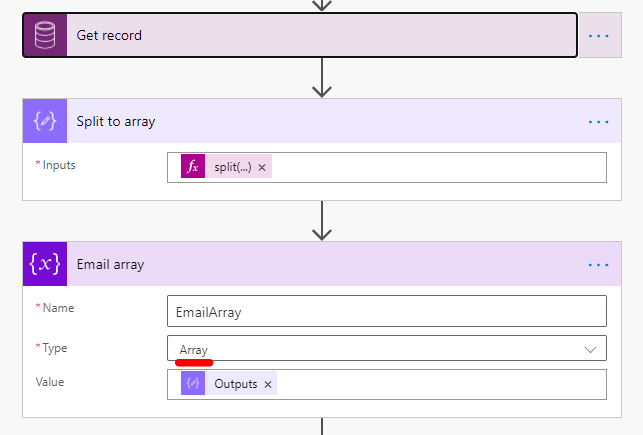
    We need an extra action to convert the output into real array variable.
    pastedimage1602667851397v3.png

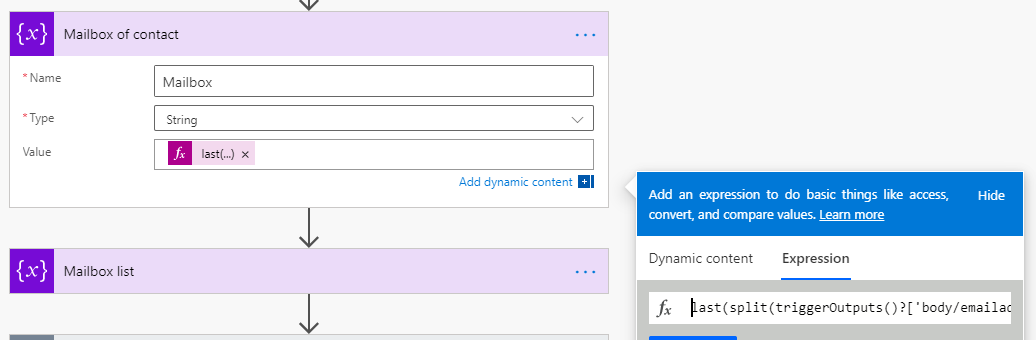
    4. Extract email domain from email field of contact.

    last(split(outputs('Get_contact')?['body/emailaddress1'],'@'))
    pastedimage1602667992686v4.png

    If the submitted value is clofly@gmail.com, then the extracted value will be gmail.com.

    5. Initialize a new string variable, append the item of email array to the string.

    pastedimage1602668378838v5.png

    The ouput of string will be gmail.comyandex.comyahoo.com

    6. Check whether mailbox of contact is in the list, if contains, delete the contact, then delete the event registration.
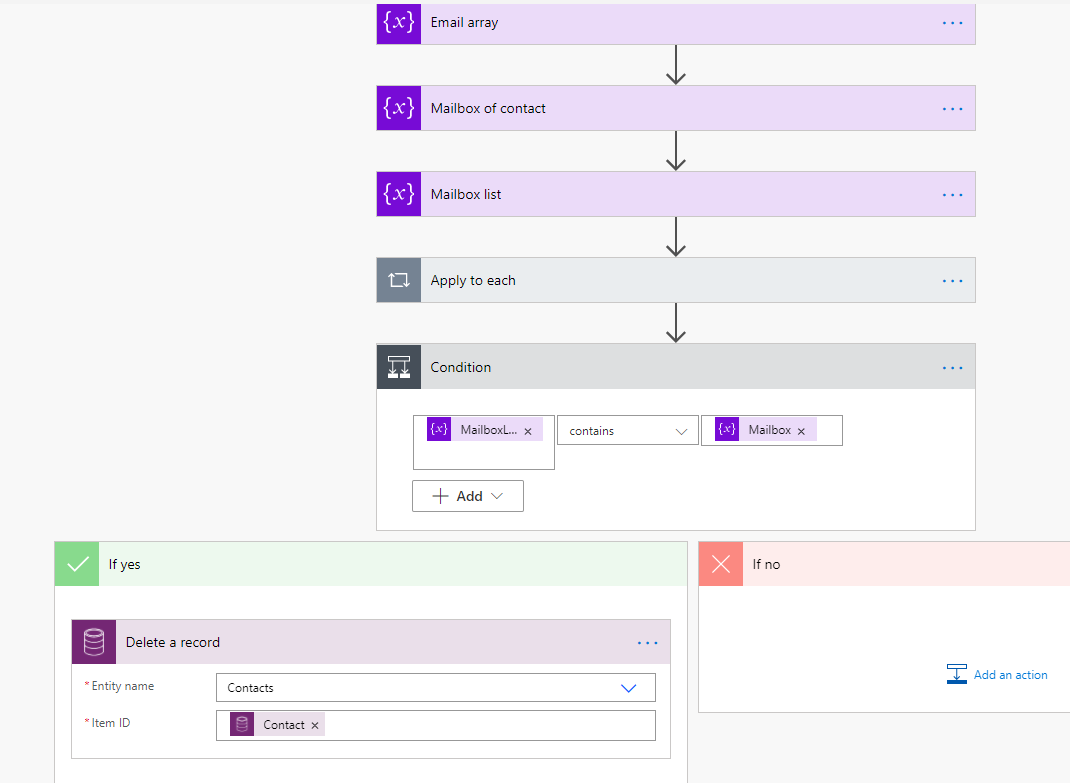
    pastedimage1602668526263v6.png

    The total process is complex, therefore, I only give screenshots of important steps, please feel free to ask question if you encountered any problem when configuring the flow.

    Regards,

    Clofly

  • Verified answer
    ShravanSuri Profile Picture
    1,255 on at

    Hey Simon,

    Limiting event registrations based on certain content in the registration information is not currently supported OOB. However, Clofly's reply should get you started in terms of building the exact logic that works for your business.

    Please note that malicious competitors can also simply put in any email ID (including a temporary one) and any company name to bypass such restrictions. An automatic check can only solve for certain scenarios. Another way to ensure a strict checking of all event registrations is to manually verify each registration as it comes in, and deactivate the malicious/competitor registrations. Would this scale to your number of events and number of registrations per event.

    Hope this helps!

    Shravan Suri

    PM, D365 Marketing

  • Simon Radford1 Profile Picture
    10 on at

    Hi Guys,

    Thanks for the help, certainly having initial measures in place to automate the process would be useful as Clofly outlined, but we would definitely need to manually check through registrants as well (cross reference against LinkedIn accounts for example)

    Thanks, Simon

Under review

Thank you for your reply! To ensure a great experience for everyone, your content is awaiting approval by our Community Managers. Please check back later.

Helpful resources

Quick Links

Responsible AI policies

As AI tools become more common, we’re introducing a Responsible AI Use…

Congratulations to our 2025 Community Spotlights

Thanks to all of our 2025 Community Spotlight stars!

Leaderboard > Customer experience | Sales, Customer Insights, CRM

#1
Tom_Gioielli Profile Picture

Tom_Gioielli 53 Super User 2026 Season 1

#2
Eugen Podkorytov Profile Picture

Eugen Podkorytov 49

#3
Fiona_Tiernan Profile Picture

Fiona_Tiernan 22 Moderator

Last 30 days Overall leaderboard

Product updates

Dynamics 365 release plans
