web
You’re offline. This is a read only version of the page.
close
Skip to main content

Announcements

No record found.

News and Announcements icon
Community site session details

Community site session details

Session Id :
Microsoft Dynamics AX (Archived)

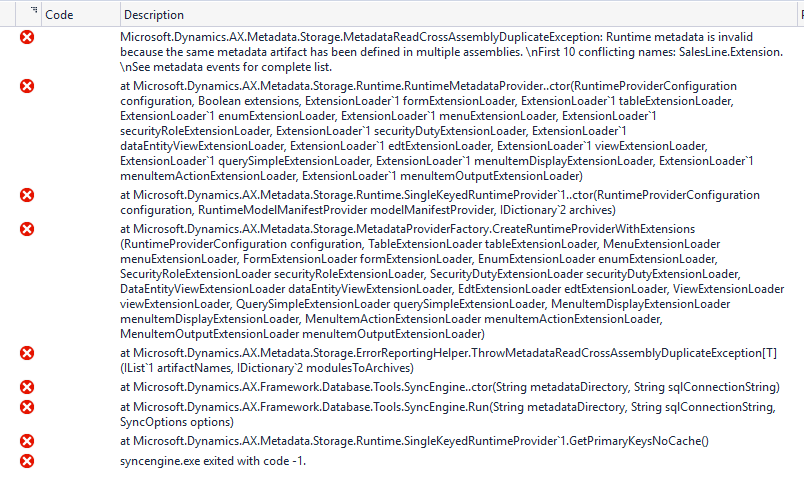
Runtime metadata is invalid because the same metadata artifact has been defined in multiple assemblies

(0) ShareShare
ReportReport
Posted on by 265

Hello All,

I am not able to perform the Database Sync.

I have performed full build and build the particular model also,still its showing same error.

I am using the Platform update 12 .
0572.error.PNG

Thanks so much for your reply!!

Regards

Deepak

*This post is locked for comments

I have the same question (0)
  • André Arnaud de Calavon Profile Picture
    304,508 Super User 2026 Season 1 on at

    Hi Deepak,

    Can you indicate if you have installed ISV solutions, partner add-ons and/or developed customizations? Why dud you perform a database sync? What steps did you exactly do before this sync?

  • Deepak kumar roy Profile Picture
    265 on at

    Hello Andre,

    Thank you so much for your reply!!!

    No we have not installed any ISV Solution.

    We have Export some project from update 10 and import to update 12,After we have checked the code in VSTS and try to create the deployment package in build server  its throwing database sync error.

    We have raised the ticket with Microsoft lastly he suggest for redeploy the environment.

    Regards

    Deepak

  • André Arnaud de Calavon Profile Picture
    304,508 Super User 2026 Season 1 on at

    Hi Deepak,

    What is the exact procedure you followed here? You can use VSTS to retrieve projects and the objects belonging to those solutions. You can also use the procedure to move models between environments: docs.microsoft.com/.../models-export-import

    Which one did you use? Did you then import all related objects? Did you perform a full build before doing a database sync?

  • Deepak kumar roy Profile Picture
    265 on at

    Hello Andre,

    Thank you so much for reply!!!

    Now i have fresh development VM with update 12.

    I have taken the backup from previous environment where we have develop reports

    some customization also available in different environment with update 10.

    Could you please suggest how we proceed to move everything in VM with update 12.

    Regards

    Deepak    

  • Deepak kumar roy Profile Picture
    265 on at

    Hello Andre,

    we have found that in update 10 we have created the sales line and sale table extension but in update 12 default sales line and sales table extension available with new  introduce model DOM  that only created the problem.

    Regards

    Deepak

  • André Arnaud de Calavon Profile Picture
    304,508 Super User 2026 Season 1 on at

    HI Deepak,

    So you had a design difference here. Is the problem solved now?

  • Community Member Profile Picture
    on at

    Hello Deepak,

    I am facing same issue.. Hence I am getting error due same object in two model.

    Did you find any solution?

    Regards,

    Shweta

  • Community Member Profile Picture
    on at

    Thanks Sukrut

Under review

Thank you for your reply! To ensure a great experience for everyone, your content is awaiting approval by our Community Managers. Please check back later.

Helpful resources

Quick Links

Introducing the 2026 Season 1 community Super Users

Congratulations to our 2026 Super Stars!

Meet the Microsoft Dynamics 365 Contact Center Champions

We are thrilled to have these Champions in our Community!

Congratulations to the March Top 10 Community Leaders

These are the community rock stars!

Leaderboard > 🔒一 Microsoft Dynamics AX (Archived)

#1
CP04-islander Profile Picture

CP04-islander 39

#2
Michel ROY Profile Picture

Michel ROY 14

#3
imran ul haq Profile Picture

imran ul haq 8

Last 30 days Overall leaderboard

Featured topics

Product updates

Dynamics 365 release plans
