web
You’re offline. This is a read only version of the page.
close
Skip to main content

Announcements

No record found.

News and Announcements icon
Community site session details

Community site session details

Session Id :
Microsoft Dynamics AX (Archived)

Closing Inventory Not Completed

(0) ShareShare
ReportReport
Posted on by

Hi

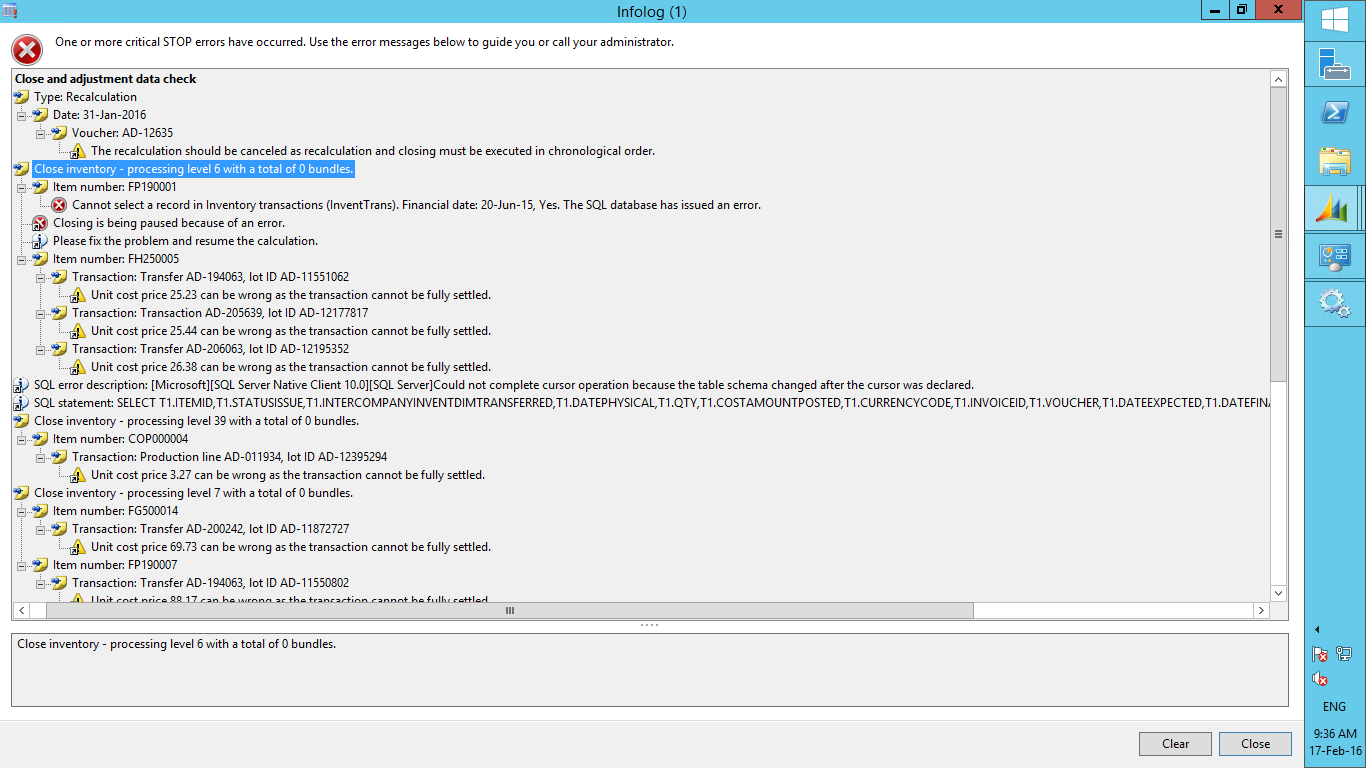
I am facing an error "Cannot select a record in Inventory transactions (InventTrans). Financial date: 20-Jun-15, Yes.The SQL database has issued an error."
while i am run closing inventory
Closing-Error.png

kindly assist me to solve this error.

mostafa hussein

*This post is locked for comments

I have the same question (0)
  • André Arnaud de Calavon Profile Picture
    304,603 Super User 2026 Season 1 on at

    Hi Mohamed,

    If you look at some lines it sais that a table schema in SQL has been changed. Are you running this report locally or in batch? Are there any other batch tasks running at the same time? Is someone also importing customizations? Can you verify if some database maintenance scripts were running at the same time? I have seen scripts in the past where e.g. a fill factor change also caused a similar error.

  • ccolombel Profile Picture
    2 on at

    Hello Mohamed,

    this errors occurs often when a SQL index REBUILD is done during a AX treatment

    de reindex action change the table schema and throw this type of error

    check with our sql admin if a index rebuild was done during the ax treatment windows.

    Charles

  • Community Member Profile Picture
    on at

    Hi André Arnaud

    Thanks for replay

    This is in relation to the problems SQL and what about the problem in the following

    Transaction: Transfer AD-194063, lot ID AD-11551062

    Unit cost price 25.23 can be wrong as the transaction cannot be fully settled.

    closing-3.png

  • Suggested answer
    Community Member Profile Picture
    on at

    Try to run Inventory Recalculation for all / specific items and see the results. Later you can try Inventory Close.

    Avoid running this job during office hours, if possbile.

    Check in test environment first and see the results .

    Best Regards,

    Vishal Salot

  • Community Member Profile Picture
    on at

    Hi Vishal Salot

    Thanks for replay .what's mean wrong MSG related cost price .

    i don't understand it after post her search bاy google but I can't find anyone answer what mean this

  • Community Member Profile Picture
    on at

    Hi,

    Cause: This problem occurs because a receipt is physically updated but not financially updated.

    Resolution:

    To resolve this problem, financially update the receipt. To do this, invoice the purchase order, and then run the Close function for the inventory.

    Best Regards,

    Vishal Salot

  • Community Member Profile Picture
    on at

    All items show in this problem Resulting transfer journal
    It is known there is no invoice

    Closing-5.png

    Closing-5.png

  • Suggested answer
    Community Member Profile Picture
    on at

    Just check if any open Purchase Receipt is pending for Invoicing or Transfer order pending for receipt....

  • Verified answer
    André Arnaud de Calavon Profile Picture
    304,603 Super User 2026 Season 1 on at

    Hi Mohamed,

    Like Vishal tries to mention it is due to not invoiced receipts. This is a normal situation where you have received goods at the end of previous month and the invoice has not been posted or even received. About the transfer you mentioned as example, try to find if the "Sold" transaction is being linked to an open purchase inventory transaction. You can do this from the Inventory closing form > Settlements.

  • Dhanicca Macatangay Profile Picture
    355 on at

    Hi Vishal,

    Our client also encountered the SQL error mentioned above and got the same info log.

    Can I ask what should be done with the inventory close that was initially run and where the SQL error occurred? Before doing the inventory recalculation and have the closing again.

    Thank you!

Under review

Thank you for your reply! To ensure a great experience for everyone, your content is awaiting approval by our Community Managers. Please check back later.

Helpful resources

Quick Links

Introducing the 2026 Season 1 community Super Users

Congratulations to our 2026 Super Stars!

Meet the Microsoft Dynamics 365 Contact Center Champions

We are thrilled to have these Champions in our Community!

Congratulations to the March Top 10 Community Leaders

These are the community rock stars!

Leaderboard > 🔒一 Microsoft Dynamics AX (Archived)

#1
CP04-islander Profile Picture

CP04-islander 39

#2
Michel ROY Profile Picture

Michel ROY 14

#3
imran ul haq Profile Picture

imran ul haq 8

Last 30 days Overall leaderboard

Featured topics

Product updates

Dynamics 365 release plans
