web
You’re offline. This is a read only version of the page.
close
Skip to main content

Notifications

Announcements

No record found.

Community site session details

Community site session details

Session Id :
Finance | Project Operations, Human Resources, ...
Answered

Email not sending and test connection error in SMTP email parameter

(0) ShareShare
ReportReport
Posted on by 3,006

Hi Team and experts:

We are getting below error while testing connection, after putting credentials. this error is coming from October 1st.
No email is sending from F&O, email batch sending got failed.

We heard that, it will work when we make authentication to Modern from Basic. Microsoft has made it mandatory to keep Modern
authentication from this month onwards.

Find below screenshots for reference:
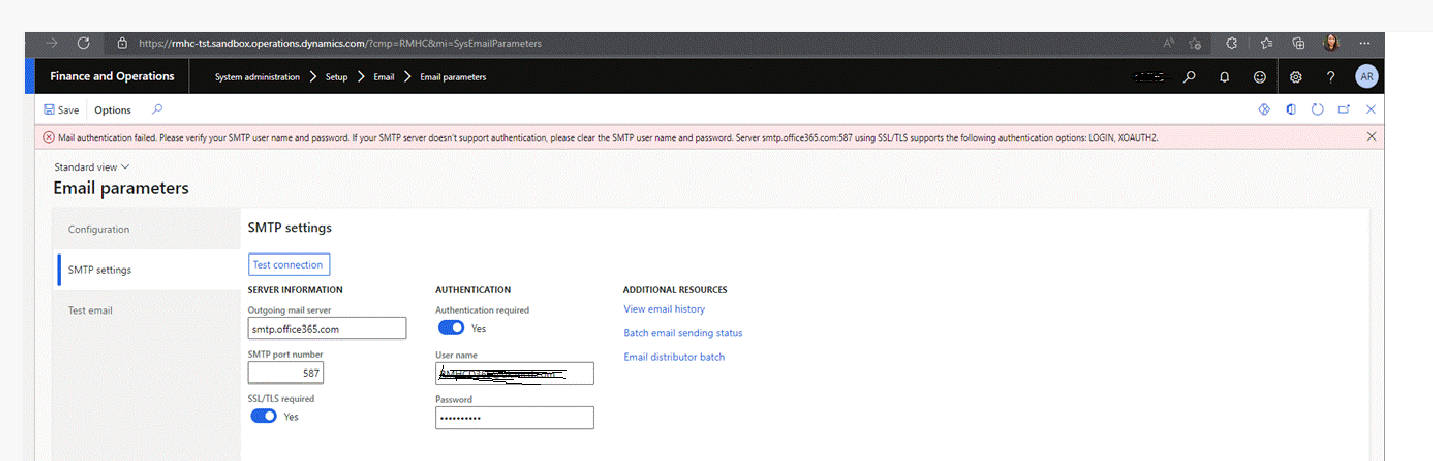
EmailSendingError_5F00_cpl.png

Can you please help use here, how to configure email authentication to Modern from Basic please...? 

I have the same question (0)
  • Suggested answer
    Ramit Paul Profile Picture
    22,797 Most Valuable Professional on at

    Have you tried to make ssil required to no?

    If Still mot working, I don't think this is d365 issue, talk to IT team to check I'd and password and other setup from admin center.

    Note- It's working for other customers.

  • krishna.rao@dax Profile Picture
    3,006 on at

    Same configuration is working earlier, credentials are fine, we verified. What we heard Microsoft had made changes in authentication policy to restrict to Modern.

    This configuration might be done from Azure. can someone please assist in this please.

  • Suggested answer
    Komi Siabi Profile Picture
    13,107 Most Valuable Professional on at

    Hello Krishna,

    You started getting that error due to the announcement by Microsoft on depreciating basic auth.

    learn.microsoft.com/.../deprecation-of-basic-authentication-exchange-online

    To resolve the error you are getting, you would have to disable the SMTP auth on the exchange admin center.

    learn.microsoft.com/.../authenticated-client-smtp-submission

  • krishna.rao@dax Profile Picture
    3,006 on at

    Thanks KOmi for the reply, I am looking into it.

    Feel free to comment if anyone had this type of issue and difficulties and resolution.

  • krishna.rao@dax Profile Picture
    3,006 on at

    Hi Community experts and Komi,

    I tried as per the below link advised by Komi (To disable SMTP AUTH globally in your organization in the new EAC, go to the Mail Flow settings page under Settings and toggle the setting labeled "Turn off SMTP AUTH protocol for your organization")

    Enable or disable SMTP AUTH in Exchange Online | Microsoft Learn

    Email-sending-issue-_2D00_-Disable-settings-MS-docs.png

    I haven't found the mentioned settings '"Turn off SMTP AUTH protocol for your organization"', in my mail below, find below screenshot as a reference.

    Email-sending-issue-_2D00_-Disable-settings-My-outlook.PNG

    Could you please assist on below queries.

    1) I haven't found setting "Turn off SMTP AUTH protocol for your organization". is anything changed here?

    2) In the MS docs article Enable or disable SMTP AUTH in Exchange Online | Microsoft Learn  , Also mentioned we can do with Powershell commond as below

    "To disable SMTP AUTH globally in your organization with PowerShell, run the following command: PowerShellCopy  Set-TransportConfig -SmtpClientAuthenticationDisabled $true""

    ->Could you please guide, in which machine/server this command has to be executed and any prerequisites required?

    Highly appreciate your assistance on this...

  • Suggested answer
    Komi Siabi Profile Picture
    13,107 Most Valuable Professional on at

    Hello ,

    1. You need to have the Global Administrator role to be able to do this.

    1376.smtp.png

    2. Here is how you can connect to Exchange online Powershell

    learn.microsoft.com/.../connect-to-exchange-online-powershell

  • Komi Siabi Profile Picture
    13,107 Most Valuable Professional on at

    Hello krishna.rao@dax ,

    Please, were you able to get the issue resolved?

  • krishna.rao@dax Profile Picture
    3,006 on at

    Hi Komi and Team,

    Apologize for the late reply.

    in our environment D365FCM Tenant (eg: admin account for F&O is D365@abc.com) and mail id mentioned in E-mail parameters in D365FCM is e@xyz.com , both are different

    In this scenario, Are we need to turn of SMTP auth protocol as mentioned in previous reply for which account? Are we need to do for D365&abc.com(F&O tenant) or e@xyz.com(mentioned in email parameters)?

    Thanks,

    Krishna.

  • Suggested answer
    Komi Siabi Profile Picture
    13,107 Most Valuable Professional on at

    Hello Krishna,

    This setup should be done on the account used in the email parameters in the system administration module.

  • krishna.rao@dax Profile Picture
    3,006 on at

    Thanks, Komi, for the prompt response.

    There is delay from our Admin Team, who is handling configuration settings, I will update here and verify solution once it's sorted out.

Under review

Thank you for your reply! To ensure a great experience for everyone, your content is awaiting approval by our Community Managers. Please check back later.

Helpful resources

Quick Links

Responsible AI policies

As AI tools become more common, we’re introducing a Responsible AI Use…

Neeraj Kumar – Community Spotlight

We are honored to recognize Neeraj Kumar as our Community Spotlight honoree for…

Leaderboard > Finance | Project Operations, Human Resources, AX, GP, SL

#1
Martin Dráb Profile Picture

Martin Dráb 584 Most Valuable Professional

#2
André Arnaud de Calavon Profile Picture

André Arnaud de Cal... 499 Super User 2025 Season 2

#3
Sohaib Cheema Profile Picture

Sohaib Cheema 254 User Group Leader

Last 30 days Overall leaderboard

Product updates

Dynamics 365 release plans
