web
You’re offline. This is a read only version of the page.
close
Skip to main content

Notifications

Announcements

No record found.

Community site session details

Community site session details

Session Id :
Finance | Project Operations, Human Resources, ...
Answered

Add a lookup field

(0) ShareShare
ReportReport
Posted on by 35

Hi D365 folks. 

I am trying to add additional field as a lookup from customer account lookup when creating  a new sales order. Currently, when typing something from the customer account field without hitting the arrow for dropdown and it can't find a specific customer account based on the keyword, it will proceed on searching for the customer name. 
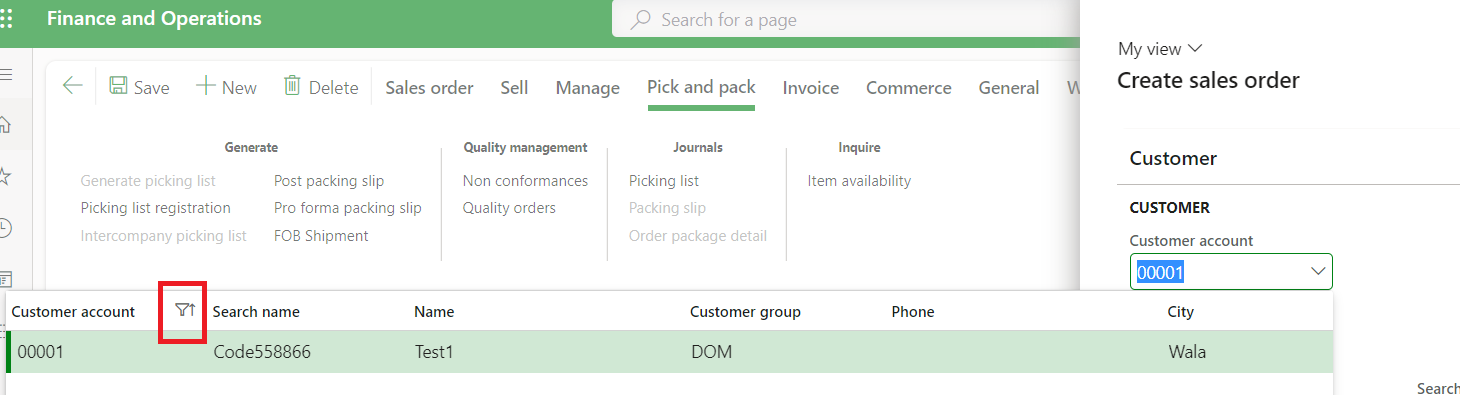
pastedimage1685635753020v3.png


Now, we need to add a new field so that when the keyword entered can't be found from the customer account and customer name, it should be able to search for another field which in my case, the search name. I already checked everything I think, but no luck. I can't use lookup CoC or event handler since lookup comes first before the modify event. Any who knows how to attain this feature? Which class or form setup to check or customize?

I have the same question (0)
  • Suggested answer
    GirishS Profile Picture
    27,827 Moderator on at

    Hi LexJann,

    You need to add Lookup event handler and cancel the standard lookup by cancelling the super call.

    Thanks,

    Girish S.

  • LOE Profile Picture
    35 on at

    Thanks, Girish! I already tried that approach. The problem is, lookup event comes first before the modify/modified event. So when I'm doing CoC or event handler on the lookup, I don't have the latest value input from the customer account field yet. Example, if I write "Test" and do my logic in the lookup, there will be no value on that field yet and it will show empty ("") string instead of "Test" which is the desired value from the user. I duplicated the CustTableLookup and assigned it to the CustAccount EDT I extended and play from there, but I can't see any lead.

  • GirishS Profile Picture
    27,827 Moderator on at

    I am not able to understand the issue. Lookup method won't give the value entered in the lookup control. In fact, as you said it's too early to get the value of lookup control in COC or event handler.

    Can you elaborate more please?

    Thanks,

    Girish S.

  • LOE Profile Picture
    35 on at

    Hi Girish,

    When entering a text from the customer account account field when creating a new sales order for instance without hitting the v icon to perform a lookup, for example the "test2" on my second screenshot, the lookup will automatically appear and search for the customer account. Then if there is no "test2" from the customer account, it will now then proceed to look for "test2" from the customer name (second screenshot). Now we need to add additional logic to look for a third field if there is no "test2" from customer account and name. Maybe search name. I can't find which form settings or code the logic takes place for me to add my logic. Hoping that you can help me find which approach to take. Thanks!

  • Verified answer
    GirishS Profile Picture
    27,827 Moderator on at

    Yeah, now I understood what you are asking.

    I don't think this is achievable. You can either filter by customer account or customer name - You cannot add third one. In CustTable you can select either by index field CustAccount or Name - You cannot add fields other than that I guess.

    Can I know which field you are trying to add?

    Thanks,

    Girish S.

  • LOE Profile Picture
    35 on at

    Hi Girish,

    I wanted to add NameAlias from DirPartyTable. Are you referring to the first index of the CustTable and DirPartyTable? Only these two index fields will appear on the lookup?

  • GirishS Profile Picture
    27,827 Moderator on at

    I think this cannot be possible. Have you tried adding the NameAlias to the lookup field and check?

    Thanks,

    Girish S.

  • LOE Profile Picture
    35 on at

    Name alias is already on the CustTableLookup form. I tried moving it right below the the AccountNum, still not working. I'll tell the users. Thanks a lot, Girish!

Under review

Thank you for your reply! To ensure a great experience for everyone, your content is awaiting approval by our Community Managers. Please check back later.

Helpful resources

Quick Links

Responsible AI policies

As AI tools become more common, we’re introducing a Responsible AI Use…

Neeraj Kumar – Community Spotlight

We are honored to recognize Neeraj Kumar as our Community Spotlight honoree for…

Leaderboard > Finance | Project Operations, Human Resources, AX, GP, SL

#1
Martin Dráb Profile Picture

Martin Dráb 551 Most Valuable Professional

#2
André Arnaud de Calavon Profile Picture

André Arnaud de Cal... 450 Super User 2025 Season 2

#3
BillurSamdancioglu Profile Picture

BillurSamdancioglu 278 Most Valuable Professional

Last 30 days Overall leaderboard

Product updates

Dynamics 365 release plans
