Hi Ali,
First if you have TMG firewall, please make sure you create separate rules for all URLs like auth.domain.com, dev.domain.com, crmexternalurl.domain.com URLs in it and not club these CRM rules together and point to crm server. This can be one of the biggest reason to get 404.
Please see below setting we need for CRM and TMG to work together:-
For CRM 2011 IFD URL to work through ISA/TMG we need following CRM and ADFS URLs to be allowed through ISA/TMG.
1) <OrganizationName.domainname.com> - This will be the IFD URL which need to be used from internet to access CRM organization. Traffic from this URL should be directed to CRM server.
2) <adfs.domainname.com> - This will be the URL which will give you form based authentication page which request for user name and password. Traffic from this URL should be directed to ADFS server. ![5707.Verify-normalization2.png]()
3) <auth.domainname.com> - This will be the URL which redirect authentication information from ADFS to CRM server. Traffic from this URL should be directed to CRM server.
![4527.ListnerAuth3.png]()
Note: All the above URL can be different according to each environment configuration.
While you create web publishing rules for above 3 URLs you have remember the following,
1) Disable "Link translation"
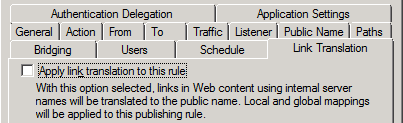
![]()
2) Disable "Verify normalization" and "Block high-bit characters" under HTTP filter setting
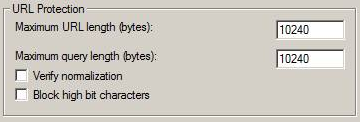
![]()
3) Listener for the web publishing rule should be configured with "No Autentication"
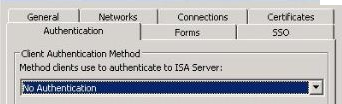
![]()
4) Authentication delegation setting for the rules should be as follows
"No delegation, but client may authenticate directly"

![]()
After all the rules are created test the rules and publish it if all the test are successful.
Once this is done please test and let me know , I can give you next steps.
Also confirm if IFD URL orgname.domain.com is working fine internally i.e when you access this external URL in internal machine attached to domain you get IFD page and can access without issues. If no , then this is not TMG issu4e but something else.


