web
You’re offline. This is a read only version of the page.
close
Skip to main content

Notifications

Announcements

Community site session details

Community site session details

Session Id :
Business Central forum

Error when printing any Reports - Business Central

(0) ShareShare
ReportReport
Posted on by 65

Wondering if someone could help me out with an error I'm receiving.

We've been setting up and importing company data into the online version of business central. Everything was working well and the configuration was almost complete until this error started.

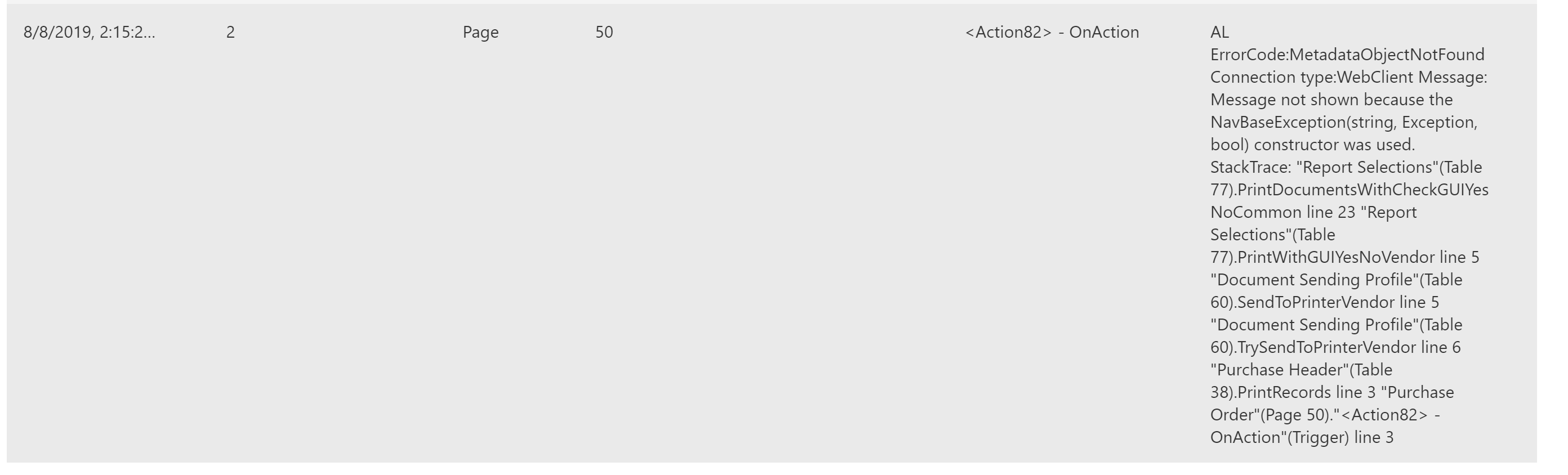
When printing reports from either sales or purchasing screens we receive the error "Something has gone wrong". Going into the admin center, the error log message is below:

Note: This error appears before being given the option to select filters for the report.
pastedimage1565239955196v1.png

We've removed all custom reports that were made up from the whole system, and set back to defaults. Not sure what to do to try to rectify.

I have the same question (0)
  • Suggested answer
    jcastro Profile Picture
    2,245 on at

    Hello,

    If you are importing information from a different tenant or installation, maybe the report selection table has a record with a report ID  that does not exist in the tenant/company you're importing the information to. If that is the case, you can either add the report object/make sure it's compiled/install the missing extension to it, or change the report selection record to use a report that exists.

    Best regards,

  • Suggested answer
    Olister Rumao Profile Picture
    3,967 on at

    Hi,

    This error generally occurs when your object MetaData is inconsistent. You may need to recompile the objects.

    If it is a Sandbox, I recommend create a new Sandbox through Admin Center to test the report first.

    If it is production then you will need to contact Microsoft Support as there is nothing we can do for Production.

  • Suggested answer
    Ozed Profile Picture
    65 on at

    Hi Steven,

    Thanks so much for your quick response. I tried what you mentioned, and they worked in the new companies. Instead of the "report layout selection" screen that I was previously using, I found the "REPORT SELECTION - SALES" screen and changed them back to the defaults that were on the new companies and it worked perfectly.

    Thanks for your help. The table lookup shortcut was really useful too.

  • Suggested answer
    Steven Renders Profile Picture
    5,672 Moderator on at

    If you create a new company in the same tenant, for example a company with setup data (and maybe even also demo data), and then try to print, do you get the same error?

    Maybe you can also compare the report selections tables between the two companies. You can run any table by putting ?table=xx in the URL, where xx is the table number.

Under review

Thank you for your reply! To ensure a great experience for everyone, your content is awaiting approval by our Community Managers. Please check back later.

Helpful resources

News and Announcements

Season of Giving Solutions is Here!

Quick Links

November Spotlight Star - Khushbu Rajvi

Congratulations to a top community star!

Forum Structure Changes Coming on 11/8!

In our never-ending quest to help the Dynamics 365 Community members get answers faster …

Dynamics 365 Community Platform update – Oct 28

Welcome to the next edition of the Community Platform Update. This is a status …

Leaderboard > Business Central

Last 30 days Overall leaderboard

Featured topics

Product updates

Dynamics 365 release plans
