web
You’re offline. This is a read only version of the page.
close
Skip to main content

Notifications

Announcements

No record found.

Community site session details

Community site session details

Session Id :
Microsoft Dynamics 365 | Integration, Dataverse...
Unanswered

WebForm custom validation D365 Portal - webFormClientValidate

(0) ShareShare
ReportReport
Posted on by 5

I am trying to add custom validation to a Web Step on one of my Web Forms in a Dynamics Portal app.  I have 2 email fields, the second is a confirmation field, so it needs to match the first field.  

if (window.jQuery) {

(function ($) {
if (typeof (webFormClientValidate) != 'undefined') {
var originalValidationFunction = webFormClientValidate;
if (originalValidationFunction && typeof (originalValidationFunction) == "function") {
webFormClientValidate = function() {
originalValidationFunction.apply(this, arguments);
if($("#cfsin_workemail").val() != $("#cfsin_confirmemail").val()){
return false;
}else{
return true;
}
};
}
}
}(window.jQuery));
}

https://docs.microsoft.com/en-us/powerapps/maker/portals/configure/add-custom-javascript

Unfortunately, it's like the JS is ignored. I am able to add JS to other Web Steps and it's executed as expected.  I'm at a bit of a loss since this is pretty much straight from Microsoft, it should be fairly straight forward.

I have the same question (0)
  • cloflyMao Profile Picture
    25,210 on at

    Hi CRMKen,

    Where did you add javascript code?

    Did you add the code in Web Page > Advanced > Custom Javascript section directly?(1)

    pastedimage1588229030915v1.png

    And you said that you JS could execute in other Web Steps, so did you add code in Web Form Step > Form Options > Custom Javascript?

    pastedimage1588229282912v2.png

    You may notice red circle 2 in my first screenshot, that's Localized Contents,

    when I opened the localized content web page record, it seems that it's still same form, but actually the form has changed from "Information" to "Content Page",

    and sections of Custom Javascript and Custom CSS are blank, so there would be a separate setting to add custom code/CSS for web page.

    pastedimage1588229573531v4.png

    Advanced tab has become the second tab:
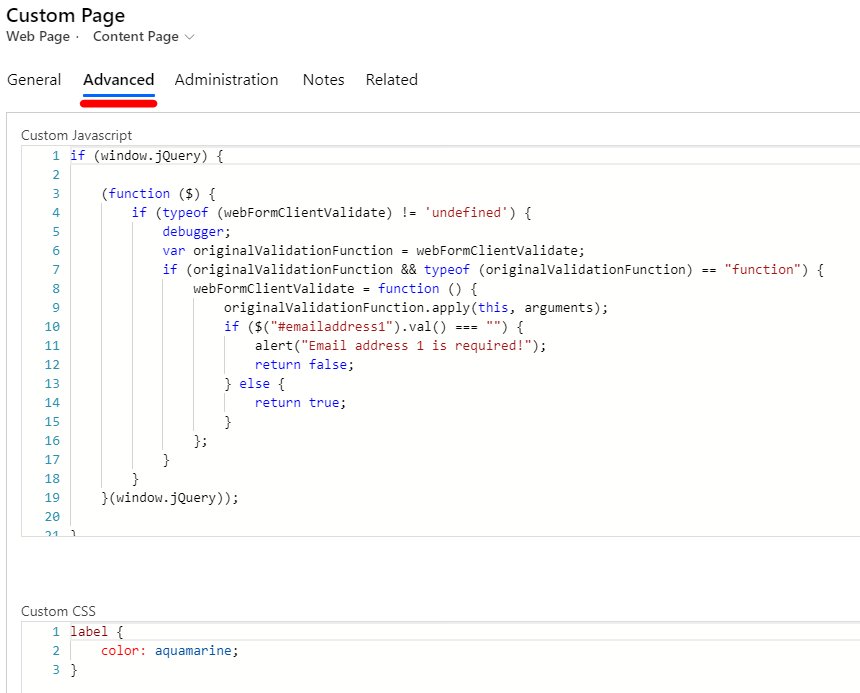
    pastedimage1588229878043v6.png

    After I applied code to "Custom Javascript" section and custom css rules to "Custom CSS section" in Content Page form of Web Page, 

    both validation code and custom CSS work.

    pastedimage1588229492080v3.png

    I remember I once met a user who had a similar issue to you, and the answer in that thread is to add code in localized content record of web page

    In addition, before giving a try, I suggest you could refresh Portal cache by clicking Browse website button in make.powerapps.com to exclude impact of cache.

    pastedimage1588230340730v7.png

    Regards,

    Clofly

  • CRMKen Profile Picture
    5 on at

    Hi Clofly,

     Thanks  for your reply.  I have tried adding the code pretty much everywhere.  I have added it directly to the Web Step, to the Web Page and to the Localized Content.  Being in Canada, we have localized content for both English and French and I have added the code in both.  I have also been using both the Syn and Browse options from make.powerapps.com. I still don't get anything, no error but no validation either, it completely ignores the JS.

  • cloflyMao Profile Picture
    25,210 on at

    Hi CRMKen,

    Could a simple alert function be executed?

    Regards,

    Clofly

  • CRMKen Profile Picture
    5 on at

    I added several alerts to follow the execution of the code.  I can now see the issue is that webFormClientValidate is undefined but I can't find anything about why it would be undefined or how to fix it.

    pastedimage1588360564863v2.png

    pastedimage1588360469563v1.png

Under review

Thank you for your reply! To ensure a great experience for everyone, your content is awaiting approval by our Community Managers. Please check back later.

Helpful resources

Quick Links

Responsible AI policies

As AI tools become more common, we’re introducing a Responsible AI Use…

Neeraj Kumar – Community Spotlight

We are honored to recognize Neeraj Kumar as our Community Spotlight honoree for…

Leaderboard > Microsoft Dynamics 365 | Integration, Dataverse, and general topics

#1
Martin Dráb Profile Picture

Martin Dráb 51 Most Valuable Professional

#2
André Arnaud de Calavon Profile Picture

André Arnaud de Cal... 38 Super User 2025 Season 2

#3
#ManoVerse Profile Picture

#ManoVerse 31

Last 30 days Overall leaderboard

Product updates

Dynamics 365 release plans



