web
You’re offline. This is a read only version of the page.
close
Skip to main content

Notifications

Announcements

No record found.

Community site session details

Community site session details

Session Id :
Microsoft Dynamics GP (Archived)

SOP Document Analysis Report not working in "Summary"

(0) ShareShare
ReportReport
Posted on by 35

Hello all:

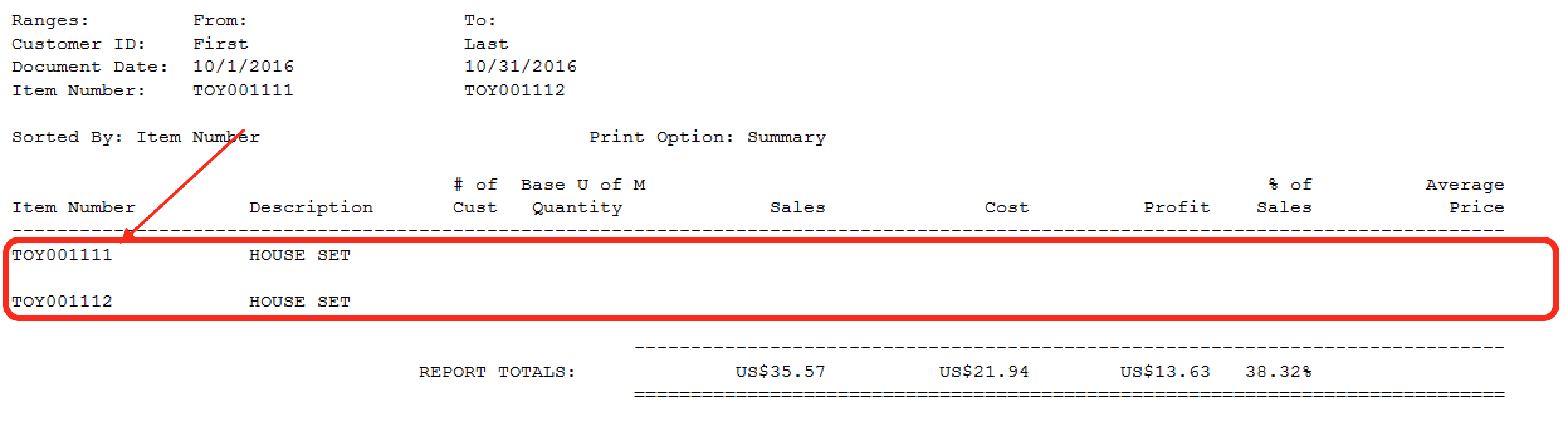
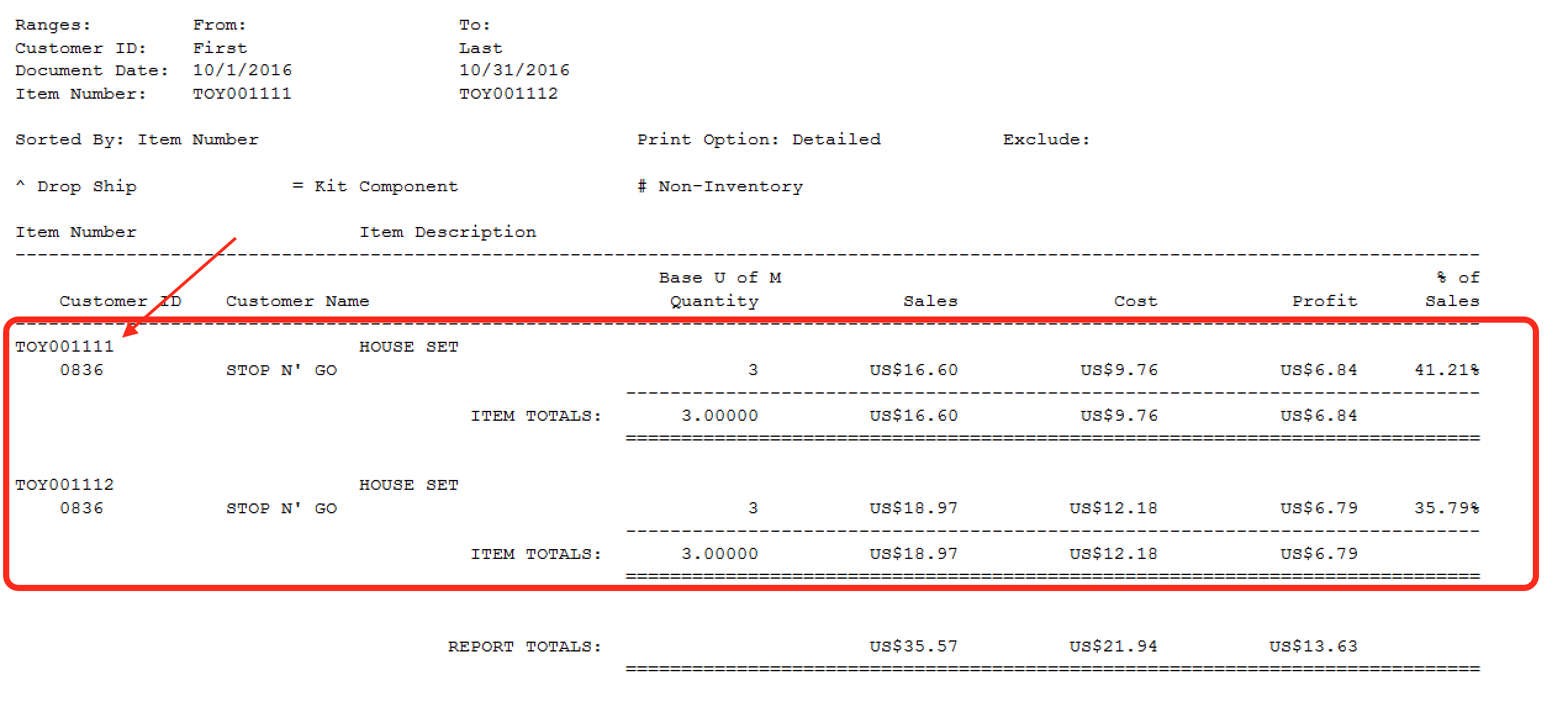
I'm having issues with the SOP Document Analysis report in GP2013 SP2 (12.00.1482). Some items won't show if I print the report in "Summary", but if I print the same report and with the same parameters, the values come out correctly. **See screenshots with example.

I looked into the tables (SOP30300 and IV30300) to see the data, and it's there. Already Checked Links on Sales and Inventory modules. 

Any ideas?

Thanks!

Carlos.
Screen-Shot-2016_2D00_10_2D00_28-at-7.27.04-PM.png

Screen-Shot-2016_2D00_10_2D00_28-at-7.26.48-PM.png

*This post is locked for comments

I have the same question (0)
  • Beat Bucher  GP Geek  GPUG All Star Profile Picture
    28,058 Moderator on at

    Hi Cafero

    Did you ever got to the ground of this problem ? 

    I've a customer that is running GP 2013 and on their Citrix server they do have this dictionary installed (834 - Transactions Reports) for SOP Document Analysis, but not on their workstations apparently. I know I could simply copy the .DIC files over and add the entry in the DYNAMICS.SET file, but I was wondering from where this module comes.. it's apparently a Microsoft add-on, but it's not part of the regular GP client setup. Do you know where this can be downloaded ? 

    I couldn't find anything about this special dictionary on the net or in the community forums.. 

    Thanks in advance for your help.

  • Verified answer
    Cafero Profile Picture
    35 on at

    Hello:

    Actually this particular issue was solved and it was related to special characters inserted on the items description on the import process. We created this script to remove the special characters, and the items start to show up correctly on the report:

    --- FIX ON SALES TABLES

    update sop30300

    SET ITEMDESC = rtrim(REPLACE(REPLACE(ITEMDESC,char(13),' '),char(10),' '))

    where ITEMDESC like '%'+char(13)+'%' or ITEMDESC like '%'+char(10)+'%'

    and ITEMNMBR = 'XXXXXX'

    -- FIX ON ITEM MASTER

    update IV00101

    SET ITEMDESC = rtrim(REPLACE(REPLACE(ITEMDESC,char(13),' '),char(10),' '))

    where ITEMDESC like '%'+char(13)+'%' or ITEMDESC like '%'+char(10)+'%'

    and ITEMNMBR = 'XXXXXX'

  • Beat Bucher  GP Geek  GPUG All Star Profile Picture
    28,058 Moderator on at

    Thanks Carlos,

    This isn't actually specific to the SOP Document Analysis report :-)

    I ran into this issues with SSRS, Excel and SmartLists reports too.

    Was hoping you could give me some insights of the origine of the reports.. how it gets installed.

    Don't worry if you don't know, I'll find out elsewhere.

    B@

  • Cafero Profile Picture
    35 on at

    The SOP Document Analysis report comes build-in in Dynamics GP, It does not require additional installation. We're probably talking of different issues then.  This is the report shown on my first post:

    Screen-Shot-2019_2D00_09_2D00_09-at-11.05.53-AM.png

  • Beat Bucher  GP Geek  GPUG All Star Profile Picture
    28,058 Moderator on at

    Carlos,

    I know where to find the report in GP.. when it's installed. The thing is that those reports are part of the module 834 in the Dynamics.set file, a dictionary that is definitely not standard part of GP, at least not in recent builds. I checked 2015 to 2018, and it's not there as a dictionary entry.

    Though It is now part of the default GP REPORTS.DIC.. somehow this wasn't the case in GP 2013. On my other customer's site, the GP security reflects that as a separate dictionary called TRXREP.DIC.. those are the entries found in DYNAMICS.SET

    :C:Program Files (x86)/Microsoft Dynamics/GP2013/TRXREP.DIC

    :C:Program Files (x86)/Microsoft Dynamics/GP2013/Data/TREP_FRM.DIC

    :C:Program Files (x86)/Microsoft Dynamics/GP2013/Data/TREP_RPT.DIC

Under review

Thank you for your reply! To ensure a great experience for everyone, your content is awaiting approval by our Community Managers. Please check back later.

Helpful resources

Quick Links

Responsible AI policies

As AI tools become more common, we’re introducing a Responsible AI Use…

Neeraj Kumar – Community Spotlight

We are honored to recognize Neeraj Kumar as our Community Spotlight honoree for…

Leaderboard > 🔒一 Microsoft Dynamics GP (Archived)

#1
mtabor Profile Picture

mtabor 1

Last 30 days Overall leaderboard

Featured topics

Product updates

Dynamics 365 release plans