web
You’re offline. This is a read only version of the page.
close
Skip to main content

Announcements

No record found.

News and Announcements icon
Community site session details

Community site session details

Session Id :
Microsoft Dynamics AX (Archived)

Check/Uncheck All Include Checkbox Field In Bank Reconciliation Form

(0) ShareShare
ReportReport
Posted on by 202

Dear Experts,

I'm a junior developer of Microsoft Dynamics AX 2012 R3.

currently, i'm working on a task to make a button that can check/uncheck all Include checkbox field In Bank Reconciliation Form.

the grid below the main grid is the calculation that updated every time you click the include checkbox field.
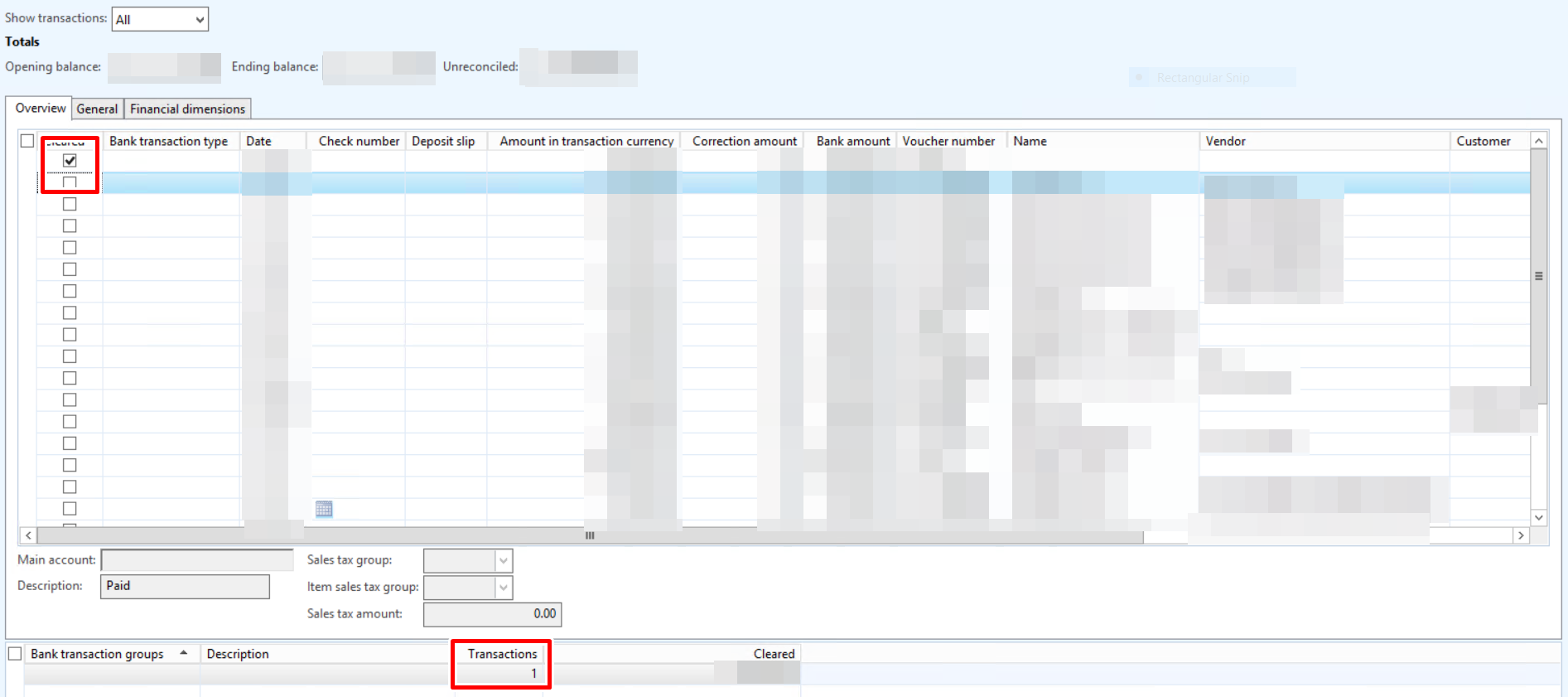
BankReconciliation.PNG

BankReconciliation_5F00_2.PNG

i can easily make the include field checked just by updating the BankAccountTrans Table.

the problem is, whenever i try to check the include field from X++, the grid below is not calculating the result.

here's the grid datasource

BankReconciliation_5F00_3.PNG

what can i do to make the calculation below the main grid is calculated while updating the include checkbox field with X++?

I appreciate any kind of answer, and thanks for your help.

*This post is locked for comments

I have the same question (0)
  • Chaidir Ali Assegaf Profile Picture
    202 on at

    any suggestions?

  • Verified answer
    Sohaib Cheema Profile Picture
    49,677 Super User 2026 Season 1 on at

    if you mark that checkbox manually, does it leaves an impact on lower grid (does it calculates value in lower grid)..? if so is the case, i would imagine something happening on modification of checkbox (which you can call/replicate)

  • Verified answer
    Sukrut Parab Profile Picture
    71,735 Moderator on at

    Hi Chaidir Ali Assegaf ,

    Look at the class BankTransTypeGroup method insertBankTransTypeSum , lines field of tmpBankTransTypeSum datasource is set in this class and tmp data is set in method updateAmountCleared of the form. You have to do the same thing from your button

  • Verified answer
    farida Profile Picture
    40 on at

    You are lucky. I did similar work lately and pasting for you entire code. The reason i used below method was the grid had 300+ entries and the usual DS_GetNext was not fetching anything after 25 records. Hope it helps!

    1. Create a new menu item in the BankReconciliation form and paste the entire below method to "Click" vent:

    /// <summary>
    /// Mark all transactions cleared.
    /// </summary>
    /// Remarks: formds_getNext() does not load all records when there are hundreds of transaction.
    void clicked()
    {
    BankAccountTrans bankTrans, bankTransTmp;
    QueryRun queryRun;
    Query query;
    int64 counter;
    boolean record;

    bankTransTmp.setTmp();
    query = BankAccountTrans_ds.query();
    queryRun = new queryRun(query);

    while (queryRun.next())
    {
    bankTrans = queryRun.getNo(1);
    buf2Buf(bankTrans, bankTransTmp);
    bankTransTmp.SourceRecId = bankTrans.RecId;
    bankTransTmp.insert();
    }

    while select bankTransTmp
    where bankTransTmp.Included == NoYes::No
    {
    select firstonly bankTrans
    where bankTrans.RecId == bankTransTmp.SourceRecId;

    record = bankaccounttrans_ds.findRecord(bankTrans);

    bankaccounttrans_ds.setRecord(bankTrans);

    //Now the current cursor can be accessed directly
    BankAccountTrans.Included = NoYes::Yes;
    bankAccountTrans.AccountStatement = bankAccountStatement.AccountStatementNum;
    bankAccountTrans.AccountStatementDate = bankAccountStatement.AccountStatementDate;

    counter++;
    BankAccountTrans_DS.write();
    element.setAllowCorrection();
    }

    BankAccountTrans_DS.research();

    info(strfmt("Number of records cleared: %1", counter));
    }

  • farida Profile Picture
    40 on at

    You can tweak the code. My requirement was to "Tick" all the bank payments. (Clear transactions). if you need UnCheck all; then use the same method as reference. Or write one method and pass boolean variable to tick/untick the lines.

    Regards

  • Chaidir Ali Assegaf Profile Picture
    202 on at

    hi farida,

    thanks to you it works, so you're using query that used in the form.

    i don't know query that have been used in the form can be recycled and used in the runtime.

    once again, many thanks to you farida.

    Regards,

    Chaidir Ali Assegaf

Under review

Thank you for your reply! To ensure a great experience for everyone, your content is awaiting approval by our Community Managers. Please check back later.

Helpful resources

Quick Links

Introducing the 2026 Season 1 community Super Users

Congratulations to our 2026 Super Stars!

Congratulations to our 2025 Community Spotlights

Thanks to all of our 2025 Community Spotlight stars!

Leaderboard > 🔒一 Microsoft Dynamics AX (Archived)

#1
Joris dG Profile Picture

Joris dG 5

#2
Alexey Lekanov Profile Picture

Alexey Lekanov 2

#2
Henrik Nordlöf Profile Picture

Henrik Nordlöf 2 User Group Leader

Last 30 days Overall leaderboard

Featured topics

Product updates

Dynamics 365 release plans
