web
You’re offline. This is a read only version of the page.
close
Skip to main content

Announcements

No record found.

News and Announcements icon
Community site session details

Community site session details

Session Id :
Microsoft Dynamics CRM (Archived)

On creation of entity a plugin is triggered and updates some fields , but it is updating twice

(0) ShareShare
ReportReport
Posted on by 217

Hi all,

I have plugin on creation of entity and based on some option set it updates positive value to negative value , (eg: value = 1800 on creation from UI and plugin triggers and updates it to negative value = -1800 , this is logic for this
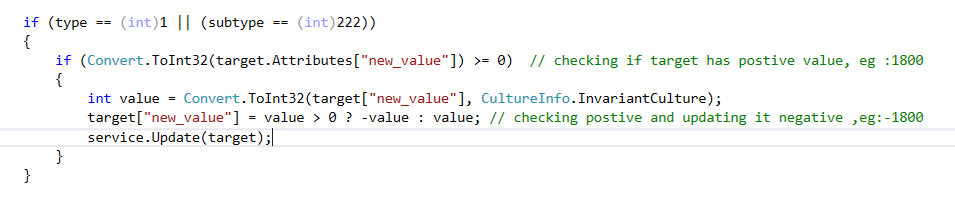

PostiveValue.PNG

But in one case it updated from 1800 to -1800 and again updated back to postive 1800 so by logic it should not happen 

Any assistance on this is much appreciated

*This post is locked for comments

I have the same question (0)
  • Community Member Profile Picture
    on at

    Do the validation check in a Pre Create operation (not post).  If you update the same entity in a post you will potentially loop.

    So when you are in the preOperation plugin you can set the value on the target like such:

    target["new_value"] = someNumber;

    And that value will get saved to the database.

  • Sainath Pillanagrovi Profile Picture
    217 on at

    Thanks for the response Daryl but i have to run in post operation as it is associating the  target to other entity.

  • Sainath Pillanagrovi Profile Picture
    217 on at

    Any assistance on this is much appreciated ?

       gdas can you pls suggest on this?

  • Suggested answer
    Kokulan Profile Picture
    18,054 on at

    Hi

    Your code seems to work fine even if its called more than once

    ScreenClip-_5B00_24_5D00_.png

    I would check the following

    01. Do you have more than one plugin step registered for the same plugin

    02. Are there any workflows executing on this entity  on create or update

    03. You could enable auditing and see the user of the update and see both updates are done by same user. You could try and change the plugin RUN as to different user and see if that makes any difference in the audit history.

  • Suggested answer
    gupta.ambar2009@gmail.com Profile Picture
    797 on at

    Check the trace log , if it is executing twice .

    handle with depth in case

  • Sainath Pillanagrovi Profile Picture
    217 on at

    Thanks for the response Kokulan,

    01.  I do have other plugin steps on this entity but not for the same plugin.

    02.  Yes, there other workflows and plugin on this entity but their functionality is completely different to this.

    03.   Yes checked the audit history of this and Same User has modified the record twice on  same time infact same minute pls look at the audit history

    1st time shows 2nd-time.PNG

    2nd update on this record 2nd-time.PNG

    bit surprised with this issue and it is not reproducible as last time it was produced was 2 months back and now it again 

  • gdas Profile Picture
    50,091 Moderator on at

    Hi ,

    I can see your code is  correct. What is the field type of "new_value" , Just to make sure that your field type is capable to store negative value , go to field properties and take a look once whether you have set any min, max value. Try to put some trace log inside the if condition so that you could understand your code fall in loop or not in that case you should check context depth.

    In addition you can also enable audit log for the field  to see how many updates has done for particular operation.

  • Sainath Pillanagrovi Profile Picture
    217 on at

    Yes Goutam, its a simple whole number and it looks fine with min/max values and my query was even if it is executing twice/trice , value should not be changed as per the code , will use the context depth for this but not sure how the value moved from negative to positive because as per code it shouldn't .

  • Suggested answer
    Sreevalli Profile Picture
    3,264 on at

    Hi,

    If it is already a whole number then don't convert it again. below code should work for you.

    int value = target.Contains("new_value") ? target.GetAttributeValue<int>("new_value") : 0;
    if(value==0) return;
    else
    target["new_value"] = value > 0 ? -(value) : value;


  • SOUNDHARYA.N.V Profile Picture
    165 on at

    Hi,

    Can you check are you updating this field any where else in the workflow.

    This may happen because, suppose you are triggering the plugin on change of that field some workflow is updating this field value.

    This field is changed now which makes the plugin to trigger again.

    Thank you

    Soundharya

    If found useful, please mark the answer as verified

Under review

Thank you for your reply! To ensure a great experience for everyone, your content is awaiting approval by our Community Managers. Please check back later.

Helpful resources

Quick Links

Introducing the 2026 Season 1 community Super Users

Congratulations to our 2026 Super Stars!

Meet the Microsoft Dynamics 365 Contact Center Champions

We are thrilled to have these Champions in our Community!

Congratulations to the April Top 10 Community Leaders

These are the community rock stars!

Leaderboard > 🔒一 Microsoft Dynamics CRM (Archived)

Last 30 days Overall leaderboard

Featured topics

Product updates

Dynamics 365 release plans
