web
You’re offline. This is a read only version of the page.
close
Skip to main content

Announcements

News and Announcements icon
Community site session details

Community site session details

Session Id :
Small and medium business | Business Central, N...
Answered

how change for the default open for planning status in Job

(0) ShareShare
ReportReport
Posted on by 373

Hi community,

I have a question, when I create a new Job, I want use planning for the default and not open job.

could you help me, how i can modify in AL Code?.

Thank you, I will appreciate
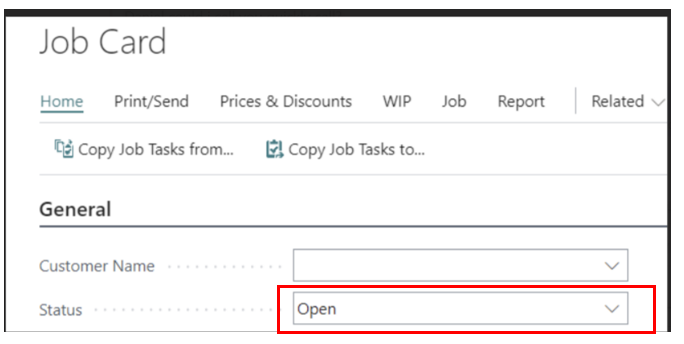
pastedimage1678987953811v1.png

I tried to use a trigger, but still does not work

trigger Onnewrecord()
    begin
        Status := Status::Planning;
    end;

I have the same question (0)
  • Suggested answer
    IB-29041624-0 Profile Picture
    1,191 Moderator on at

    You can try to use this even on the Job table:

    local procedure OnAfterOnInsert(var Job: Record Job; var xJob: Record Job)

       begin

       end;

    And set the status there.

  • Suggested answer
    YUN ZHU Profile Picture
    102,361 Super User 2026 Season 1 on at

    Hi, If you only want to run in Job Card, you can try the code below.

    pastedimage1679016891429v1.png

    pastedimage1679016899849v2.png

    But please note whether to use the Validate method, and the code of the Modify trigger needs to be run.

    Hope this helps.

    Thanks.

    ZHU

  • Suggested answer
    Ben Baxter Profile Picture
    7,142 Super User 2026 Season 1 on at

    Rather than hard coding the status, it is better to add a field to the Job Setup table for "Default Job Status".  This way if you needed it to be something different in the future it wouldn't take a developer to change it.  As a non-developer, I can't stand hardcoded development.

  • Manuel Lozada Profile Picture
    373 on at

    YUN ZHU

    Thank you for helping me, now works perfect

  • Verified answer
    Manuel Lozada Profile Picture
    373 on at

    Inge M. Bruvik

    Thank you, this is other way to do it. I appreciated

Under review

Thank you for your reply! To ensure a great experience for everyone, your content is awaiting approval by our Community Managers. Please check back later.

Helpful resources

Quick Links

Season of Sharing Community Challenge Winners!

Congratulations to our community stars!

Women in Power Builds Momentum

Expanding mentorship, skilling, and AI innovation

Congratulations to the June Top 10 Community Leaders

These are the community rock stars!

Leaderboard > Small and medium business | Business Central, NAV, RMS

#1
OussamaSabbouh Profile Picture

OussamaSabbouh 649 Super User 2026 Season 1

#2
Gerardo Rentería García Profile Picture

Gerardo Rentería Ga... 447 Most Valuable Professional

#3
YUN ZHU Profile Picture

YUN ZHU 388 Super User 2026 Season 1

Last 30 days Overall leaderboard

Featured topics

Microsoft Training Manuals

Product updates

Dynamics 365 release plans
