web
You’re offline. This is a read only version of the page.
close
Skip to main content

Notifications

Announcements

No record found.

Community site session details

Community site session details

Session Id :
Microsoft Dynamics CRM (Archived)

Dynamic CRM : Ignore DATETIME.MINVALUE JsonConvert C#

(0) ShareShare
ReportReport
Posted on by 5

Hello community , 

I have to convert a object to json string I try to ignore the properties with a minvalue datetime in my Json string 

this is my code convert :

string jsonString = Newtonsoft.Json.JsonConvert.SerializeObject(customerB2B, Formatting.Indented, new JsonSerializerSettings
{
NullValueHandling = NullValueHandling.Ignore
});

this is my Json : 
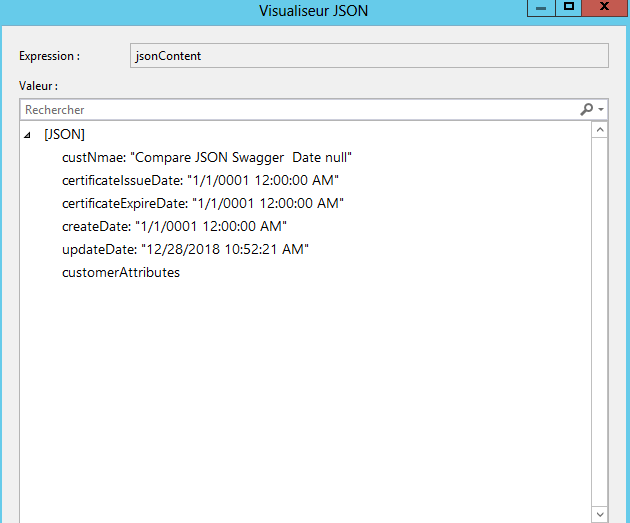
json.png

This is my class object :

using Newtonsoft.Json;
using Newtonsoft.Json.Converters;
using Newtonsoft.Json.Serialization;
using System;
using System.Collections.Generic;
using System.Linq;
using System.Reflection;
using System.Text;
using System.Threading.Tasks;

namespace OCM.XRM.Plugins.Objects
{

public class CustomerB2B
{

public string id { get; set; }
public string custNmae { get; set; }
public string custType { get; set; }
public string businessRegister { get; set; }
 public DateTime certificateIssueDate { get; set; }
public DateTime certificateExpireDate { get; set; }
public DateTime createDate{ get; set; }

public DateTime updateDate{ get; set; }

}

Does any one Have an idea how to ignore a datetime with a minvalue ? 

Pleassse let me know !!

Ps: I work on CRM 2015 on premises 


*This post is locked for comments

I have the same question (0)
  • Verified answer
    Shaminderpal Singh Profile Picture
    1,565 on at

    Hi,

    Could you try below:

    string jsonString = Newtonsoft.Json.JsonConvert.SerializeObject(customerB2B, Formatting.Indented, new JsonSerializerSettings

    {

    DefaultValueHandling = DefaultValueHandling.Ignore

    });

    -Shaminder

  • Jamil Lamyae Profile Picture
    5 on at

    Thanks a lot Shaminderpal for your reply

    it works fine I used //NullValueHandling = NullValueHandling.Ignore, instead of DefaultValueHandling = DefaultValueHandling.Ignore

Under review

Thank you for your reply! To ensure a great experience for everyone, your content is awaiting approval by our Community Managers. Please check back later.

Helpful resources

Quick Links

Responsible AI policies

As AI tools become more common, we’re introducing a Responsible AI Use…

Neeraj Kumar – Community Spotlight

We are honored to recognize Neeraj Kumar as our Community Spotlight honoree for…

Leaderboard > 🔒一 Microsoft Dynamics CRM (Archived)

#1
SA-08121319-0 Profile Picture

SA-08121319-0 4

#1
Calum MacFarlane Profile Picture

Calum MacFarlane 4

#3
Alex Fun Wei Jie Profile Picture

Alex Fun Wei Jie 2

Last 30 days Overall leaderboard

Featured topics

Product updates

Dynamics 365 release plans
