web
You’re offline. This is a read only version of the page.
close
Skip to main content

Announcements

No record found.

News and Announcements icon
Community site session details

Community site session details

Session Id :
Finance | Project Operations, Human Resources, ...
Answered

Budget transfer rule

(0) ShareShare
ReportReport
Posted on by 125

Hello experts,

This is my step:

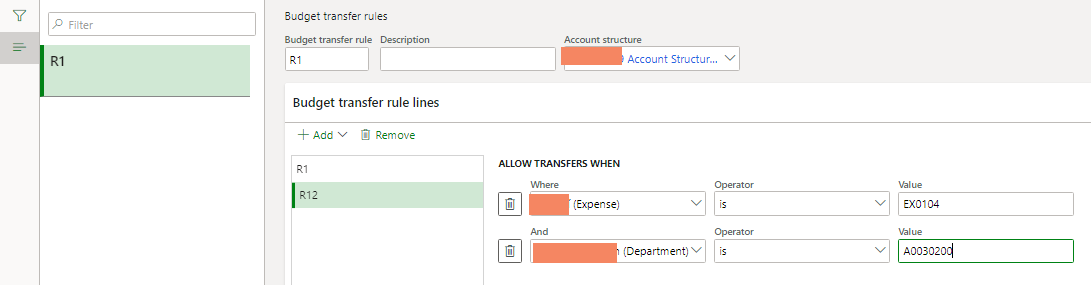
1/ I have create Budget transfer rule
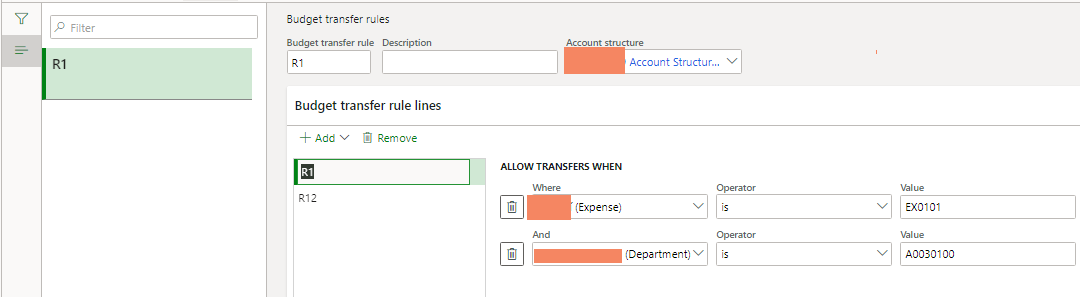
pastedimage1607583267283v1.png

 pastedimage1607583279436v2.png

2/ Set Use rule for budget transfer = Yes in Budget parameters

3/ Set workflow for budget transfer code

4/ Create budget register entries
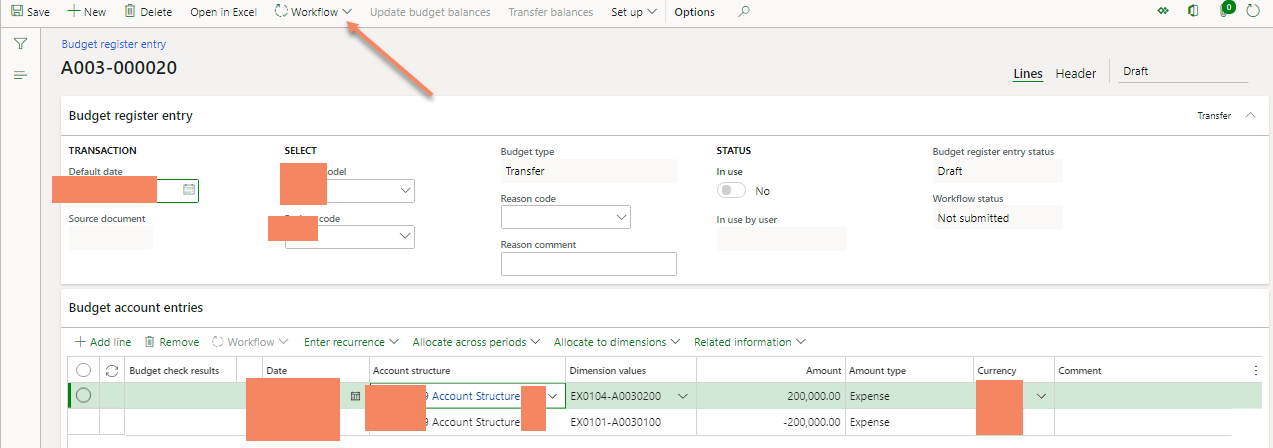
pastedimage1607583582017v3.png

As I know if my entries is same the rule, my budget register entries will be updated  without approval workflow ?

I don't understand why I have to submit my entries, while no message info about Violent the transfer rule.

Best regards

I have the same question (0)
  • Suggested answer
    Ludwig Reinhard Profile Picture
    Microsoft Employee on at

    Hi,

    There is no transfer specific workflow available.

    Can you please double check that normal budget register entries from the type 'original budget' do also need to go through the workflow?

    That's what I would expect.

    Best regards,

    Ludwig

  • Nhu Quynh Profile Picture
    125 on at

    Hello Ludwig,

    This is my setup

    pastedimage1607650096994v1.png

    pastedimage1607650112051v2.png

  • Suggested answer
    Junaid Idrees Profile Picture
    2 on at

    Hi Nhu Quynh,

    If there is a WF attached to "Transfer" budget code then budget registered entry has to go through WF process.

    In my Contoso environment, I made the same configuration on "Transfer" budget code and linked the WF as well and i cannot update the balance unless the request is approved.

    0423714.PNG

  • Nhu Quynh Profile Picture
    125 on at

    Hi Junaid,

    As I read 'No budget transfers are allowed outside of these rule lines unless you use workflow to approve the transfer. If no criteria are specified, then the rule applies to all dimension values.'

    So I don't understand Rule use for what ? As I understand if my Budget entries are the same to rule, my entries will be skipped through Workflow.

    What about your opinion?

  • Suggested answer
    Ludwig Reinhard Profile Picture
    Microsoft Employee on at

    Hi Nhu,

    In your last screenprint that you shared, you have workflow id 52 assigned to your budget code that's why you see the workflow button and have to go through the workflow.

    Can you share details of the workflow?

    What tasks has it setup?

    Does it possibly complete automatically?

    What might help you getting some additional insight into this feature is this MS video.

    www.youtube.com/watch

    The video was made for AX2012 but is still valid for D365FO systems.

    Best regards,

    Ludwig

  • Nhu Quynh Profile Picture
    125 on at

    Hello Ludwig,

    This is my setup

    pastedimage1607667626400v1.png

    I have seen the link you share, it is an example of violent to the rule and you have to use WF.

    But I try to test without violent the rule. What will be happen if Budget register entries are not violent to the rule ?

    Many thanks

  • Verified answer
    Paul Sinnott Profile Picture
    90 User Group Leader on at

    Hi Nhu,

    The workflow requirement is assigned to the budget code and type. It is not assigned to the record lines, therefore it will always be present and must be submitted for all entries that are for a budget type with a workflow specified.

    What i would suggest is to build in an auto approval step into the workflow as follows so that entries which are not violating your transfer rule can be posted without issue:

    pastedimage1607696936616v1.png

    Kind Regards

  • Nhu Quynh Profile Picture
    125 on at

    Hi Paul,

    Good idea, many thanks for your suggestion

Under review

Thank you for your reply! To ensure a great experience for everyone, your content is awaiting approval by our Community Managers. Please check back later.

Helpful resources

Quick Links

Introducing the 2026 Season 1 community Super Users

Congratulations to our 2026 Super Stars!

Meet the Microsoft Dynamics 365 Contact Center Champions

We are thrilled to have these Champions in our Community!

Congratulations to the April Top 10 Community Leaders

These are the community rock stars!

Leaderboard > Finance | Project Operations, Human Resources, AX, GP, SL

#1
Giorgio Bonacorsi Profile Picture

Giorgio Bonacorsi 802

#2
André Arnaud de Calavon Profile Picture

André Arnaud de Cal... 636 Super User 2026 Season 1

#3
Subra Profile Picture

Subra 534

Last 30 days Overall leaderboard

Product updates

Dynamics 365 release plans