web
You’re offline. This is a read only version of the page.
close
Skip to main content

Announcements

No record found.

News and Announcements icon
Community site session details

Community site session details

Session Id :
Customer experience | Sales, Customer Insights,...
Answered

Creating Auto-Posts on Assignment of Cases

(0) ShareShare
ReportReport
Posted on by 2,175

Hi all,


Been trying to utilise posts for case timeline. Specifically for when a case is assigned, it creates a auto-post in the timeline of the case. So I've done a few things and none of it works.

I tried using the out of the box configurations by going to the Post Configuration area and activating the Case post configuration and turning on the "Case Assigned to User/Team" rule. Yes I also gone to the default solution and published the case entity again.
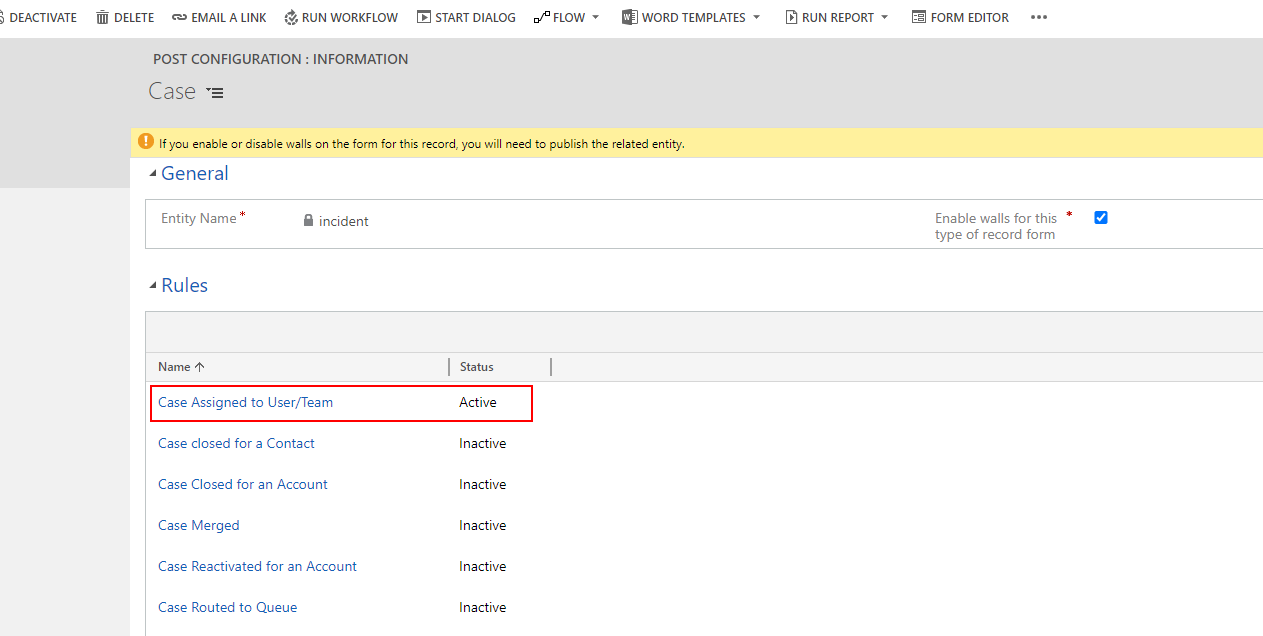
pastedimage1596095726084v1.png

I then went into the case form in question and in the timeline area I made sure that filter by was enabled for post.
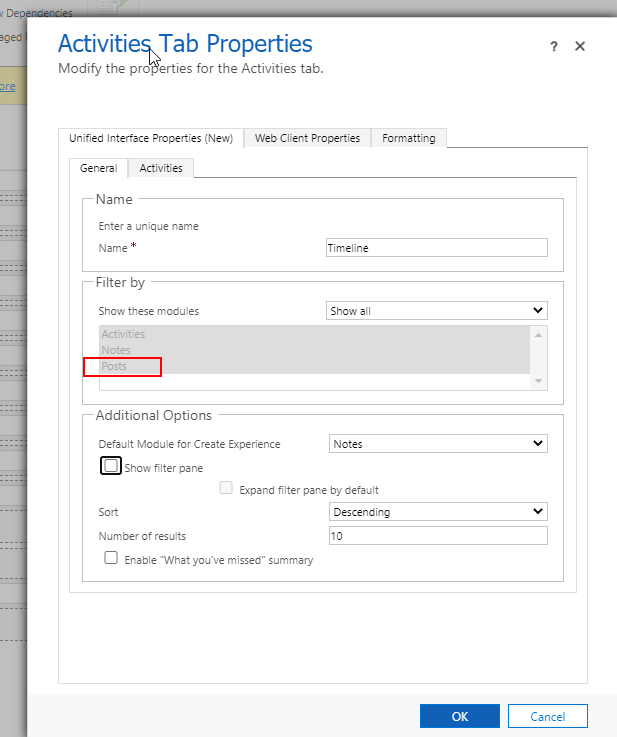
pastedimage1596095879085v2.png

I then tried going into the app designer for the customer service hub and attempted to add the post entity to the app but there obviously wasn't any.

pastedimage1596095935576v3.png

I then tried another method of creating posts. I then created a power Automate flow based on case assign and attempted to create the post. The problem was that for some reason the regarding field of the post is not available so it then throws a error.

pastedimage1596096050942v4.png

pastedimage1596096191789v5.png

Not sure what else I can do to resolve this. Any help would be greatly appreciated.

Kind regards,

Mike

I have the same question (0)
  • Verified answer
    a33ik Profile Picture
    84,331 Most Valuable Professional on at

    Hello,

    Seems that this field is not exposed for usage in flows but it's available in workflows so you can use it.

  • MikeC282 Profile Picture
    2,175 on at

    Thanks Andrew,

    Yea it looks that way to me. I've been trying to create any new workflows in Power Automate but I guess some features still need to be done in the classic old workflow or via a plugin I guess.

    Also in relation to not showing the posts in the timeline. Seems like I needed to clear my cache lol.

    Thanks for the help Andrew!

    Kind regards,

    Mike

  • Carolin Profile Picture
    127 on at

    Is there a timeline when that feature will be available (as Workflows should be replaced by Power Automate Flows...)?

Under review

Thank you for your reply! To ensure a great experience for everyone, your content is awaiting approval by our Community Managers. Please check back later.

Helpful resources

Quick Links

Introducing the 2026 Season 1 community Super Users

Congratulations to our 2026 Super Stars!

Meet the Microsoft Dynamics 365 Contact Center Champions

We are thrilled to have these Champions in our Community!

Congratulations to the April Top 10 Community Leaders

These are the community rock stars!

Leaderboard > Customer experience | Sales, Customer Insights, CRM

#1
Muhammad Shahzad Shafique Profile Picture

Muhammad Shahzad Sh... 69 Most Valuable Professional

#2
ManoVerse Profile Picture

ManoVerse 55 Super User 2026 Season 1

#3
11manish Profile Picture

11manish 37

Last 30 days Overall leaderboard

Product updates

Dynamics 365 release plans
