web
You’re offline. This is a read only version of the page.
close
Skip to main content

Announcements

No record found.

News and Announcements icon
Community site session details

Community site session details

Session Id :
Finance | Project Operations, Human Resources, ...
Suggested Answer

Invalid column name 'CWTRANSID'. Object Server Azure: Cannot select a record in Bank statement report entry (BankStmtISOReportEntry)

(0) ShareShare
ReportReport
Posted on by 70

I added field 'CWTransId' to BankStmtISOReportEntry table, while trying to import Bank statement from Excel document. When I select Bank statement from Cash and Bank Management I got this error "session 5123 (Admin)"

SELECT T1.ACCOUNTSERVICERREFERENCE,
T1.ADDITIONALENTRYINFORMATION,
T1.AMOUNT,
T1.AMOUNTCREDITDEBITINDICATOR,
T1.BANKDOCUMENTNUMBER,
T1.BANKSTATEMENTCOUNTERCURRENCY,
T1.BANKSTATEMENTCOUNTERCURRENCYAMOUNT,
T1.BANKSTATEMENTCOUNTEREXCHANGERATE,
T1.BANKSTATEMENTLINESTATUS,
T1.BANKSTMTISOACCOUNTSTATEMENT,
T1.BOOKINGDATETIME,
T1.BOOKINGDATETIMETZID,
T1.CHARGERATE,
T1.ENTRYREFERENCE,
T1.INTERESTRATE,
T1.ISNEWBANKDOCUMENT,
T1.PARENTBANKSTMTISOREPORTENTRY,
T1.PROPRIETARYBANKTRANSACTIONCODE,
T1.RECONCILED,
T1.REFERENCENUMBER,
T1.RELATEDBANKACCOUNT,
T1.RELATEDBANKNAME,
T1.REVERSALINDICATOR,
T1.SOURCEDOCUMENTLINE,
T1.TAXAMOUNT,
T1.TAXID,
T1.TAXRATE,
T1.TRADINGPARTY,
T1.BANKSTATEMENTINSTRUCTEDCURRENCY,
T1.BANKSTATEMENTINSTRUCTEDCURRENCYAMT,
T1.BANKSTATEMENTINSTRUCTEDEXCHANGERATE,
T1.CREDITORREFERENCEINFORMATION,
T1.CWTRANSID,
T1.CWTRANSACTIONDETAILS,
T1.DATAAREAID,
T1.RECVERSION,
T1.PARTITION,
T1.RECID FROM BANKSTMTISOREPORTENTRY T1 WHERE ((PARTITION=5637144576) AND (SOURCEDOCUMENTLINE=?))
[Microsoft][ODBC Driver 17 for SQL Server][SQL Server]Invalid column name 'CWTRANSID'.
Object Server Azure:
Cannot select a record in Bank statement report entry (BankStmtISOReportEntry). Reference: 0. The SQL database has issued an error.
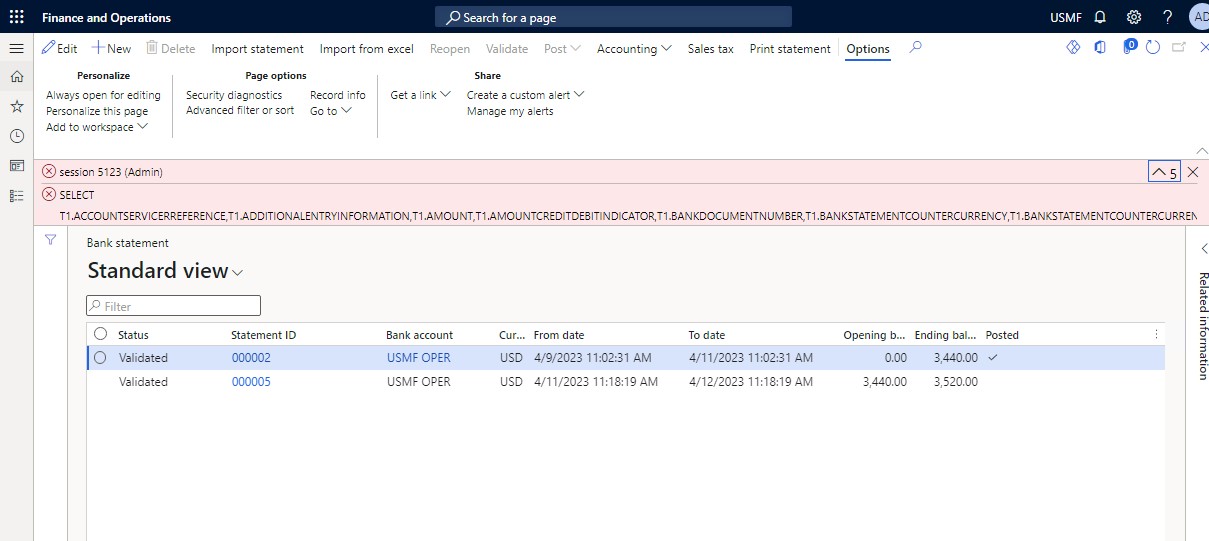
bnkstmt.jpg

I have the same question (0)
  • Suggested answer
    GirishS Profile Picture
    27,833 Moderator on at

    Hi,

    Ran a database synchronization and then try.

    Thanks,

    Girish S.

  • Suggested answer
    huijij Profile Picture
    19,811 on at

    Hi ccobasi,

    Do you resolve your issue yet? In Dynamics 365 Finance and Operations > Click on Dynamics 365 Menu on Top > Click On Build Models > Click on Select All Option > Click Build. This will perform a full compilation.

  • Mohit Rampal Profile Picture
    12,565 Moderator on at

    DB synchronization should resolve this issue. Let us know if DB sync doesn't work.

Under review

Thank you for your reply! To ensure a great experience for everyone, your content is awaiting approval by our Community Managers. Please check back later.

Helpful resources

Quick Links

Introducing the 2026 Season 1 community Super Users

Congratulations to our 2026 Super Stars!

Congratulations to our 2025 Community Spotlights

Thanks to all of our 2025 Community Spotlight stars!

Leaderboard > Finance | Project Operations, Human Resources, AX, GP, SL

#1
André Arnaud de Calavon Profile Picture

André Arnaud de Cal... 583 Super User 2026 Season 1

#2
Giorgio Bonacorsi Profile Picture

Giorgio Bonacorsi 378

#3
Diego Mancassola Profile Picture

Diego Mancassola 255

Last 30 days Overall leaderboard

Product updates

Dynamics 365 release plans
