web
You’re offline. This is a read only version of the page.
close
Skip to main content

Notifications

Announcements

No record found.

Community site session details

Community site session details

Session Id :
Microsoft Dynamics CRM (Archived)

Creating a custom activity record - how to default open in new tab

(0) ShareShare
ReportReport
Posted on by 1,328

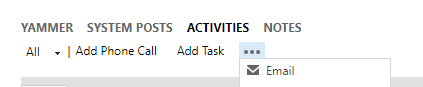
From the activities pane, when creating a new custom activity record (or email or appointment), I wan't to automatically open the new record in a new tab or window so that I don't have to leave the parent record. Is this possible?
06387070.Capture.PNG

*This post is locked for comments

I have the same question (0)
  • Suggested answer
    Mahendar Pal Profile Picture
    45,095 on at

    Not possible at this point, you can't customise activity pane at this point at least in supported way. Only supported workaround could be open these activities using associated view or using custom ribbon button.

  • Suggested answer
    Adrian Begovich Profile Picture
    1,027 Moderator on at

    Hi LearningCRM,

    I do not think this is currently possible. However, I think that a custom ribbon button with JavaScript to open the new record is a great alternative.

  • epark06 Profile Picture
    1,328 on at

    Thanks for the suggestion. Could you guide me as to how to do this via javascript?

  • Suggested answer
    Mahendar Pal Profile Picture
    45,095 on at

    IF you are looking for adding ribbon button, please check my old post here: http://himbap.com/blog/?p=1722

  • Verified answer
    SCV Profile Picture
    1,004 on at

    You can create a javascript function and use the Xrm.Utility.openEntityForm (check here: msdn.microsoft.com/.../jj602956.aspx) to open the new activity record form. You can use the current record’s id as a parameter and pass to the above method so the regarding object of the new activity form will be populated.

    Check here to see how to pass parameters to the above method:

    msdn.microsoft.com/.../gg334375.aspx

    Call your javascript function from the a ribbon button.

  • Suggested answer
    Community Member Profile Picture
    on at

    Not Possible Out of the box. You may use Web Resource with links to create forms for each type of custom activity you want. Or create custom ribbon buttons for each activity type.

Under review

Thank you for your reply! To ensure a great experience for everyone, your content is awaiting approval by our Community Managers. Please check back later.

Helpful resources

Quick Links

Responsible AI policies

As AI tools become more common, we’re introducing a Responsible AI Use…

Neeraj Kumar – Community Spotlight

We are honored to recognize Neeraj Kumar as our Community Spotlight honoree for…

Leaderboard > 🔒一 Microsoft Dynamics CRM (Archived)

#1
SA-08121319-0 Profile Picture

SA-08121319-0 4

#1
Calum MacFarlane Profile Picture

Calum MacFarlane 4

#3
Alex Fun Wei Jie Profile Picture

Alex Fun Wei Jie 2

Last 30 days Overall leaderboard

Featured topics

Product updates

Dynamics 365 release plans



