web
You’re offline. This is a read only version of the page.
close
Skip to main content

Announcements

No record found.

News and Announcements icon
Community site session details

Community site session details

Session Id :
Microsoft Dynamics AX (Archived)

Run Software update Checklist or Model Upgrade checklist after importing Model file

(0) ShareShare
ReportReport
Posted on by 4,624

Hello All,

I have imported one model file in USR layer and when i open AX it shows me :
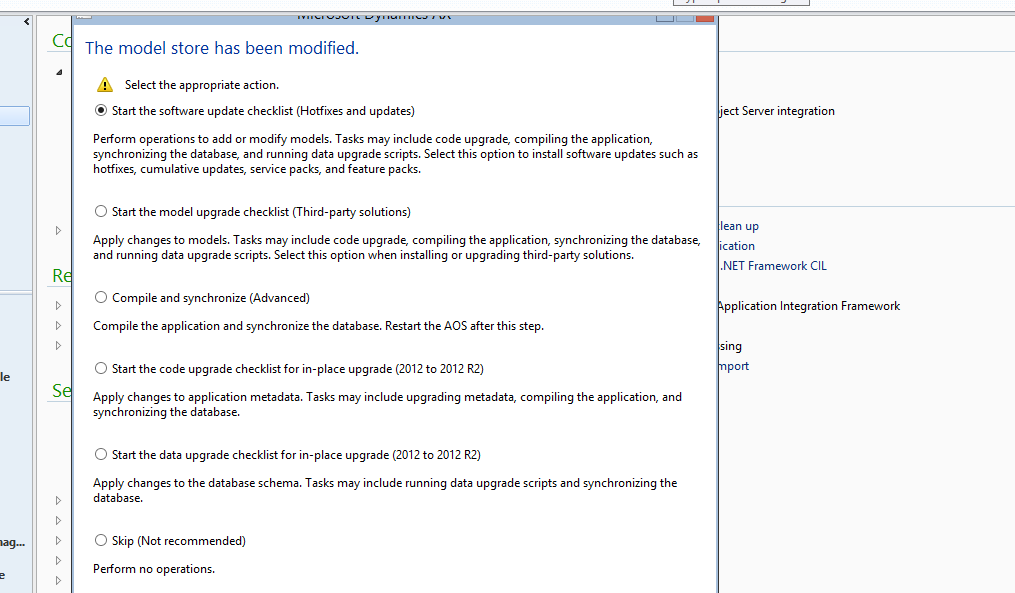
modelstore-change.PNG

what AX shows to me ? what do i need to do ? as i know i need to do only Full Compilation , Full CIL and Synchronize database. do i need to do anything else ?

Please suggest 

Thanks

Visvash Walia

*This post is locked for comments

I have the same question (0)
  • Verified answer
    Mea_ Profile Picture
    60,286 on at

    Hi Visvash Walia,

    It depends what changes do you have there, you can go with "Model upgrade checklist" if you need to merge code or update data. If you know that there is no conflicts to resolve you can just compile and synchronize.

  • Rohin Profile Picture
    4,624 on at

    if there  would conflict , it would not allow to import the model as it was succesfully imported ..am i correct ..please suggest

    Thanks

  • Verified answer
    Martin Dráb Profile Picture
    239,647 Most Valuable Professional on at

    It says that you've modified the modelstore and you need to do some steps before you can use the environment. Compilation, code upgrade etc.

    If you need only compilation and synchornization, choose the option Compile and synchronize.

    You're confusing ID conflicts and code conflicts. The import tool know nothing about whether your X++ code conflicts with X++ code in another layer.

Under review

Thank you for your reply! To ensure a great experience for everyone, your content is awaiting approval by our Community Managers. Please check back later.

Helpful resources

Quick Links

Introducing the 2026 Season 1 community Super Users

Congratulations to our 2026 Super Stars!

Meet the Microsoft Dynamics 365 Contact Center Champions

We are thrilled to have these Champions in our Community!

Congratulations to the April Top 10 Community Leaders

These are the community rock stars!

Leaderboard > 🔒一 Microsoft Dynamics AX (Archived)

#1
CP04-islander Profile Picture

CP04-islander 24

#2
Michel ROY Profile Picture

Michel ROY 14

#3
Jagadabi Profile Picture

Jagadabi 6

Last 30 days Overall leaderboard

Featured topics

Product updates

Dynamics 365 release plans
