web
You’re offline. This is a read only version of the page.
close
Skip to main content

Announcements

No record found.

News and Announcements icon
Community site session details

Community site session details

Session Id :
Small and medium business | Business Central, N...
Answered

Add action in Job page Print/Send Area section

(0) ShareShare
ReportReport
Posted on by 373

Hi Community,

could you help me how I can add new action to Print/Send Area?

I did a new report and I am show this action in Job page Print/Send Area section.

This is the Job Page system
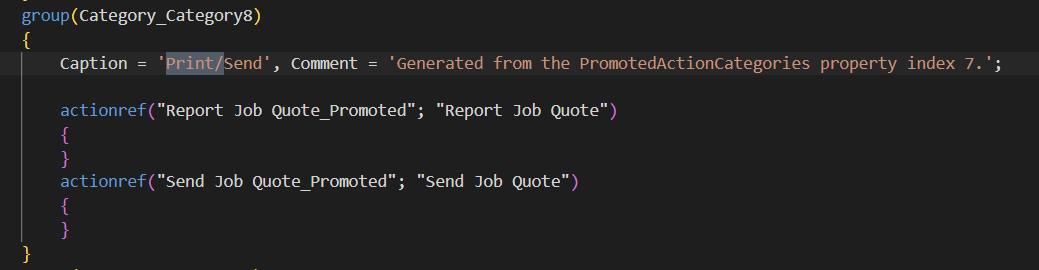
pastedimage1677177232940v2.png

and this is my page extension that show error, I tried to use modify but still does not work
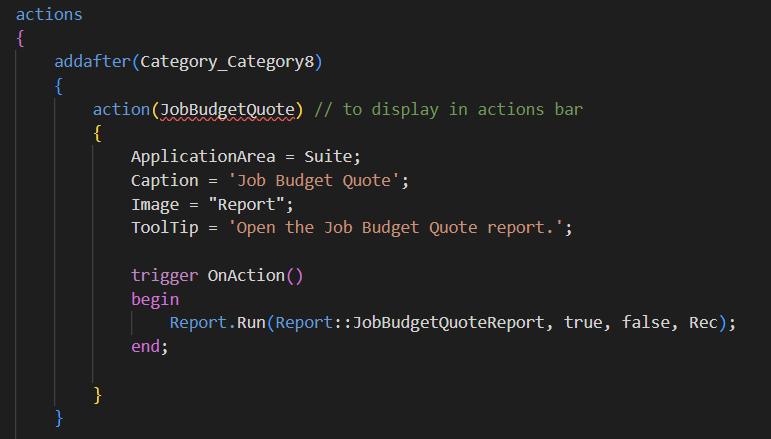
pastedimage1677177627121v3.png

Here, is the solution that I try to do it

pastedimage1677177738173v4.png

Thank you

  • Verified answer
    Hasnain Ali Profile Picture
    136 on at

    Hi,

    Try:

    addafter("Print/Send")

    Add these properties in you action to move it in Print/Send Area:

    Promoted = true;
    PromotedCategory = Category8;

  • Manuel Lozada Profile Picture
    373 on at

    Hasnain Ali, thank you for you time is running well

Under review

Thank you for your reply! To ensure a great experience for everyone, your content is awaiting approval by our Community Managers. Please check back later.

Helpful resources

Quick Links

Season of Sharing Community Challenge Winners!

Congratulations to our community stars!

Women in Power Builds Momentum

Expanding mentorship, skilling, and AI innovation

Congratulations to the July Top 10 Community Leaders

These are the community rock stars!

Leaderboard > Small and medium business | Business Central, NAV, RMS

#1
OussamaSabbouh Profile Picture

OussamaSabbouh 710 Super User 2026 Season 2

#2
YUN ZHU Profile Picture

YUN ZHU 387 Super User 2026 Season 2

#3
AndrewThomas81 Profile Picture

AndrewThomas81 385 Super User 2026 Season 2

Last 30 days Overall leaderboard

Featured topics

Microsoft Training Manuals

Product updates

Dynamics 365 release plans



