web
You’re offline. This is a read only version of the page.
close
Skip to main content

Announcements

No record found.

News and Announcements icon
Community site session details

Community site session details

Session Id :
Microsoft Dynamics AX (Archived)

AX 2009 : What's the difference "Header, Header + Lines " in Check credit limit parameter?

(0) ShareShare
ReportReport
Posted on by

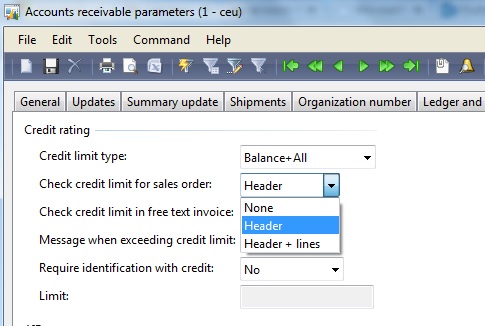
Could you please explain about the difference between parameter of credit limit.

from the picture at "Check credit limit for sales order"

Now I know difference from "None"

but I didn't see any difference from "Header" or "Header + Lines"


How? and When it working difference? Thank you.
*This post is locked for comments

I have the same question (0)
  • Verified answer
    André Arnaud de Calavon Profile Picture
    305,150 Super User 2026 Season 1 on at

    Hi,

    The difference is that the system will also check during editing of lines if the credit limit is exceeded when you select Header + lines. If you have Header only, it will not check during line entry.

  • Community Member Profile Picture
    on at

    Thank you. I had test again and it's show alert message in difference case.

    But if i normally insert line,it's not show alert but when I editing or do something that not only insert new line, it is happen.

    Thank you so much I got it but in Ax 2012 only have select box.

  • Community Member Profile Picture
    on at

    I have something not clear in "None" can you explain to me,too

  • André Arnaud de Calavon Profile Picture
    305,150 Super User 2026 Season 1 on at

    Hi,

    When you select 'None', it will not do a credit limit check during data entry. So no warning or error will be prompted during data entry. Then the check will be done when you try to update the sales order, e.g. post Confirmation, Packing slip, Invoice.

  • Community Member Profile Picture
    on at

    Thank you

Under review

Thank you for your reply! To ensure a great experience for everyone, your content is awaiting approval by our Community Managers. Please check back later.

Helpful resources

Quick Links

Introducing the 2026 Season 1 community Super Users

Congratulations to our 2026 Super Stars!

Meet the Microsoft Dynamics 365 Contact Center Champions

We are thrilled to have these Champions in our Community!

Congratulations to the April Top 10 Community Leaders

These are the community rock stars!

Leaderboard > 🔒一 Microsoft Dynamics AX (Archived)

#1
CP04-islander Profile Picture

CP04-islander 24

#2
Michel ROY Profile Picture

Michel ROY 14

#3
Jagadabi Profile Picture

Jagadabi 6

Last 30 days Overall leaderboard

Featured topics

Product updates

Dynamics 365 release plans
