web
You’re offline. This is a read only version of the page.
close
Skip to main content

Notifications

Announcements

No record found.

Community site session details

Community site session details

Session Id :
Microsoft Dynamics GP (Archived)

Microsoft SQL Server Reporter Builder Error

(0) ShareShare
ReportReport
Posted on by

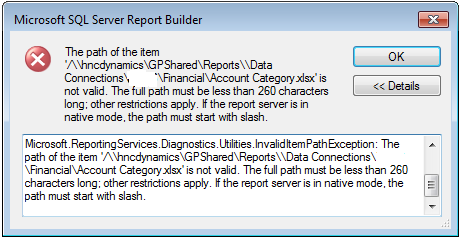
I am receiving an error when I try to open the Microsoft SQL Server Reporter Builder to edit reports. 

The path is within the 260 character limit and it starts with a slash. Any ideas what else could be causing this?
Capture-error.PNG

*This post is locked for comments

I have the same question (0)
  • Beat Bucher  GP Geek  GPUG All Star Profile Picture
    28,058 Moderator on at

    Hi John,

    Can you please send a screenshot of your Excel reporting setup :

    Administration >> Setup >> System >> Reporting Tools Setup

    The second button :  "Excel Reports"

    This will show us how the reports were deployed..

    Thanks.

  • Community Member Profile Picture
    on at

    Beat,

    It will not let me attach a picture as I did my first post. Can I email it to you perhaps?

    Thanks,

    John

  • Beat Bucher  GP Geek  GPUG All Star Profile Picture
    28,058 Moderator on at

    John,

    To attach a picture, you have to save it first locally on your PC and then upload it by using the 'image' icon in the forum reply... there you can select the file to insert in your reply.

  • Community Member Profile Picture
    on at

    picture-of-excel-reporting-setup.PNG Thank you for the details, I was able to attach.

  • Beat Bucher  GP Geek  GPUG All Star Profile Picture
    28,058 Moderator on at

    Thanks John,

    Your setup path seems to be fine.. now you mentioned that you're getting the error messagen when opening the SQL report builder in your initial post.. How do access that in GP ?

  • Community Member Profile Picture
    on at

    how-to-open.PNGhow-to-open.PNG

    I click excel reports, and the edit report button. (see attached screen shots) The error comes up before it is even done opening.

    Thanks,

    John

  • Verified answer
    Beat Bucher  GP Geek  GPUG All Star Profile Picture
    28,058 Moderator on at

    John,

    One thing that strikes me is that you're trying to edit the actual Data Connection file (see file option column).. not the actual Excel report.  

    I know this sounds silly, but actually the Excel reports when deployed show up twice for each report, once for the data connection file and once for the report itself. Microsoft should have done a better job by filtering out the navigation list, something I did myself for my users :

    2016_2D00_04_2D00_21_5F00_133626.png

    So after applying a filter, it looks less crowded and confusing :

    2016_2D00_04_2D00_21_5F00_133626.png


    What I notice when you select a report and click on the 'Edit Report' button, is that GP is actually going to run the SQL SSRS Report Builder 3.0 (which gets downloaded from your SSRS server).. and not Microsoft Excel.  This leads then to the infamous error message you got (which I get too).. Definitely not the way to go.

    To modify/customize an Excel report, there are multiple ways to do it.. Either you just open the report (View in the Navigation bar) and change the columns sorting / display as you want. All the Excel (and SSRS) reports are relying on existing SQL Views in your databases. 

    If you want to change those underlying views or create new ones, you have to have either the Builder Series module from eOne installed, or the license enabled (I think) for the SmartList Designer that comes with GP2013 and up.. (for customers that don't own eOne's product).  SmartList Designer then allows you the make Excel refreshable reports out of the SL reports.

    https://community.dynamics.com/gp/b/dynamicsgp/archive/2014/12/18/draft-gp-2015-new-feature-creating-refreshable-excel-reports-based-on-smartlist-designer-queries

    The Excel Report Builder only exists for the eOne SL Builder module. This tools allows you to create new Excel reports from scratch directly without the need to base on a custom SL.

    I agree that the "Edit Report" button is very confusing in the navigation pane when it comes to show Excel reports only... and not SSRS reports. To me this sound more like a bug.. because SSRS reports already have a dedicated button. So either Microsoft removes this button or links it properly to the SL Designer tool.

    Hope this helps to solve your mystery.

  • Suggested answer
    Community Member Profile Picture
    on at

    Thank you for your thorough response, I appreciate it!

Under review

Thank you for your reply! To ensure a great experience for everyone, your content is awaiting approval by our Community Managers. Please check back later.

Helpful resources

Quick Links

Responsible AI policies

As AI tools become more common, we’re introducing a Responsible AI Use…

Neeraj Kumar – Community Spotlight

We are honored to recognize Neeraj Kumar as our Community Spotlight honoree for…

Leaderboard > 🔒一 Microsoft Dynamics GP (Archived)

#1
Community Member Profile Picture

Community Member 2

#2
mtabor Profile Picture

mtabor 1

#2
Victoria Yudin Profile Picture

Victoria Yudin 1

Last 30 days Overall leaderboard

Featured topics

Product updates

Dynamics 365 release plans



