web
You’re offline. This is a read only version of the page.
close
Skip to main content

Announcements

No record found.

News and Announcements icon
Community site session details

Community site session details

Session Id :
Microsoft Dynamics AX (Archived)

Integration of FedEx shipping interface

(0) ShareShare
ReportReport
Posted on by

Hi,

I am trying to integrate FedEx shipping interface.

For this I have tried the integration in test mode. Now when I try to make sales order I am getting the following screen which allows me to enter tracking number( after pick and pack) which is correct.
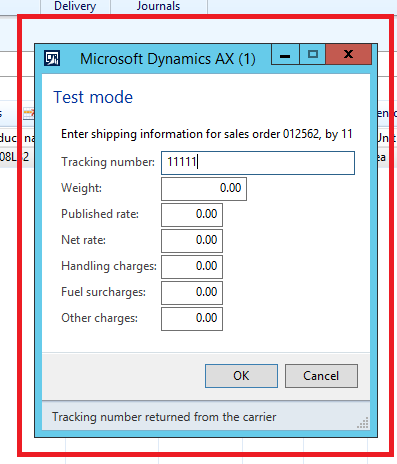
1184.nb.png

But when I am trying same thing on Sales orders generated using Retail online store ,I am not getting any screen where I can enter tracking number.

Please help me out.

Thanks
pallavi

*This post is locked for comments

I have the same question (0)
  • Suggested answer
    Community Member Profile Picture
    on at

    Hi,

    Create two different sales orders (one manually and other with retail online store) in the system.

    Try to match the values of both the records in Sales Table (if needed, salesline  table as well) and see the difference. One of the value might not be populating properly while creating the sales order via online store and hence causing the issue.

    Best Regards,

    Vishal Salot

  • Community Member Profile Picture
    on at

    Hi Vishal,

    Thanks for the reply

    I have checked each and every field in both the tables, the only difference which I can saw that in case of sales orders generating from Retail online store prepayment is done .As compare to sales orders generating from AX Post payment is going on.

    Can this be the issue?

    Thanks

    Pallavi

  • Suggested answer
    Community Member Profile Picture
    on at

    Hi Pallavi,

    I don't think so that, prepayment could be the reason.

    Can you please try to refresh the Mode of Delivery, Delivery Terms & Shipping Carrier on Sales Order, which got generated via Online Store.

    If nothing works, arrange to debug the code and see the reason...

    I have seen certain problems in the past, while working with Retail POS / Online Store, which is creating various issues due to fields not getting populated correctly at HQ.

    Best Regards,

    Vishal Salot

  • Community Member Profile Picture
    on at

    Hi Vishal,

    I just saw in AOT if we look in into the sales table, fields such as  Carrier Id and Carrier Account code is automatically getting attached with orders which we are creating manually but orders which are generating from online store Carrier Id and Carrier Account code is blank in this.

    Do you have any idea on this?

    Thanks

    Pallavi

  • Verified answer
    Community Member Profile Picture
    on at

    Hi Pallavi,

    As I mentioned earlier, we have found such issue while working with Online Store / Retail POS, where certain fields are not getting populated correctly in the table.

    Just try to refresh / populate the related fields manually and see if it works.

    Later you might have to do small customization to populate these fields, just before posting the document.

    Also, you may register this event at Microsoft, so that the same can be rectified in the future release.

    Hope this helps.

    Best Regards,

    Vishal Salot

  • Community Member Profile Picture
    on at

    Hi Vishal,

    Carrier Id and Carrier Account Code are such fields which we cant edit manually. There are coming from configuration.

    And when I see the configuration there is nothing specific to retail orders

    Thanks

    Pallavi

  • Suggested answer
    Community Member Profile Picture
    on at

    Hi,

    Have you tried to refresh the Mode of Delivery, Delivery Terms & Shipping Carrier on Sales Order? Does it populating the required fields as mentioned by you?

    Best Regards,

    Vishal Salot

  • Community Member Profile Picture
    on at

    hi,

    Thanks ..that works

  • Suggested answer
    Community Member Profile Picture
    on at

    That's great.

    Please verify the answer, if it was helpful...

  • Dick Wenning Profile Picture
    8,705 Moderator on at

    look at this it is c#

    www.codeproject.com/.../Fedex-integration-with-Asp-Net

Under review

Thank you for your reply! To ensure a great experience for everyone, your content is awaiting approval by our Community Managers. Please check back later.

Helpful resources

Quick Links

Introducing the 2026 Season 1 community Super Users

Congratulations to our 2026 Super Stars!

Congratulations to our 2025 Community Spotlights

Thanks to all of our 2025 Community Spotlight stars!

Leaderboard > 🔒一 Microsoft Dynamics AX (Archived)

#1
Joris dG Profile Picture

Joris dG 5

#2
Alexey Lekanov Profile Picture

Alexey Lekanov 2

#2
Henrik Nordlöf Profile Picture

Henrik Nordlöf 2 User Group Leader

Last 30 days Overall leaderboard

Featured topics

Product updates

Dynamics 365 release plans
