web
You’re offline. This is a read only version of the page.
close
Skip to main content

Notifications

Announcements

No record found.

Community site session details

Community site session details

Session Id :
Microsoft Dynamics AX (Archived)

Cannot resolve the collation conflict between "SQL_Latin1_General_CP1_CI_AS" and "Latin1_General_CI_AS" in the equal to operation.

(0) ShareShare
ReportReport
Posted on by

Hi All,

May I know if anyone encounter issue below and hope can share how it fix.

I got below error in Management Reporter 2012 Service. 

Cannot resolve the collation conflict between "SQL_Latin1_General_CP1_CI_AS" and "Latin1_General_CI_AS" in the equal to operation. Cannot resolve the collation conflict between "SQL_Latin1_General_CP1_CI_AS" and "Latin1_General_CI_AS" in the equal to operation.
Component: Microsoft.Dynamics.Integration.Common.TraceLog
User: XXX\Admin
Machine: XXXXXX
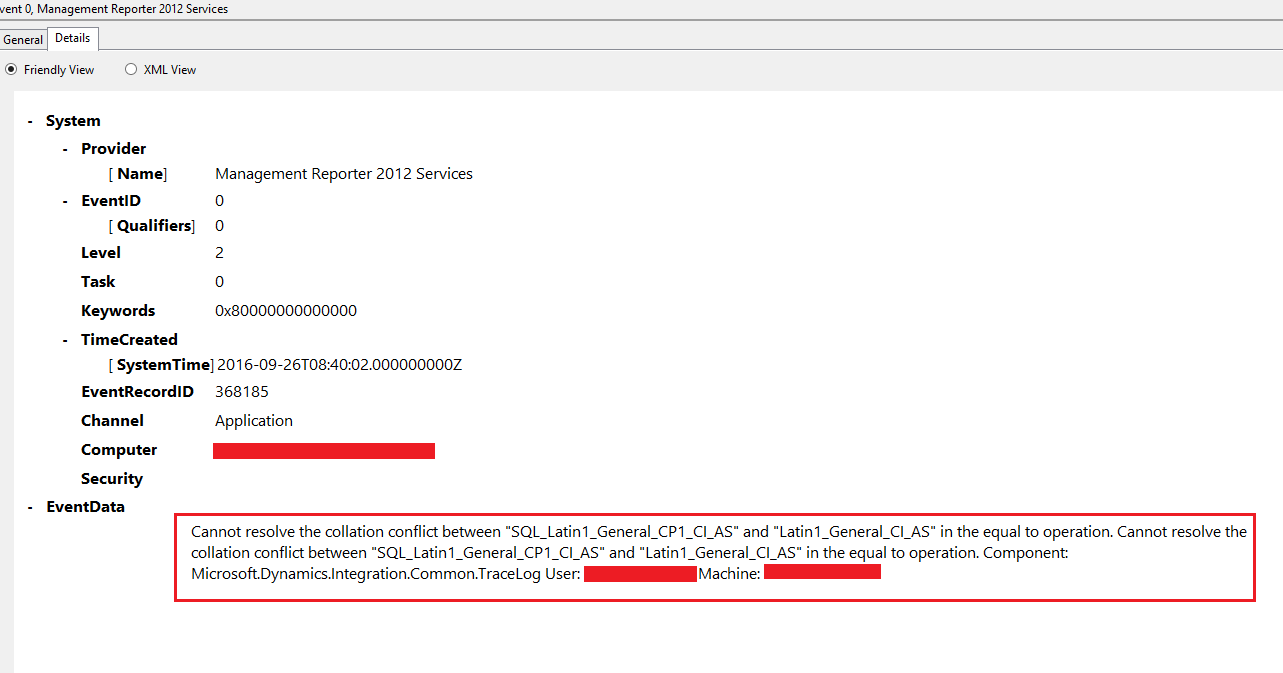
SQL_5F00_Latin1_5F00_General_5F00_CP1_5F00_CI_5F00_AS-and-Latin1_5F00_General_5F00_CI_5F00_AS.png

*This post is locked for comments

I have the same question (0)
  • Suggested answer
    Vilmos Kintera Profile Picture
    46,149 on at

    It is because some AX tables come with a fixed collation, and not the one that SQL uses by default. Modify your SQL statement and put COLLATE SQL_Latin1_General_CP1_CI_AS for both sides of your equation after the name of the column.

  • Ariston J. Profile Picture
    on at

    Hi Vilmos Kintera,

    Thanks for response, but I got this error in Management Reporter not in AX and also there is no customisation done in Management Reporter all are standard.

  • Community Member Profile Picture
    on at

    Hi Ariston,

    Have u found the solution for it? I'm facing same issue while running one report, it doesn't happens for all. Some reports still can work, some can't.

    Thanks.

    Regards,

    Ryan.

  • Ariston J. Profile Picture
    on at

    Ryan,

    Sorry, but I haven't get the clear solution up to this time. Even though I recreated a new AX Environment with Management Reporter the issue are still exists in Management Reporter Console. I suspected it was something like SQL Databases configuration, but don't know what exactly need to configure.

  • Tommy Skaue Profile Picture
    Moderator on at

    Hi

    It seems the only (official) requirement in the MMR documentation is that the collation should be case insensitive. If I understand your case correctly, your AX database uses a different collation than the MMR datamart database. I suspect the MMR datamart database collation is defined when you set it up, and you have no control over what collation is being used. The error you get is most likely because of unicode difference between the collations, meaning it uses two different methods of storing special characters.

    I'm curious to  see what the solution is here.

  • Community Member Profile Picture
    on at

    Hi,

    For my case, AX and MMR databases are the same collation. Only thing that I reckoned is Database server instance and Databases are different collation. It's hard to say the suspected cause. I did try to set SQL trace and check, but not much help for me.

    If you have any ideas, let shed me some light :)

    Thanks.

    Ryan.

  • Douglas Noel Profile Picture
    3,905 on at

    Hi,

    did you check the collation of the used temp db databases too?

    I remember some stuff with different kind of collations in conjunction with management reporter and ax, but can't remember exactly.

    Regards

    Douglas

  • Verified answer
    Douglas Noel Profile Picture
    3,905 on at

    Hi,

    did you get it?

    There seems to be an interesting fix within CU16 for MR2012:

    377152: Integration fails if collation is different between tempdb and Ax database

    regards

    Douglas

  • Suggested answer
    Ariston J. Profile Picture
    on at

    Hi Douglas,

    Yes, you're right after upgrading my MR 2012 to CU16 the issue in collation conflict has been fixed and it working great now.

    Thank you for advice.

Under review

Thank you for your reply! To ensure a great experience for everyone, your content is awaiting approval by our Community Managers. Please check back later.

Helpful resources

Quick Links

Responsible AI policies

As AI tools become more common, we’re introducing a Responsible AI Use…

Neeraj Kumar – Community Spotlight

We are honored to recognize Neeraj Kumar as our Community Spotlight honoree for…

Leaderboard > 🔒一 Microsoft Dynamics AX (Archived)

#1
Martin Dráb Profile Picture

Martin Dráb 4 Most Valuable Professional

#1
Priya_K Profile Picture

Priya_K 4

#3
MyDynamicsNAV Profile Picture

MyDynamicsNAV 2

Last 30 days Overall leaderboard

Featured topics

Product updates

Dynamics 365 release plans
