web
You’re offline. This is a read only version of the page.
close
Skip to main content

Notifications

Announcements

No record found.

Community site session details

Community site session details

Session Id :
Microsoft Dynamics CRM (Archived)

Action Microsoft.Crm.Tools.Admin.InstallSqlClrHelperAction failed when adding / importing an org in CRM 2015. An Asymmetric key with name 'MSCRMSqlClrKey' already exists or this asymmetric key has already been added to the database".

(0) ShareShare
ReportReport
Posted on by 321

I'm doing a new install of CRM 2015 and creating the first org. Part way through the installation I'm getting the error above. The full error is:
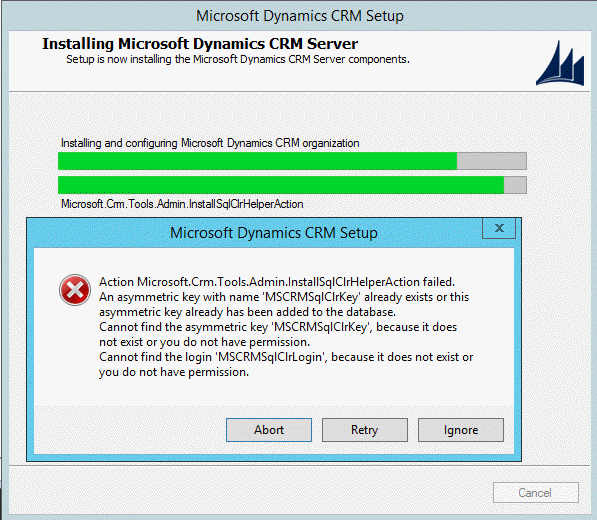
This is a fresh install of SQL 2014 on a Win2K12R2 server, and the only thing present thus far is the CRM database. It has never been used in any sort of replication (referenced in other solutions). 

When I do "select * from sys.asymmetric_keys" the name "MSCRMSQLCLRKEY" does not exist. I have confirmed the DLL is present in the DATA folder on the SQL server. 

I have tried to add the key as mentioned in other solutions:

IF NOT EXISTS (SELECT * FROM sys.asymmetric_keys WHERE name = 'MSCRMSqlClrKey') BEGIN CREATE ASYMMETRIC KEY MSCRMSqlClrKey FROM EXECUTABLE FILE = 'E:\Program Files\Microsoft SQL Server\MSSQL12.MSSQLSERVER\MSSQL\DATA\Microsoft.Crm.SqlClr.Helper.dll';
END

and I get:

Msg 15396, Level 16, State 1, Line 1
An asymmetric key with name 'MSCRMSqlClrKey' already exists or this asymmetric key already has been added to the database.

I'm stuck at this point. I can Ignore the error and the installation will complete, but the error appears again when I try to import my CRM2013 database to this instance.

Any suggestions / ideas as to how to troubleshoot and resolve this issue? Any help is appreciated.

Thanks

Garrett

*This post is locked for comments

I have the same question (0)
  • Community Member Profile Picture
    on at

    Check if select count(*) from sys.asymmetric_keys returns 0

  • GTW Profile Picture
    321 on at

    No, it returns 4 values, but as noted above none have the name "MSCRMSQLCLRKEY"

  • Community Member Profile Picture
    on at

    Hello GWT,

    Could you please inform me whether you have GP server as well ? And if yes, is the database of the GP server on the same SQL server which is of the CRM 2015 server ?

    Your response is awaited!

    Thanks & Regards,

    Sharon Mhatre

    Support Engineer

    Microsoft Dynamics CRM

  • S Florance Profile Picture
    100 on at

    Sharon,

    I am receiving the same error message. This is the second time I have encountered this error on two separate installations. Both of the installations have had the GP DB on the same SQL server as I am attempting to install CRM.

    I received a SQL Script to run on the MASTER DB from Microsoft Support the first time I encountered the issue and plan on using it again. I would like to know what it is that is causing the issue and how I can avoid it in the future. Is it something tied to GP?

    Thank you

    Scott

  • Community Member Profile Picture
    on at

    I am experiencing the same problem but with CRM 2013 installation (upgrade from 2011 to 2015 through 2013). I learned that the SQL server I have for this exercise had a GP database previously. Your answer refers to a specific script which has to be run in such case. Can you please provide the script if you have one.

    Thanks,

    Milos

  • Community Member Profile Picture
    on at

    In my case, I found there were 2 asymmetric keys which were belonging to GP. GP database was not hosted on that SQL server anymore, so after deleting the logins for those asymmetric keys and dropping both keys from the master database, the CRM installation continued with no errors.

  • Rick Heinrichs Profile Picture
    on at

    Hey

    Are you able to post the script or what it does?  I too am having this issue and installing it on the same SQL as our GP databases...Thanks

    Rick

  • S Florance Profile Picture
    100 on at

    The script I received ended up not doing anything. In the end I was told to ignore the error which allowed me to continue with the installation. I have yet to notice any issues as a result of this. The other bit of information that I found stated that this is not an issue if you install CRM first and then GP.

  • Rick Heinrichs Profile Picture
    on at

    Ok I will try it out.  Thanks for responding

    Rick

  • crexin Profile Picture
    137 on at

    I ran into this as well with a CRM 2015 installation that was pointed to a SQL Server instance that contained Dynamics GP 2015.  I contacted Microsoft CRM support and verified that this error is only thrown in this scenario because both Dynamics GP 2013 and later and Microsoft Dynamics CRM are using the exact same login name, 'MSCRMSqlClrLogin'.  If you add the HKLM\Software\Microsoft\MSCRM\IgnoreChecks as a reg_dword key with a value of 1 on the Microsoft CRM Server, you can get by this error message and provided you don't have any other blocking errors, should see no problems from having ignored this particular error.

Under review

Thank you for your reply! To ensure a great experience for everyone, your content is awaiting approval by our Community Managers. Please check back later.

Helpful resources

Quick Links

Responsible AI policies

As AI tools become more common, we’re introducing a Responsible AI Use…

Neeraj Kumar – Community Spotlight

We are honored to recognize Neeraj Kumar as our Community Spotlight honoree for…

Leaderboard > 🔒一 Microsoft Dynamics CRM (Archived)

#1
SA-08121319-0 Profile Picture

SA-08121319-0 4

#1
Calum MacFarlane Profile Picture

Calum MacFarlane 4

#3
Alex Fun Wei Jie Profile Picture

Alex Fun Wei Jie 2

Last 30 days Overall leaderboard

Featured topics

Product updates

Dynamics 365 release plans



