web
You’re offline. This is a read only version of the page.
close
Skip to main content

Announcements

No record found.

News and Announcements icon
Community site session details

Community site session details

Session Id :
Business Central forum

Publishing extension failed in Business Central

(0) ShareShare
ReportReport
Posted on by

Hello

Has anyone seen this error when tying to publish an extension to a tenant?
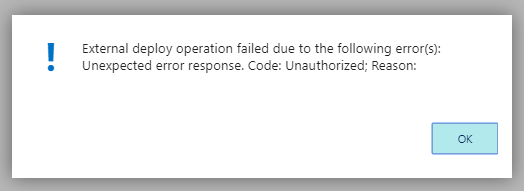
6558.Screenshot_5F00_1.png

Any idea?

To give context, we published an extension before with no issues.

We are trying to publish a new version of the same extension, but cannot get past the upload screen.

Thanks,

Julien

Categories:
I have the same question (0)
  • Suggested answer
    CDsilva Profile Picture
    4,188 on at

    In the launch.json file check your tenant id.

    Maybe your tenant id is not of the env. in whicch your uploading.

  • Ezra Nielsen Profile Picture
    810 on at

    If you are adding a new table you need a permissions xml file. Please see this thread github.com/.../1880

  • Suggested answer
    Stefano Demiliani Profile Picture
    37,166 Most Valuable Professional on at

    Activate the PerTenantExtensionCop Analyzers and this could help. Normally it’s related to missing permissions.xml.

Under review

Thank you for your reply! To ensure a great experience for everyone, your content is awaiting approval by our Community Managers. Please check back later.

Helpful resources

Quick Links

November Spotlight Star - Khushbu Rajvi

Congratulations to a top community star!

Forum Structure Changes Coming on 11/8!

In our never-ending quest to help the Dynamics 365 Community members get answers faster …

Dynamics 365 Community Platform update – Oct 28

Welcome to the next edition of the Community Platform Update. This is a status …

Leaderboard > Business Central

Last 30 days Overall leaderboard

Featured topics

Product updates

Dynamics 365 release plans
