web
You’re offline. This is a read only version of the page.
close
Skip to main content

Announcements

No record found.

News and Announcements icon
Community site session details

Community site session details

Session Id :
Microsoft Dynamics AX (Archived)

Update Counting Journal with Excel Add-in

(0) ShareShare
ReportReport
Posted on by

I am attempting to update a counting journal via the Excel Add-in. I have created a counting journal and imported records into the journal for counting.

In Excel, I selected the InventJournalTrans table and filtered for my new journal number.
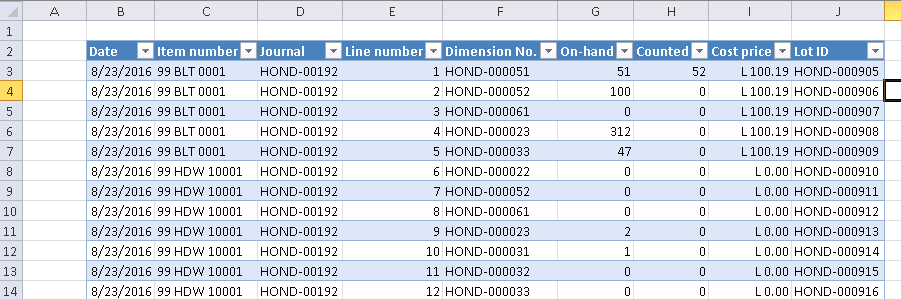
7624.excel1.png

I updated the "Counted" value on the first record, published the data and got this error:

"The value 'HOND-000905' in field 'Lot ID' is not found in the related table 'Inventory transactions originator'."
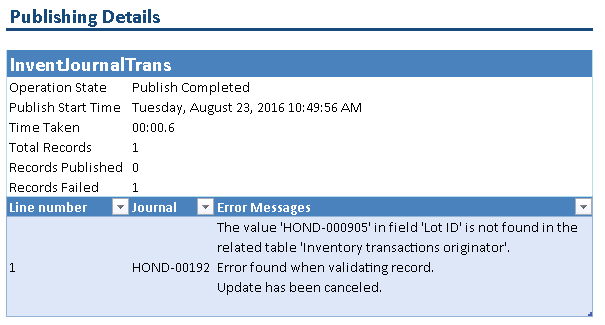
1348.excel2.png

Any idea what is causing this?

*This post is locked for comments

I have the same question (0)
  • Vilmos Kintera Profile Picture
    46,149 on at

    Lot ID is a field in InventTransOrigin.InventTransId. Do you have the value above in that table/field?

  • MattA Profile Picture
    on at

    I have Lot ID in my Excel spreadsheet, but I noticed that those Lot ID's do not appear in the InventTransId field on the InventTransOrigin table. Is that because the journal is not yet posted?

  • Verified answer
    Vilmos Kintera Profile Picture
    46,149 on at

    I think this is normal.

    I am only seeing an inventory transaction for my counted items in case of a difference. So my guess is that the system temporarily allocates Lot IDs for these journal lines, which are then released if there is no change in quantity. It is most likely not meant to be updated from Excel, since that will do the validation for the connected tables, in which case InventTransOrigin.InventTransId will make it fail.

  • Verified answer
    ColbyGallagher Profile Picture
    3,668 on at

    Vilmos is correct.  It sounds like you pushed all the rows in without quantities, and now you are trying to input quantities on a second pass?  If thats the case, yes, your LotID's are temporary and can't be updated.  Push the quantities in with the transaction on the first pass.  

  • Muhammad Haroon Profile Picture
    2,376 on at

    Hi All

    Can anyone of you could let me know how you have resolved this issue because I am also facing this problem.

    Thanks in advance

    Haroon

  • Community Member Profile Picture
    on at

    Muhammad,

    The fact that the Lot ID's are temporary is what prevents us from using the Excel Add-in for this. We will be using Atlas for this process going forward. They are integrated with Excel and have developed a spreadsheet that allows you to update the counting journal.

  • Muhammad Haroon Profile Picture
    2,376 on at

    Thanks Matt for your reply.

  • Shahzad Sarang Profile Picture
    90 on at

    Hi All,

    By using X++ customization on counting journal and using VBA coding on Excel, we have made a workaround which got us through this functionality

    Now we are using Excel Add-in spreadsheet to update counting journal records

Under review

Thank you for your reply! To ensure a great experience for everyone, your content is awaiting approval by our Community Managers. Please check back later.

Helpful resources

Quick Links

Introducing the 2026 Season 1 community Super Users

Congratulations to our 2026 Super Stars!

Meet the Microsoft Dynamics 365 Contact Center Champions

We are thrilled to have these Champions in our Community!

Congratulations to the April Top 10 Community Leaders

These are the community rock stars!

Leaderboard > 🔒一 Microsoft Dynamics AX (Archived)

#1
CP04-islander Profile Picture

CP04-islander 39

#2
Michel ROY Profile Picture

Michel ROY 14

#3
imran ul haq Profile Picture

imran ul haq 8

Last 30 days Overall leaderboard

Featured topics

Product updates

Dynamics 365 release plans
