web
You’re offline. This is a read only version of the page.
close
Skip to main content

Announcements

No record found.

News and Announcements icon
Community site session details

Community site session details

Session Id :
Microsoft Dynamics AX (Archived)

License Plate Specified on Non-License Plate Controlled Location - Error on Purchase Put away.

(0) ShareShare
ReportReport
Posted on by

Hello All - I'm getting the below error while processing Purchase Put away. My configurations are:

1- Warehouse Management > Setup > Warehouse Management Parameter > User Location - [ LP enabled]

2- Warehouse Management > Setup > Location Directive > Purchase Order > - [Selected LP Enabled Location Profile ID in Edit Query]

3- Warehouse Management > Setup > Mobile Device > Mobile Device Menu item > Purchase Put away > Selected work Class 'PURCHASE' - and for Work Class, selected LP Enable Location type. 

With all above configuration, my Purchase Receive is working fine but when I'm trying to process the Purchase Put away, got below error;
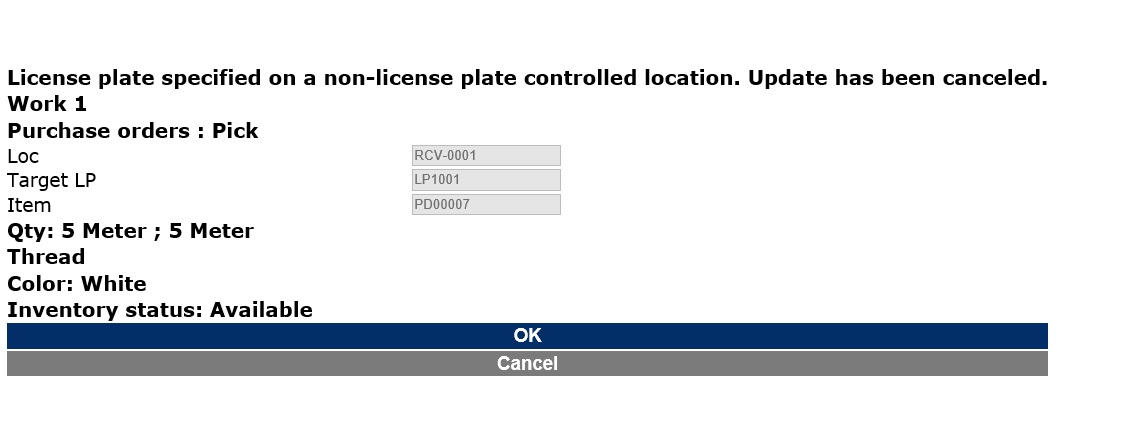
Test.jpg

Please help me to figure out the issue ....

Thanks,

Fawad Aslam

*This post is locked for comments

I have the same question (0)
  • Guy Terry Profile Picture
    28,981 Moderator on at

    Hi Fawad,

    Some things to check when you see this message:

    In Warehouse management parameters, check the 'User location' is defined, and that this location profile has 'Use licence plate tracking' ticked.

    In Setup -> Work users -> Worker, delete the Work user which you are using when you get the error and recreate.

    On the 'Purchase order' work template, check that 'Automatically process' is not ticked.

  • Community Member Profile Picture
    on at

    Also, check and make sure your mobile device menu item does not have "generate license plate" checkbox marked

  • ShaikhAtif Profile Picture
    201 on at

    Hi ColeCW,

    I face same problem on : Put-away the purchase override location error. I done some configuration, is it right.

    1 - purchase receiving:

    5126.PR.png

    2 - purchase put away:

    5126.PR.png

  • Kareem_Murad Profile Picture
    35 on at

    do you have any update for this issue.

Under review

Thank you for your reply! To ensure a great experience for everyone, your content is awaiting approval by our Community Managers. Please check back later.

Helpful resources

Quick Links

Introducing the 2026 Season 1 community Super Users

Congratulations to our 2026 Super Stars!

Meet the Microsoft Dynamics 365 Contact Center Champions

We are thrilled to have these Champions in our Community!

Congratulations to the April Top 10 Community Leaders

These are the community rock stars!

Leaderboard > 🔒一 Microsoft Dynamics AX (Archived)

#1
CP04-islander Profile Picture

CP04-islander 24

#2
Michel ROY Profile Picture

Michel ROY 14

#3
Jagadabi Profile Picture

Jagadabi 6

Last 30 days Overall leaderboard

Featured topics

Product updates

Dynamics 365 release plans
